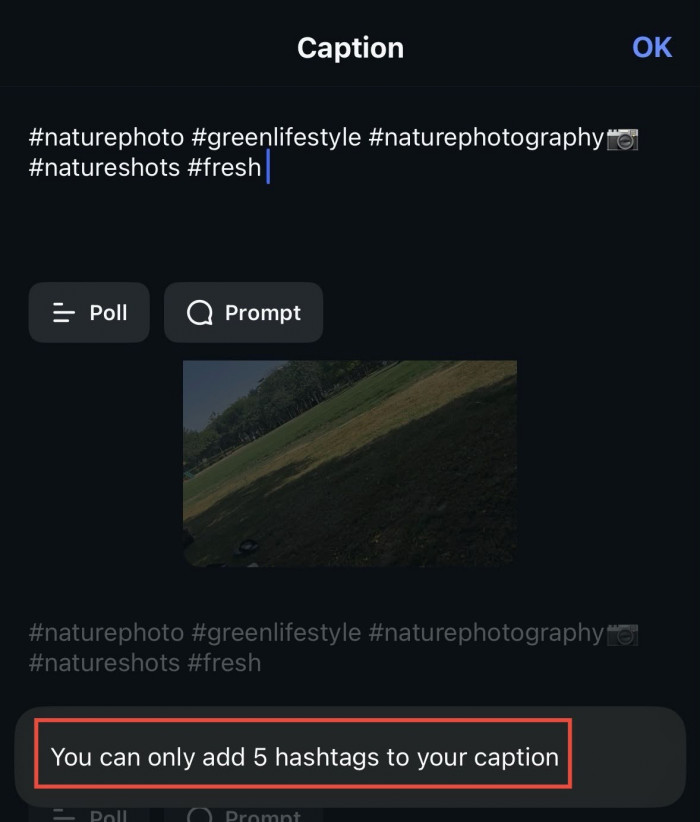
Here is the short version, because I know it is what brought you here. You should use up to five hashtags per Instagram post or Reel. Not thirty.
For a long time I did the opposite. I kept a note on my phone with thirty hashtags ready to paste onto every post, and I was sure that block of tags was doing the heavy lifting. It was not.
Instagram changed how it finds and recommends content, and my old habit quietly stopped working while I carried on anyway. This guide is what I wish someone had handed me back then. I will walk you through what the five-hashtag limit means and the exact method I now use to pick my tags. By the time we reach the workflow near the end, you will be able to choose your five in about a minute.
Why the number of hashtags matters
Why does the count get so much attention in the first place?
A hashtag is a label. When you add one, you tell Instagram what your post is about, so it can file the post beside similar content and show it to people who care about that topic. That is the whole job. A relevant tag is a clean label, and a pile of irrelevant ones reads as spam to the algorithm and to the person scrolling past.
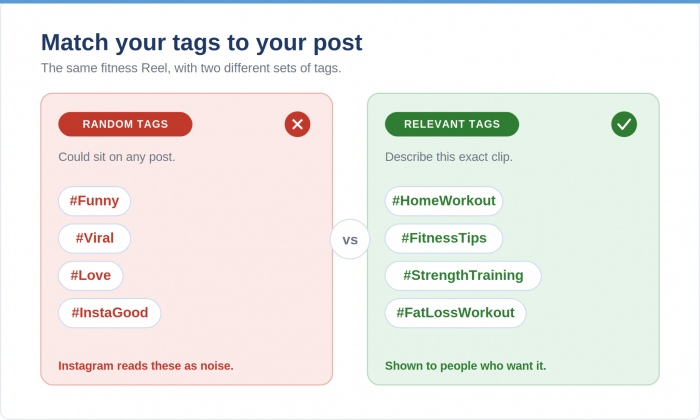
Picture a fitness creator posting a home workout. Tags like #Funny or #Viral say nothing true about the clip, so they sit there as noise. #HomeWorkout and #FitnessTips describe the real content, which points the post at people who opened the app looking for that.
The shift fits in one line: the goal is accuracy, not volume. Hold onto that, because it explains every recommendation that follows.
The current Instagram hashtag limit
So where did five come from?
Instagram rolled the limit out in December 2025 after testing it for about a year. The company was blunt about the reasoning. Long lists of generic tags were being used to game discovery, and they created noise instead of helping anyone find good content. Five forces a choice.
A few details matter here, because I keep watching them trip people up.
| Hashtag use | What I would recommend |
|---|---|
| 0 hashtags | Works if your caption and on-screen words are doing the SEO job |
| 1 to 2 hashtags | Fine for simple, personal posts |
| 3 to 5 hashtags | The range I use for most content |
| More than 5 | Capped inside the app, so any extra tags are ignored |
The cap lives inside the Instagram app, and it covers the caption and the comments together, so the old trick of hiding a block of tags in the first comment no longer slips past it. During the testing phase, some accounts were limited to three rather than five, so do not panic if your app shows you a smaller number. And if you schedule through an older third-party tool that still lets you paste in thirty, save the effort. Instagram ignores everything past the limit, so those extra tags are just decoration.
How to choose the right hashtags
This is the part that changed my results, so I want to slow down.
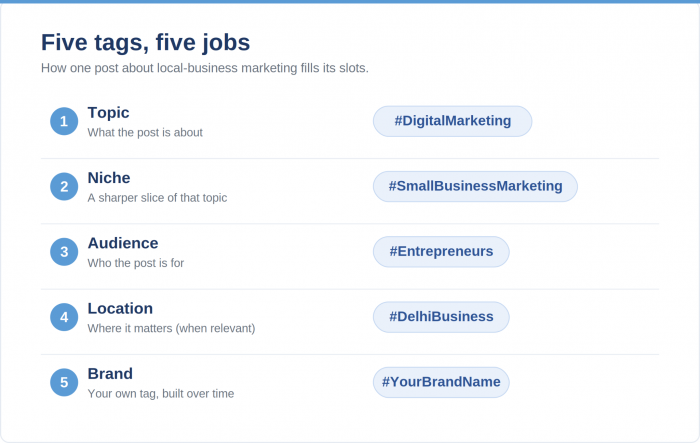
Think of the five slots as a budget, not a shopping list. You are not required to spend one tag on each category below. You are picking the five labels that describe this one post most precisely. Some posts pull two or three tags from a single category, and some skip a category completely. The menu just makes sure you have looked at the full range before you commit.
Here are the five types I draw from.
Topic tag. The broad subject of the post. If I publish a piece about email funnels, the topic tag is something like #DigitalMarketing. It tells Instagram which broad area you sit in.
Niche tag. A narrower version of the same idea that filters for a sharper audience. #SmallBusinessMarketing instead of plain marketing. Fewer people see it, and the right people do.
Audience tag. Who the post is for, in their own words. #Entrepreneurs speaks to the person rather than the subject, and people browse tags that match their own identity.
Location tag. Only when it is relevant. A local bakery or a regional service gains from #DelhiBusiness. A software tutorial does not, so I drop this slot and spend it elsewhere.
Brand or community tag. Your own handle-style tag, like #YourBrandName, or a campaign tag you want to collect posts under. This one grows over time as people start using it back to you.
Put it together and a single post about marketing for local shops might use #DigitalMarketing, #SmallBusinessMarketing, #Entrepreneurs, and #DelhiBusiness, with the fifth slot saved for my brand tag. Four categories filling five slots, every tag earning its place.
Should you use popular hashtags?
A question I get constantly. Should I chase the big hashtags, the ones with millions of posts?
I understand the pull. A tag like #Travel feels like standing in Times Square, where surely someone will spot you in the crowd. In practice the opposite happens. Millions of posts flood that tag every day, so yours drops out of sight within seconds, and you are up against accounts a hundred times your size for the same space.
Smaller tags work like a quiet room full of people who came specifically for your topic. #SoloTravelIndia has a fraction of the audience of #Travel, and that is the point. The people browsing it want solo travel in India, which might be exactly what you posted.
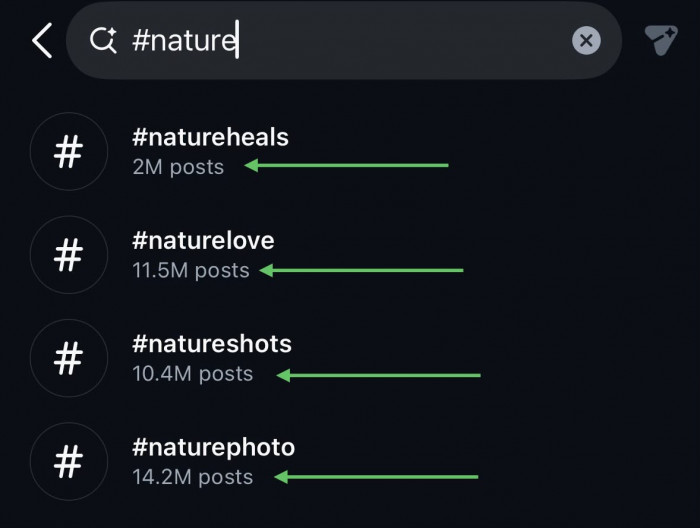
The range I aim for sits in the middle. Tags holding roughly ten thousand to five hundred thousand posts are big enough to have an audience and small enough that good content can surface. That mid-tier band is where I have seen the most reach from people who do not already follow me, and it deserves far more of your attention than the giants do.
Do hashtags actually increase reach?
Here is where I have to manage expectations, because this is the question people most want a yes to.
Hashtags help. They are not magic. Adam Mosseri, who runs Instagram, has said plainly for years that tags do not lift reach the way they once did. Their job now is to tell the system what your post is about so it can match you with the right people.
What a good set of tags can do:
- give Instagram a clear read on your topic
- help your post surface when someone searches that subject
- connect you with a small, interested niche
- add context that supports your other signals
What no hashtag can do:
- rescue a weak photo or a dull video
- hand you followers on its own
There is one more change that reset my expectations. Instagram removed the ability to follow a hashtag back in December 2024. For years, tagging #Photography meant your post could land in the feed of everyone subscribed to that tag. That door is shut. Hashtags no longer push your content to subscribers in the background, so any reach they help with now runs through the algorithm and leans on your other signals.
Which signals? Watch time, saves, shares, comments, and profile visits. These actions show Instagram that a real person got value from the post, and they move the needle more than any tag, which leads straight into the change sitting underneath all of this.
Instagram hashtags vs Instagram SEO
Instagram now behaves like a search engine, and that single fact reframes everything above.
People type real queries into the search bar. The algorithm reads your caption and the text on your screen. It even transcribes what you say out loud in a Reel. All of it feeds how Instagram understands and ranks your post, so your tags end up as one input among several. Your words are a bigger one.
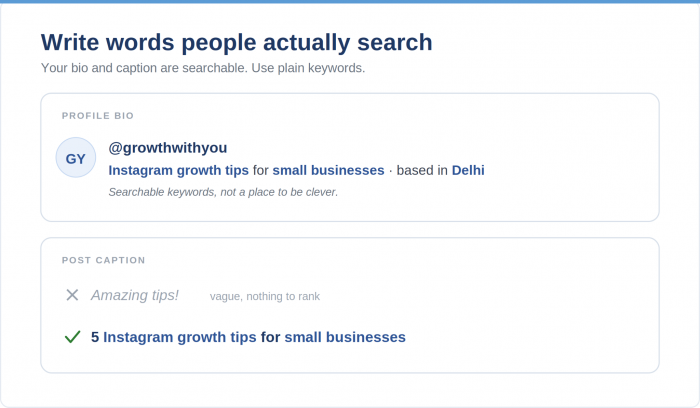
So I rewrote the way I caption. I used to post “Amazing tips 🔥” and move on. Now I write the topic in plain words, like “5 Instagram growth tips for small businesses.” Less cute, far more findable.
The same logic runs through a Reel. When I say the subject in the first few seconds, something like “Here is how to create Instagram Reels,” the system gets clean audio to read, and so does anyone watching with captions on.
Your profile is the last piece. The name and bio fields are searchable, so I treat them as keywords rather than a place to be clever. The work you do and the niche you serve. Spell it out, and you become the result when someone searches for it.
Common hashtag mistakes
Before I give you the workflow, let me clear out the habits that quietly cost people reach. I made most of these myself.
- Chasing unrelated trending tags. Putting #Viral on a recipe video confuses the same system you are trying to please.
- Pasting the same block onto every post. Instagram reads repetition as lazy or spammy, and your reach can dip for it.
- Picking a tag only because it is huge. Popularity is not relevance, and we covered why the mid-tier band beats the giants above.
- Using empty engagement-bait tags like #reels or #followme. Instagram discourages these, and they work against you when they do not match what you posted.
- Stuffing tags into the first comment to dodge the limit. That gap is closed now, so it only makes your comments look messy.
- Ignoring your caption and on-screen words. After the SEO section just above, you already know these often outweigh the tags.
A simple hashtag strategy you can follow
Here is the routine I run before I publish. It takes about a minute once it becomes habit.
- Get clear on what the post is about. One sentence in your head is enough.
- Pull five relevant tags from the five-type menu earlier. Topic and niche go in nearly every time, then you fill the rest from the remaining categories depending on what the post needs.
- Check the size of each tag and aim for the mid-tier band rather than the millions-of-posts giants.
- Write a caption that states the topic in plain words, since that is doing as much work as the tags.
- Post, then come back in a few days and read your reach sources in Instagram Insights.
Keep the tags that bring in people who do not follow you, and swap out the ones that do nothing. That last step is the one almost everyone skips, and it is how you stop guessing. Two or three rounds of this and you will be holding a short, rotating set of tags built for your account and nobody else’s.
The bottom line
Choose five tags precise enough that Instagram never has to guess who your post is for, then put the rest of your energy into the caption and the content. Five good labels and a clear caption will carry you further than any block of thirty ever did.