Posting consistently sounds simple until the ideas stop coming. The problem usually is not a lack of creativity. It is the absence of a reliable system for finding, shaping, and reusing ideas before the content calendar goes empty.
Creators and businesses often wait until posting day to decide what to say. That turns every post into a fresh problem. A better method is to capture useful topics, develop multiple angles, and keep production moving even when inspiration is low.
Why Ideas Dry Up
Most people do not truly run out of subjects. They run out of prepared angles.
A nutrition coach may feel they have already covered meal planning. Yet the same subject can lead to posts about shopping lists, portion sizes, common mistakes, time-saving routines, budget limits, family meals, ingredient substitutions, and preparation habits. The topic has not been exhausted. It has simply been treated as one post instead of a broader content area.
Ideas also disappear because content is created too late. A useful question comes up during a client call, an example appears in a comment, or a mistake becomes obvious during a project, but none of it is recorded. By the next posting day, the details are gone.
Trends create a similar weakness. They can help with reach, but they are unreliable as a long-term source and may push creators toward subjects that do not fit their audience. Simple ideas are often rejected too quickly as well. The creator may know the subject well, but the audience may still need it explained.
Start With Content Pillars
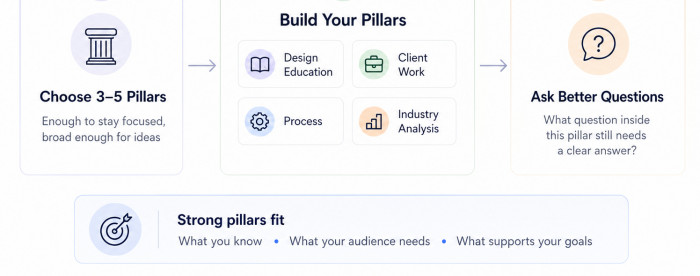
Content pillars are the recurring subjects an account regularly covers. They create boundaries around what to post, which makes idea generation easier rather than restrictive.
Three to five pillars are usually enough. Too many make an account feel scattered and increase the pressure to research unfamiliar subjects. Too few can make the content repetitive unless each pillar is broad enough to support different angles.
A freelance designer, for example, might use this structure:
| Content pillar | What it can include |
| Design education | Typography, colour, layout, accessibility, and visual hierarchy |
| Client work | Briefs, revisions, feedback, deadlines, and communication |
| Process | Research, wireframes, tools, testing, and decision-making |
| Industry analysis | Rebrands, interface trends, campaigns, and design criticism |
The strongest pillars sit at the intersection of what you understand, what your audience needs, and what supports your wider purpose. They should also be specific enough to guide decisions. “Business” is too broad, while “pricing for freelance services” gives a much clearer direction. A useful pillar should be able to produce at least twenty meaningful ideas.
Once the pillars are clear, stop asking, “What should I post today?” Ask, “Which question inside this pillar has not been answered clearly yet?” That change turns an open-ended task into a focused search.
Divide Pillars Into Post Categories
A pillar tells you what subject to discuss. A post category tells you how to approach it.
This second layer keeps content from sounding repetitive. The same pillar can produce educational posts, opinions, examples, comparisons, mistakes, case studies, checklists, myths, and behind-the-scenes explanations. The topic stays consistent while the angle changes.
Useful categories include:
● A step-by-step post that helps the audience complete a specific task from beginning to end.
● A mistake-based post that explains what goes wrong, why it happens, and how to correct it.
● An example-led post that shows how a principle works in a real or realistic situation.
● A comparison post that helps people choose between two methods, tools, or approaches.
● An opinion post that challenges weak advice and replaces it with a more accurate explanation.
● A frequently asked question post based on repeated confusion from customers, clients, or followers.
This creates a simple planning formula: Content pillar + post category + audience problem = specific post idea
For example: Email marketing + common mistake + low open rates = “Why Your Subscribers Stop Opening Your Emails After the First Week.”
With four pillars and six categories, you already have twenty-four combinations before writing a single title. Add different audience problems, experience levels, and formats, and the number of possible posts grows quickly.
The system is not meant to make content mechanical. It removes the need to invent a completely new direction every time.
Build a Central Idea Bank
A content system fails when ideas are scattered across notes, screenshots, emails, voice messages, and unfinished drafts. Choose one main place where every usable idea is stored.
The tool can be simple. A spreadsheet, notes app, project board, or document works well if it is easy to open and update. The best system is the one you will actually use during normal work.
Each idea should include enough detail to remain useful later. “Post about engagement” will not help much two weeks from now. A stronger entry would be: “Explain why broad questions such as ‘What do you think?’ produce weak comments, then show three more specific prompts that invite useful responses.”
A practical idea bank can include:
| Field | Purpose |
| Working idea | Captures the core point in one clear sentence |
| Audience problem | Explains why the topic matters |
| Content pillar | Keeps the idea aligned with the account |
| Possible format | Suggests a video, carousel, thread, article, or short post |
| Supporting material | Stores examples, screenshots, quotes, or data |
| Status | Shows whether the idea is new, selected, drafted, or published |
The bank should collect unfinished thoughts, not only polished concepts. A complaint, repeated objection, surprising result, or noticed mistake can all become useful content later. Review it regularly so weak ideas are removed and promising ones gain examples or supporting material.
Capture Ideas During Real Work
The strongest content ideas often appear while doing the work the content is meant to support.
A consultant hears the same objection during sales calls. A teacher notices students making the same mistake. A software company receives repeated support tickets. A creator gets the same question under several posts. These are signals of what the audience needs explained.
Build capture habits into existing routines. After a call, write down the questions that required the most explanation. After publishing, review comments for confusion or disagreement. After completing a project, note what changed between the first draft and the final result.
Other useful sources include search suggestions, reviews, community discussions, support conversations, and comments under competitor content. The goal is to identify recurring problems and provide a clearer answer. Questions that affect a decision are especially valuable because they usually support deeper, more practical posts.
Turn One Topic Into Many Posts
Running out of ideas often comes from treating every topic as a one-time opportunity. A better approach is to develop a subject across several angles, formats, and levels of detail.
Take the topic of writing better social media captions. It can become a post about weak opening lines, a before-and-after rewrite, a checklist for editing, a video about calls to action, a carousel on caption structure, a myth-based post about ideal length, and a breakdown of why a particular caption performed well.
These posts are connected, but they are not duplicates. Each one answers a different question.
The difference between repetition and reinforcement matters. Repetition publishes the same message with minor wording changes. Reinforcement revisits an important subject through a new example, audience segment, objection, format, or level of depth.
A practical expansion method is to ask:
● What mistakes do beginners make with this?
● What does a strong example look like?
● What common advice about this topic is incomplete?
● What decision does the audience need help making?
● What part of the process creates the most confusion?
One broad subject can often produce ten useful posts once these questions are applied. This also builds recognisable expertise instead of forcing the account to jump between unrelated themes.
Long-form content is especially valuable here. A detailed article, webinar, interview, or case study can be divided into smaller posts, each focused on one lesson. The smaller posts can support the larger idea without repeating it word for word.
Create Repeatable Formats
Creators often struggle because they invent both the topic and the structure at the same time. Repeatable formats reduce that workload.
A format is a familiar way of arranging information. Useful options include problem and solution, mistake and correction, before and after, question and answer, myth and reality, step-by-step process, comparison, and example followed by a lesson.
A problem-solution post might follow this sequence:
1. Open with a specific problem the audience recognizes.
2. Explain why the common approach fails.
3. Introduce a more practical method.
4. Show how it works through a concrete example.
5. End with one action the audience can take.
A comparison post can define the decision, compare the options by clear criteria, show who each suits, and finish with a practical recommendation. Formats should guide the work without making every post sound identical. Their purpose is to reduce blank-page pressure, not create a rigid template.
Separate Ideas From Production
Idea generation and content creation require different types of thinking. Mixing them in one session makes the work slower.
When someone tries to research, choose an angle, write, design, edit, and schedule at the same time, every step competes for attention. This creates decision fatigue and encourages rushed content.
A better workflow separates the stages:
| Stage | Main task |
| Collection | Save questions, examples, observations, and possible topics |
| Selection | Choose ideas that fit current priorities |
| Development | Define the argument, examples, and supporting points |
| Production | Write, record, or design the content |
| Editing | Improve clarity, structure, accuracy, and presentation |
| Scheduling | Place the finished post into the publishing calendar |
Batching does not mean creating thirty posts in one exhausting session. It simply means grouping similar tasks. You might select ideas on Monday, develop outlines on Tuesday, draft on Wednesday, and schedule on Thursday.
It also reveals the real bottleneck. If ideas are plentiful but posts remain unfinished, the problem may be design, approval, editing, or scheduling.
Set a Sustainable Posting Rhythm
Consistency does not require daily publishing. A realistic schedule is better than an ambitious one that collapses after two weeks.
Choose a frequency based on available time, production complexity, number of platforms, and the amount of original material you can support. A small business may benefit more from three strong posts each week than seven rushed ones.
A simple weekly mix could include one educational post, one example or opinion post, and one lighter community or behind-the-scenes post. This creates variation without constant reinvention.
It also helps to distinguish between frequency consistency and subject consistency. An account may publish every day and still feel inconsistent if each post targets a different audience. Another may publish twice a week but build a strong identity because its subjects, examples, and point of view are clear.
The schedule should also leave room to respond to comments, review performance, and improve future content.
Use a Flexible Content Calendar
A content calendar should reduce uncertainty, not lock the account into an inflexible plan. Include the working title, publishing date, content pillar, format, audience problem, call to action, production status, and link to supporting material. These details make it easier to see whether the schedule is balanced or repetitive.
A useful calendar combines three types of content:
| Content type | Role |
| Evergreen | Answers problems that remain useful over time |
| Timely | Responds to current conversations, updates, or events |
| Campaign | Supports a launch, service, product, or specific objective |
Evergreen content gives the calendar stability. Timely content keeps the account connected to current conversations. Campaign content ensures publishing supports a wider goal rather than existing only for activity.
Do not fill every date months in advance. Leave space for unexpected questions, industry developments, and strong ideas that emerge during work. A calendar should guide decisions while remaining easy to adjust.
Refresh Strong Older Content
Publishing a post does not make the idea unusable forever.
Older content can be updated when information changes, new examples become available, audience comments reveal missing details, or the original version was too broad. A strong post can also be adapted for a different platform or expanded into a more detailed piece.
Review previous content every few months and sort it into four groups: still useful, needs updating, worth expanding, and no longer relevant. This keeps valuable ideas active and prevents the team from rebuilding everything from zero.
Performance can guide the refresh. Strong saves with weak reach may signal a poor opening, while repeated questions may justify a follow-up. Refreshing should improve the idea through a new example, updated explanation, different format, or fresh objection.
Decide Which Ideas Deserve Publishing
A large idea bank is useful only if weak topics are filtered out. Before developing a post, ask whether it solves a clear audience problem, fits a content pillar, adds a useful example or interpretation, and differs enough from recent posts. Also consider whether there is a reason to publish it now.
Some ideas are too broad. “Tips for better marketing” gives no clear promise. “Three reasons your lead magnet attracts the wrong audience” is more focused and easier to support.
Other ideas are relevant but poorly timed. A detailed launch post may not make sense months before the product is ready. Good planning includes choosing the right moment, not only the right subject.
Avoid Common Consistency Mistakes
Several habits make consistent posting harder than necessary. Creating a calendar before building an idea bank is one of the biggest. The dates may be filled, but the topics are often weak because they were chosen under pressure. Build the supply before setting the schedule.
Copying every popular format creates another problem. Trend-driven posts can make an account look active while weakening its identity. Use trends only when they support a useful point and suit the audience.
Posting too often can also reduce quality. When frequency becomes the main target, research becomes thinner, examples become repetitive, and editing is rushed. Consistency should describe reliability, not volume.
Another mistake is assuming a subject can only be discussed once. Important ideas often need several explanations because people learn through different examples and formats. Add a new angle rather than repeating the same words.
Finally, avoid choosing topics only because they interest you. Strong content connects your knowledge with a problem, decision, or goal the audience already has.
A Practical Weekly Workflow
A weekly system can keep production moving without daily brainstorming.
● Monday, review the idea bank, audience questions, recent performance, and business priorities. Select two or three topics that fit the week.
● Tuesday, develop each angle. Write the main point, audience problem, supporting example, and intended format. This prevents vague ideas from reaching production.
● Wednesday, draft or record the posts. Focus on completing the message before editing. Trying to perfect every sentence while drafting slows the process.
● Thursday, edit for clarity, remove repeated points, verify examples, and prepare the visual elements. Check whether the opening makes the value clear and whether the conclusion gives the audience a useful next step.
● Friday, schedule the content and record any ideas discovered during production. Review which topics created the strongest comments, saves, shares, or questions. Those responses should feed the next cycle.
This workflow can be compressed into one or two days or spread across a team. The order matters more than the exact schedule: collect, select, develop, create, edit, publish, and learn.
The Verdict
Consistent posting does not depend on endless creativity. It depends on building a system that captures useful ideas before they disappear and turns broad subjects into specific, repeatable posts.
Clear content pillars reduce confusion. A central idea bank protects good observations from being lost. Repeatable formats make drafting faster, while a realistic calendar keeps production sustainable. Reusing strong themes through new examples and angles prevents the account from becoming either repetitive or scattered.
The goal is not to fill every date with something new. It is to create a dependable pipeline of useful ideas, develop them with enough depth, and publish at a pace you can maintain. Once that system is in place, consistency becomes a process rather than a weekly creative emergency.