Repurposing a long video is not just about cutting it shorter. A good short clip needs a clear opening, enough context, readable captions, proper vertical framing, and an ending that feels complete. This is why AI repurposing tools can be useful for creators who want to turn long-form content into short-form videos more efficiently.
2short.ai is an AI video repurposing tool designed for YouTube Shorts, Instagram Reels, and TikTok. It helps creators find useful moments inside existing long videos and prepare them as short clips faster. The tool is especially useful for YouTubers, podcasters, educators, coaches, interview channels, and creators who already have long-form content and want to reduce editing time without losing control over the final result.
What 2short.ai Actually Is
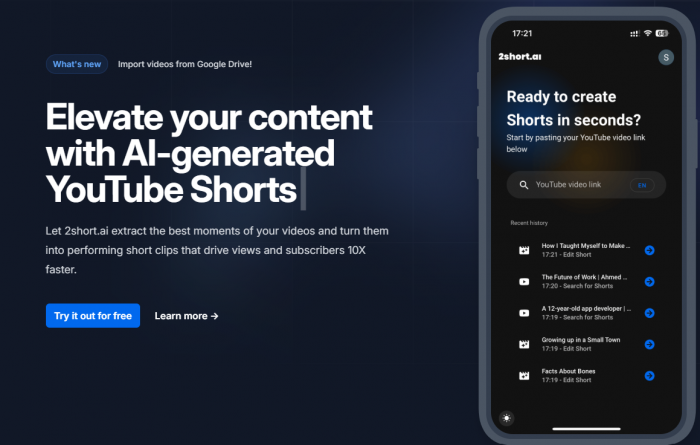
2short.ai is an AI-powered long-video-to-shorts tool. It analyzes existing videos and helps turn selected moments into vertical clips. The platform is mainly designed for creators who already publish longer videos and want to reuse that content across short-form platforms.
This category is important to understand. 2short.ai is closer to tools like OpusClip, Klap, Vizard.ai, Munch, and Vidyo.ai. It is not in the same category as Runway, Kling, Pika, or Luma, which focus more on AI video generation. It also does not replace traditional editing tools like CapCut, Premiere Pro, DaVinci Resolve, or Final Cut Pro.
| Category | Details |
| Tool type | AI video clipping and repurposing tool |
| Main purpose | Turning long videos into Shorts, Reels, and TikToks |
| Best for | YouTubers, podcasters, educators, coaches, interview channels |
| Core workflow | Add video, let AI analyze, review clips, edit captions/framing, export |
| Free plan | Yes, with limited AI analysis time |
| Paid plans | Start around $9.90/month |
| Main strength | Saves time when finding short-form moments |
| Main limitation | Clips still need human review before publishing |
The simplest way to describe 2short.ai is this: it helps creators get more short-form content from videos they have already made. That is useful, but it also means the tool is only as good as the source material it receives.
The Core Promise: Faster Clip Discovery
The main reason to use 2short.ai is not because it has AI in the name. The real promise is time-saving. A 30-minute interview or a one-hour podcast may contain several useful short clips, but finding them manually can be slow. 2short.ai tries to reduce that search process by scanning the video and suggesting moments that could work as short-form content.
This is helpful because clip discovery is often the most boring part of repurposing. Creators may already know how to trim a clip or add captions, but they may not want to watch the same long video repeatedly just to find the strongest 30 to 60 seconds. 2short.ai helps with that first step.
The important point is that AI clip discovery is not the same as editorial judgment. The tool may find a sentence that sounds useful, but a good short clip also needs structure. It should open cleanly, make sense without the full video, and end in a way that feels complete. That is why the clips should be treated as suggestions rather than final decisions.
| What 2short.ai promises | What users should realistically expect |
| Find strong moments automatically | Useful clip suggestions, but not perfect judgment |
| Turn long videos into short clips | Faster first drafts, not always finished posts |
| Add captions | Helpful subtitles that still need checking |
| Format clips vertically | Stronger for talking-head videos than complex footage |
| Save editing time | Reduces repetitive work, but not creative decisions |
This balance is what defines the tool. It can speed up the first cut, but it does not remove the need for human review.
The Workflow Is Simple, But Not Fully Hands-Off
The workflow is built around speed. Users add a video or supported video link, let 2short.ai analyze it, review the suggested clips, make adjustments, and export the final short videos. That makes the tool approachable for creators who do not want to spend hours inside a full editing timeline.
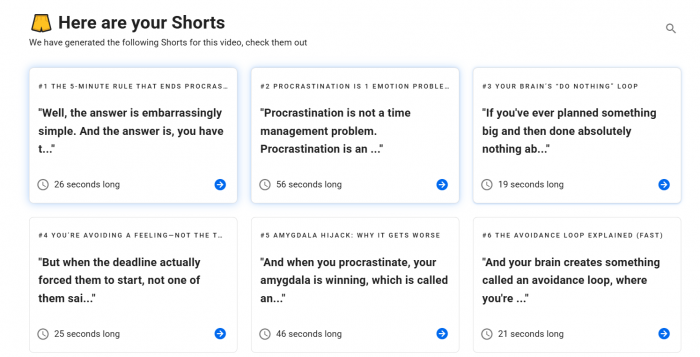
This simplicity is useful for solo creators and small content teams. A podcaster, for example, may not need advanced cinematic editing for every clip. They may only need a strong quote, clean captions, and a vertical frame that keeps the speaker visible. In that situation, 2short.ai can reduce the repetitive work involved in repurposing.
The limitation is that simple workflows usually mean less creative control. If a clip needs detailed pacing, multiple layers, B-roll, music timing, transition effects, advanced caption styling, or brand-specific motion graphics, 2short.ai may not be enough on its own. The user may still need to finish the clip in CapCut, Premiere Pro, or another editor.
So the workflow is better described as assisted editing rather than automatic editing. It helps users move faster, but it does not fully replace the editing process.
Feature Analysis: What Actually Matters
The most important features in 2short.ai are the ones that directly support repurposing. AI highlight detection, auto captions, vertical reframing, and face tracking are the features that matter most because they solve the real problem: turning long videos into short-form clips without starting from scratch each time.
AI Highlight Detection
AI highlight detection is the core feature of 2short.ai. The tool scans a long video and tries to identify sections that could work as short clips. This is useful for interviews, podcasts, tutorials, commentary videos, and educational content where strong spoken moments are often hidden inside a longer recording.
The practical value is clear. Instead of manually scrubbing through a long video, the creator gets a set of possible clips to review. That can save time, especially when dealing with recurring content such as weekly podcasts or YouTube uploads.
The critical point is that highlight detection should not be trusted blindly. AI can identify moments that sound important, but it may not always choose the best hook or understand whether the clip has enough context. A section may be informative, but still not work as a standalone short. This is why manual review remains necessary.
Auto Captions
Captions are one of the most useful parts of short-form video creation. Many viewers watch videos without sound, especially on mobile feeds. Auto captions help make clips easier to follow and more accessible for viewers who are scrolling quickly.
For talking-head videos, podcasts, coaching clips, and explainers, captions can make a big difference. They give structure to the clip and help viewers understand the main point even before they turn on sound. This is especially useful when the clip is built around advice, commentary, or a quotable sentence.
However, auto captions are not something creators should publish without checking. Names, technical words, brand terms, accents, fast speech, and background noise can create errors. Even small caption mistakes can make a clip look careless, so this feature is useful but still needs a final review.
Vertical Reframing
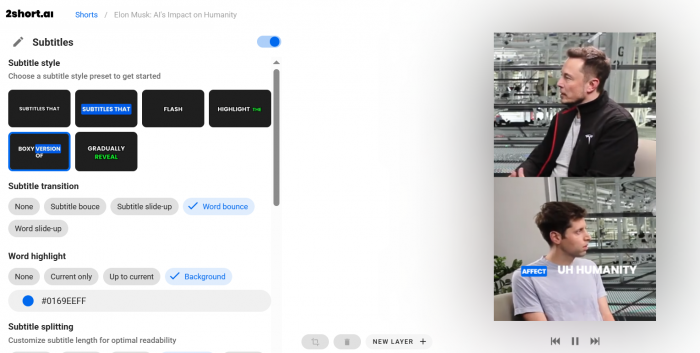
Most long-form videos are recorded in horizontal format, while Shorts, Reels, and TikToks are vertical. 2short.ai helps reframe videos into a short-form layout, which saves users from manually cropping every clip.
This is especially useful for simple talking-head videos and interviews. If the speaker is clearly visible, vertical reframing can make the clip look more natural on mobile platforms. It helps turn a standard YouTube video into something that feels closer to a native short-form post.
The limitation appears when the original video is visually complex. Screen recordings, multi-camera videos, group conversations, gaming clips, and videos with important elements spread across the frame may not crop cleanly. In these cases, the user may need to adjust the framing manually.
Face Tracking
Face tracking is useful when converting landscape videos into vertical clips. The idea is simple: keep the speaker visible and centered as much as possible. For interviews, podcasts, educational videos, and commentary clips, this can make the final output feel less like a rough crop.
This feature matters because a bad crop can ruin an otherwise useful clip. If the speaker’s face is cut off, placed too low, or pushed to the edge of the frame, the video immediately feels less polished. Face tracking helps reduce that problem.
Still, it works best when the video has a clear subject. If there are multiple people speaking, frequent camera changes, screen shares, or visual elements that matter as much as the face, face tracking may not solve everything. It is a helpful feature, but not a substitute for proper framing judgment.
Link-Based Video Input
2short.ai supports a workflow built around existing video sources, which can make the process easier for creators who already upload long-form content online. Instead of always starting from raw files, users can work from supported links where available.
This is practical because many creators already have their content on YouTube, Google Drive, or similar storage platforms. A link-based workflow reduces friction and makes repurposing feel less like a full editing project.
The downside is that this convenience depends on platform support, video access, and account limitations. If a video is private, restricted, unsupported, or difficult to access, the workflow may not feel as smooth.
Script and Idea Tools
2short.ai also includes creator support tools such as video idea generation and script-related features. These can be useful for planning future content or reshaping ideas, especially for creators who want help beyond clipping.
However, these should be seen as secondary features. The main reason to use 2short.ai is still long-video repurposing. If a user mainly wants a scriptwriter, there are many broader AI writing tools available. If a user mainly wants short clips from existing videos, 2short.ai becomes more relevant.
The feature set is useful, but its real strength is focused. It works best when users judge it as a clipping and repurposing assistant, not as an all-in-one creator platform.
Output Quality Depends More on the Source Video Than the AI
The output quality of 2short.ai depends heavily on the quality of the original video. If the source video has clear audio, visible speakers, good lighting, and strong talking points, the tool has a much better chance of producing useful clips.
This is why it works well for podcasts, interviews, tutorials, commentary videos, and educational content. These formats usually contain spoken moments that can be separated into short clips. A strong answer from an interview or a clear explanation from a tutorial can work well as a standalone short.
The results become weaker when the source video lacks structure. If the video is slow, noisy, visually flat, poorly paced, or filled with moments that only make sense in full context, AI clip selection becomes less reliable. The tool can cut sections, but it cannot create strong content from weak material.
| Output area | Balanced assessment |
| Clip selection | Useful for finding possible moments, but not always the strongest ones |
| Captions | Helpful for social viewing, but must be checked before publishing |
| Vertical crop | Good for clear talking-head videos, less reliable for complex layouts |
| Final polish | Good as a draft, but not always ready without trimming or styling |
The best way to think about 2short.ai output is as a first draft. It can help find and prepare clips quickly, but the final version still needs human judgment. The creator should check whether the clip opens strongly, has enough context, ends cleanly, and looks good in vertical format.
Where 2short.ai Works Best
2short.ai works best for creators who already publish long, speech-driven content. These are videos where the value comes from what someone says, rather than complex visuals or heavy editing.
A podcaster can use it to find strong quotes from a full episode. A YouTuber can use it to turn a long commentary video into multiple Shorts. An educator can use it to extract short lesson clips. A coach or consultant can use it to turn advice-based videos into social media snippets.
It also makes sense for social media managers who work with client videos. If a client records webinars, interviews, explainers, or long YouTube videos, 2short.ai can help turn that material into more social content without manually cutting every clip from scratch.
2short.ai is strongest when the content has:
● Clear speech and clean audio.
● One main speaker or a simple interview setup.
● Strong opinions, tips, explanations, or quotable lines.
● Enough context for clips to work independently.
● A regular content workflow where repurposing happens often.
For these users, the tool can reduce the time between publishing a long video and distributing short clips across social platforms.
Where It Is Less Convincing
2short.ai is less convincing when the content depends heavily on visual storytelling. Some videos are not built around spoken highlights. Cinematic vlogs, gaming montages, music videos, screen-heavy tutorials, product ads, and highly edited brand videos often need more manual control.
In those cases, the “best moment” may depend on pacing, music, camera movement, visual impact, or a sequence of shots. AI highlight detection may struggle because the strongest part of the video is not always a clean spoken sentence.
It is also not ideal for users who expect one-click finished content. Even if the tool creates a good draft, creators may still need to adjust the crop, rewrite the hook, fix captions, remove awkward openings, or shorten the ending. The tool helps with the heavy lifting, but the final decision still belongs to the user.
This does not make 2short.ai a weak tool. It simply makes its role clearer. It is built for repurposing efficiency, not advanced video craftsmanship.
Pricing and Real Value
2short.ai uses a freemium pricing model. The free plan is useful for testing the platform, but it is limited by AI video analysis time. Paid plans start around $9.90/month and increase based on usage limits and access to higher-tier features.
| Plan | Price | Practical reading |
| Starter | Free | Useful for testing, but not enough for regular publishing |
| Lite | Around $9.90/month | Better for occasional creators with shorter videos |
| Pro | Around $19.90/month | More suitable for weekly repurposing |
| Premium | Around $49.90/month | Better for heavy users, podcasters, or small teams |
The key detail is that pricing should be judged by video length. A creator who repurposes 10-minute YouTube videos may get more value from a lower plan. A podcaster who uploads one-hour episodes may burn through monthly analysis time much faster.
This makes 2short.ai affordable for some users and limiting for others. The starting price is reasonable compared with many AI video tools, but users should calculate how much footage they process each month before choosing a plan.
For occasional creators, Lite may be enough. For regular YouTubers and podcasters, Pro will likely feel more realistic. For teams or high-volume creators, Premium is easier to justify if the tool saves enough editing time.
Real User Sentiment
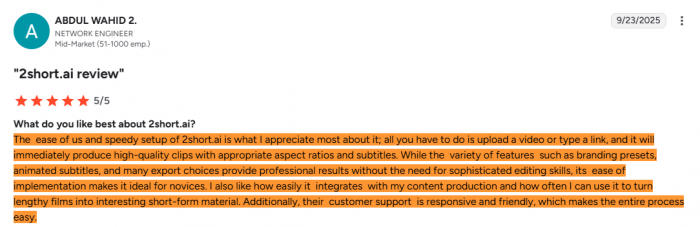
Public user feedback for 2short.ai appears positive, but the review base is still small. That is important because a good score from a small number of reviews should be treated with caution. It suggests early satisfaction, but not enough data to judge long-term reliability across many user types.
Available feedback generally praises speed, ease of setup, captions, and the ability to create short clips from longer videos. These positives match the tool’s main promise. Users who want faster repurposing are likely to see value if the AI suggestions are useful.
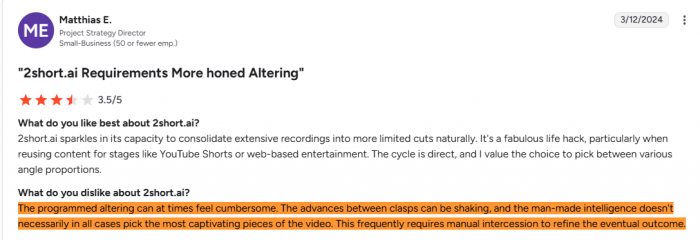
The critical side focuses on pricing, usage limits, and imperfect AI decisions. Some users may like the time-saving workflow but still feel that clips need manual cleanup. Others may question whether the monthly limits work for long podcasts or frequent uploads.
| Users tend to like | Users tend to question |
| Fast clip creation | Whether the AI always picks the best moments |
| Simple workflow | Whether pricing works for long videos |
| Captions and vertical formatting | Whether clips need too much manual cleanup |
| Useful podcast and YouTube repurposing | Whether usage limits are enough for regular creators |
The fair reading is that 2short.ai is useful for creators who understand its role. It works best as a clipping assistant. It becomes less satisfying when users expect perfect final edits or unlimited automation.
Alternatives May Fit Better Depending on the Workflow
2short.ai is part of a growing group of AI repurposing tools. Depending on the user’s needs, another tool may be a better fit.
OpusClip is one of the strongest direct alternatives for creators who want a more polished AI clipping workflow.
Vizard.ai is better suited for transcript-based editing and team workflows. Klap is useful for fast YouTube-to-Shorts conversion.
Munch is more attractive for users who want marketing-focused content repurposing and insights. Vidyo.ai is another creator-friendly option for simple clip generation.
CapCut is not a direct AI clipping replacement, but it remains important because many creators may still use it for final polishing. If 2short.ai gives a rough cut, CapCut can help tighten pacing, add effects, refine captions, and make the final version more platform-ready.
The best alternative depends on what the user wants. If the priority is simple repurposing, 2short.ai is worth considering. If the priority is deeper editing, collaboration, branding, content strategy, or manual polish, another tool may fit better.
Strengths and Limitations
The biggest strength of 2short.ai is that it saves time during the least enjoyable part of repurposing. It helps creators find possible short clips without manually watching every minute of a long video. For creators who publish consistently, that can make a real difference.
It is also beginner-friendly. The workflow is much easier than using a professional timeline editor from the start. This makes it useful for creators who want more short-form output but do not have the time or skill to edit every clip manually.
The main limitation is that the tool cannot fully understand creative intent. A good short video is not only a clip from a longer video. It needs pacing, context, timing, captions, framing, and a clear reason for viewers to keep watching. 2short.ai can help with several of these pieces, but it does not guarantee all of them.
Its limitations are easier to accept when users see it as a first-draft engine. It is less useful when users expect fully finished, high-polish videos from automation alone.
Final Verdict
2short.ai is a practical AI repurposing tool for creators who already have long-form videos and want to turn them into short-form clips faster. It is best suited for podcasts, interviews, tutorials, coaching videos, commentary content, and YouTube channels where strong spoken moments can be extracted into Shorts, Reels, or TikToks.
Its strongest value is not creative video production. Its strongest value is workflow speed. AI highlight detection, captions, vertical formatting, and face tracking can reduce the manual work involved in repurposing long videos.
At the same time, 2short.ai should not be treated as a complete editing replacement. The output still needs review. Users should check whether the clip has a strong opening, enough context, accurate captions, clean framing, and a complete ending before publishing.
The balanced verdict is that 2short.ai is worth considering if your main problem is finding and preparing short clips from long videos. It is less suitable if you need advanced creative editing, cinematic production, or fully finished social clips without manual polish. For creators with the right type of content, it can be a useful time-saver. For users with the wrong expectations, it may feel limited.