getimg.ai looked simple when I first opened it, but after using it for image generation, editing, upscaling, video, and audio, I realized it is not just another AI image generator. It works more like a compact creative workspace where different production tools sit together.
The biggest question for me was simple: can getimg.ai actually help in a real content workflow, or does it only create nice-looking AI samples? After testing it across blog covers, product concepts, image edits, short videos, and audio, I found it useful, but not perfect.
Quick Verdict
getimg.ai is a good choice if you regularly create visual content and want one place for images, edits, video, and basic audio. I found it most useful for blog covers, social media visuals, product mockups, short motion clips, and fast campaign ideas.
It is not the best tool for exact branding, perfect product labels, long-form video editing, or highly sensitive uploads. The credit system also needs attention because repeated testing, premium models, and video generation can use credits faster than expected.
| Area | My Experience |
| Image generation | Strong for blog covers, social graphics, product concepts, and creative visuals |
| Image editing | Useful for quick background changes, object edits, and simple corrections |
| Image-to-image | Good for keeping a similar mood or style from a reference |
| Upscaling | Helpful after choosing a strong final image |
| Video generation | Useful for short clips and visual hooks, but small details can shift |
| Audio tools | Good for basic voiceover and music support |
| Pricing | Credit-based, so testing needs control |
| Best for | Bloggers, marketers, creators, agencies, and small teams |
What getimg.ai Actually Is
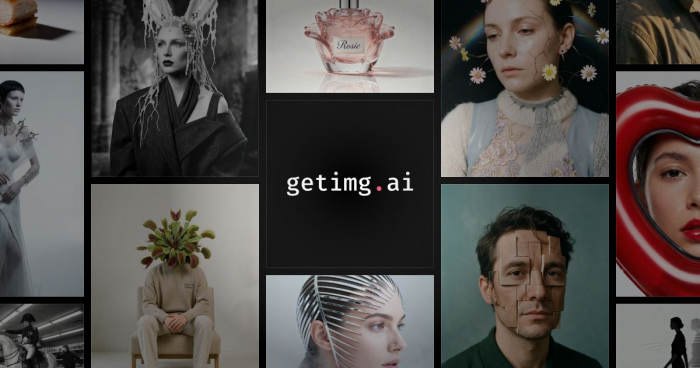
Before testing it, I thought getimg.ai was mainly a text-to-image tool. That is only part of the story. The platform includes image generation, image editing, background removal, upscaling, resizing, video generation, music generation, speech generation, team features, asset management, and API access.
That combination matters because a normal creative workflow rarely ends at one image. I might create a blog cover, then resize it, improve the quality, edit the background, and later turn the same concept into a short video. getimg.ai keeps many of those steps in one place.
It does not replace every creative tool. I would still use Canva, Photoshop, Figma, or a proper video editor for final design work. But for the early creative stage, getimg.ai saves time.
First Impression of the Dashboard
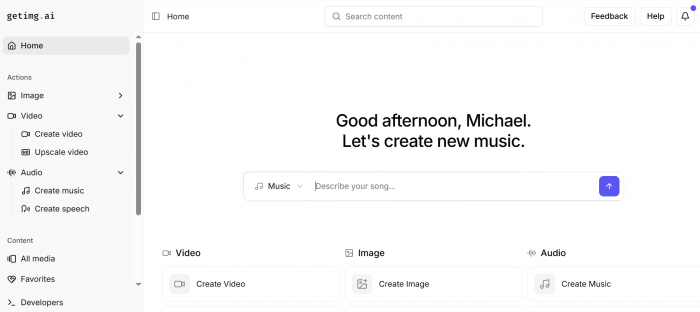
The interface was easier to understand than I expected. The left sidebar separates the main actions clearly: image tools, video tools, audio tools, content library, favorites, and developer access.
Under the image section, I could see options like Create Image, Resize Image, Remove Background, and Upscale Image. Video and audio also have their own places, so the dashboard does not feel hidden or messy.
The main Create Image page feels clean. There is a large prompt area, model settings, aspect ratio controls, reference options, and example cards. I liked that it does not feel too technical at first. A beginner can start quickly, while advanced users can still test different models and settings.
The confusing part is model choice. getimg.ai gives access to several models, and it is not always obvious which one should be used for realism, typography, product visuals, or video. Auto mode helps, but if you want consistent results, you still need to spend time learning which model works best for your use case.
Image Generation Experience
Image generation is where I started. My first practical use case was a blog cover because that is something I often need for AI tool reviews and comparison articles.
I tried a dark tech-style cover with neon blue and purple lighting, abstract interface elements, and a clean 16:9 layout. The result looked polished enough for a review article. It had the right SaaS-style mood, modern lighting, and a professional technology feel.
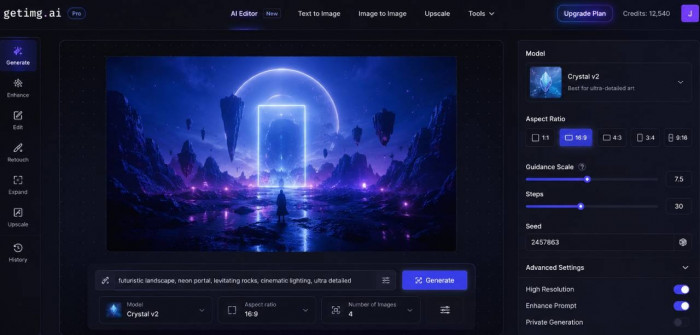
The weak point was that the first image felt a little familiar. It had the common AI-cover look: glowing panels, abstract dashboard shapes, and neon gradients. It was attractive, but not very original. When I made the instruction more specific and reduced the number of decorative elements, the result became cleaner and more editorial.
That is the pattern I noticed with getimg.ai. It can create strong visuals quickly, but the first generation is not always the final one. The best results come after small refinements.
Product Mockup Experience
I also tested getimg.ai for product-style visuals because many users will want it for ads, e-commerce, or social media content.
For a skincare-style product scene, the platform handled lighting and atmosphere well. The marble counter, soft morning light, shadows, and background blur created a premium feel. It looked useful for a moodboard, campaign direction, or early ad concept.
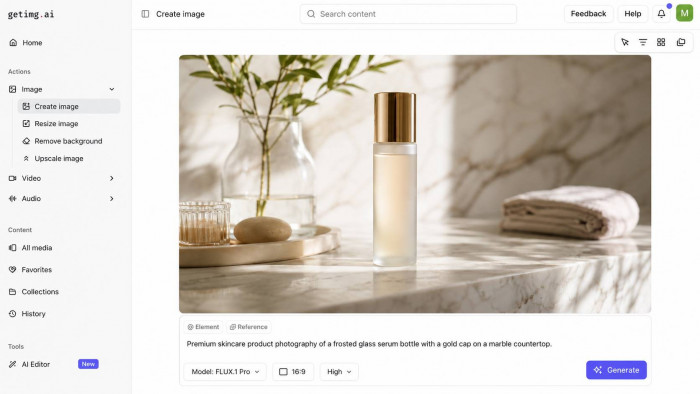
The problem came with the product label. Even when I asked for no readable text, the tool still created vague label-like marks. That is not a big issue for concept work, but it matters for real product marketing.
My conclusion is that getimg.ai is good for product concepts and lifestyle mockups. It is not a replacement for real product photography when exact labels, packaging shape, size, and branding must be accurate.
Image Editing Experience
The editor is one of the most useful parts of getimg.ai. Instead of generating a completely new image, I could take an existing image and ask for a specific change.
I tested background replacement on a magazine-style image. The result was better than expected for a quick edit. The new background looked natural, and the product stayed as the main subject. The shadow was not perfect, but it was good enough for a draft visual.
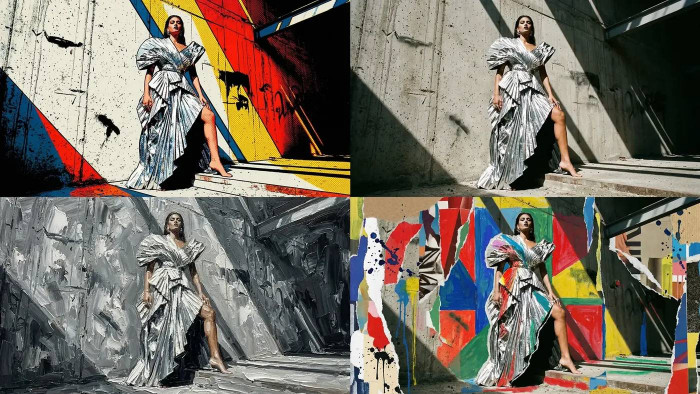
The edges were mostly clean, although one side looked a little soft. That is where manual editing still wins. If the image is going into a paid ad or client project, I would still review it carefully.
For quick content work, though, the editor is genuinely helpful. Background swaps, object removal, restyling, and simple corrections are much faster than doing everything manually.
Image-to-Image and References
Prompt-only generation can be unpredictable, so I also tested reference-based creation. This is useful when you already have a visual style and want new images in a similar direction.
I used a dark tech-style reference and asked getimg.ai to create a fresh version with the same mood. The output followed the overall look well. It kept the dark background, glowing elements, and futuristic feel without copying the image exactly.
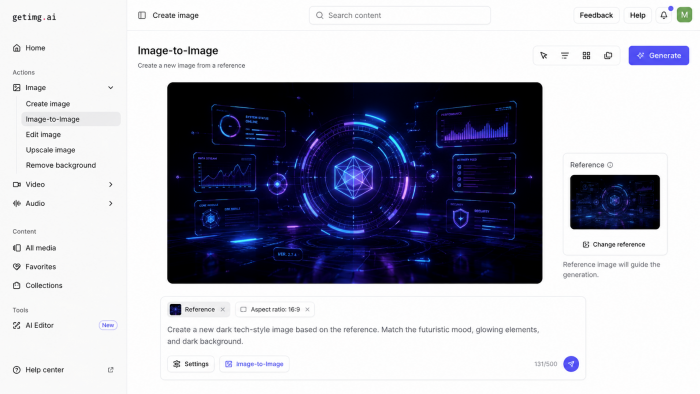
The limitation was layout control. The tool understood the mood, but it changed smaller design details. That means image-to-image is good for style direction, not exact reproduction.
I would use this feature for moodboards, article image series, campaign drafts, and creative exploration. I would not use it when I need an exact layout or strict brand template.
Upscaling and Resizing Experience
Upscaling is not the most exciting feature, but it matters in real publishing work. A generated image can look good in preview but still feel soft when used as a blog cover or social graphic.
I used upscaling on a selected image after choosing the best version. The result looked cleaner and sharper. Background details improved, and the image felt more ready for publishing.
The important thing is that upscaling does not fix bad images. If the original has broken text, odd hands, messy shapes, or poor composition, upscaling only makes those flaws more visible.
Resizing is also useful if you need the same concept in different formats. For example, a blog cover may need a wide 16:9 format, while a social post may need square or vertical output. This is where getimg.ai feels practical for creators who publish across multiple platforms.
Video Generation Experience
getimg.ai also supports video generation, and this is where I saw both the potential and the limitations.
I tested a short futuristic dashboard-style clip with slow camera movement and blue-purple lighting. The result had a strong visual mood. It looked good enough for a short social media hook, article promo, or website background.
The issue was detail stability. Some tiny interface shapes shifted during movement. That is common with AI video, but it matters if you want exact branding, readable text, or product accuracy.
I would use getimg.ai video generation for short clips, motion backgrounds, image animation, campaign drafts, and visual hooks. I would not use it as a full replacement for a proper video editor.
For short-form creative work, it is useful. For long-form storytelling or brand-critical video, it still needs manual editing and review.
Audio Generation Experience
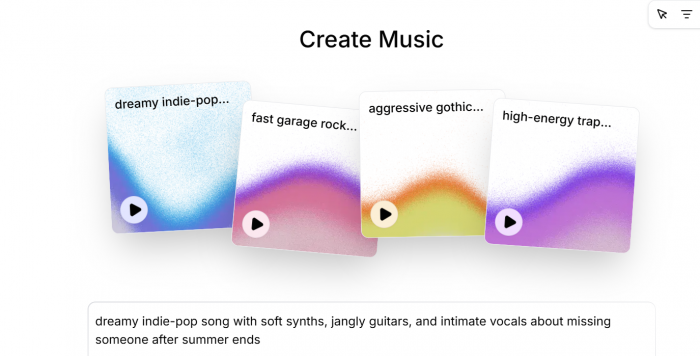
The audio tools make getimg.ai feel more complete. I did not expect audio to be a major part of the platform, but it adds value if you are creating short videos or campaign assets.
The platform includes music generation and speech generation. I tested a short voiceover-style script and found that it worked best with simple sentences. The output felt suitable for explainers, product demos, short ads, social media videos, and quick intros.
The music feature is also useful for basic background audio. I tried a soft electronic music direction for a futuristic product video, and the result matched the mood well enough for a draft or social clip.
Audio is not the strongest reason to choose getimg.ai, but it improves the workflow. If I create an image, animate it, and need a basic voiceover or background track, I can do that without leaving the platform.
For professional audio, I would still prefer tools like ElevenLabs, Descript, Suno, Udio, or Adobe Podcast, depending on the task.
Output Quality
Output quality depends on the model, prompt, and task. getimg.ai gives access to multiple models, which is useful, but it also means results can vary.
| Output Type | My Experience |
| Blog covers | Strong with clear layout and mood direction |
| Product mockups | Useful for concepts, but exact labels need review |
| Portraits | Good overall, but faces and hands still need checking |
| Image editing | Practical for background swaps and simple changes |
| Image-to-image | Good for style matching, less exact for layout |
| Upscaling | Useful after selecting a strong image |
| Video clips | Good for short motion, weaker for fine detail stability |
| Audio | Helpful for simple voice and music support |
The best results came when I gave clear, focused instructions. Vague prompts produced generic images. Overloaded prompts sometimes made the output messy. The strongest prompts were specific about subject, style, lighting, background, aspect ratio, and what to avoid.
Pricing and Credits
getimg.ai uses a credit-based system. Every action uses credits, and the cost can change depending on the model, number of images, video settings, and extra features.
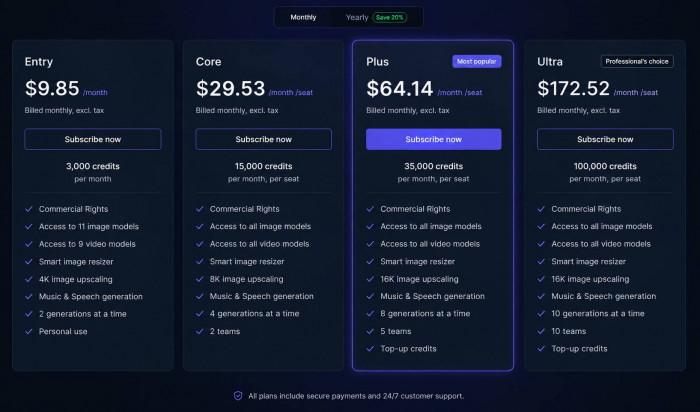
*Note: Pricing might change according to time and place so check the official updated pricing before using.
This system is easy to understand, but it needs discipline. Image generation felt manageable, but video generation, premium models, batch outputs, and repeated testing can use credits quickly.
I would not recommend jumping straight into large batches. It is better to test one or two outputs first, refine the direction, and then spend credits on the stronger version.
Another important point is that plan credits do not roll over. So if you pay for a monthly plan, you should actually use your credits within that billing period.
Privacy and Ownership
Privacy is important because getimg.ai allows users to upload photos, product visuals, reference images, brand assets, and campaign materials.
For normal creative work, I would feel comfortable using it for blog images, social graphics, public marketing concepts, and non-sensitive assets. I would be more careful with private identity photos, confidential client work, unreleased products, legal evidence, medical images, or internal company documents.
getimg.ai says uploaded materials remain yours, and that is important for users creating commercial content. Still, because this is a cloud-based AI platform, sensitive uploads should be handled carefully.
My practical rule is simple: use it freely for public-facing creative work, but think twice before uploading anything confidential.
Commercial Use
Paid plans include commercial rights, but that does not mean every generated image is automatically safe to publish anywhere.
If an output includes a celebrity likeness, copyrighted character, protected logo, fake brand label, or design too close to another company’s work, that still needs caution. Commercial rights from a platform do not clear third-party rights.
For blog covers, general marketing visuals, abstract graphics, campaign ideas, and original product concepts, getimg.ai can be practical. For final ads, client campaigns, and e-commerce assets, I would still review the output carefully before publishing.
Refunds and Cancellation
The refund policy is stricter than some users may expect. Refund eligibility depends on both timing and credit usage. If someone tests too much immediately after subscribing, they may no longer qualify.
Cancellation is easier to understand. Users can cancel and keep access until the paid period ends, then the account returns to the free plan.
This matters because getimg.ai invites experimentation, but experimentation uses credits. Anyone testing paid features should check the refund terms before spending credits heavily.
API and Team Features
getimg.ai is also useful beyond solo creators. Teams can use shared workspaces and asset management features, which makes sense for agencies, content teams, and brands producing visuals regularly.
The API is aimed at developers who want to add image or video generation into their own products or workflows. That makes getimg.ai more scalable than a casual image generator.
For most individual users, the app interface will be enough. For SaaS tools, automation workflows, or larger production systems, the API is the more relevant feature.
Strengths
● The workflow feels connected. I could create, edit, upscale, resize, animate, and add audio without moving between many platforms.
● It is strong for practical content work. Blog covers, social visuals, ad concepts, thumbnails, and product ideas are natural use cases.
● The editor makes the platform more useful. Background changes and object edits add real value beyond basic image generation.
● Video and audio help with campaign creation. Short clips, voiceovers, and music make it easier to build simple multimedia assets.
● Model variety gives creative flexibility. If one model does not work well, another may produce a better style or quality.
Limitations
● The first result usually needs refinement. I rarely saw the first output as the final version.
● Credits can disappear quickly. Video, batch testing, and premium models need careful planning.
● Video is not fully stable. Small objects, text, and fine visual details can shift during motion.
● Exact branding is difficult. Logos, labels, product packaging, and typography still need manual review.
● It does not replace professional design tools. Canva, Photoshop, Figma, Illustrator, and video editors are still better for final production.
Best Use Cases
| Use Case | Why It Works |
| Blog covers | Fast featured images and review graphics |
| Social media visuals | Quick variations for posts and campaigns |
| Product concepts | Lifestyle mockups and ad ideas |
| YouTube assets | Thumbnails, intros, and short visual hooks |
| Agency drafts | Fast campaign options for clients |
| Brand moodboards | Style exploration and early creative direction |
| Team production | Shared assets and repeated visual workflows |
| Developer workflows | API-based image and video generation |
Real User Reviews
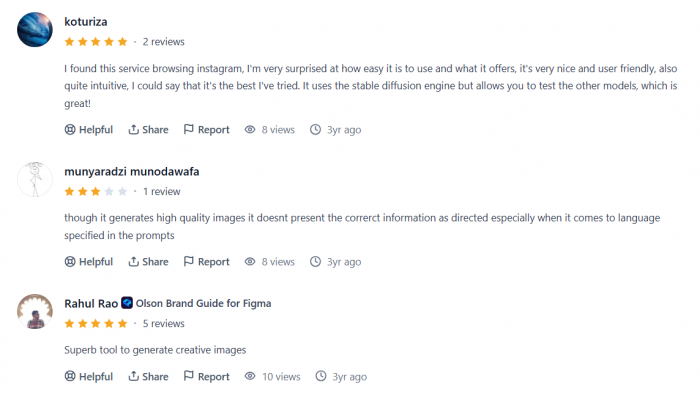
Public feedback on getimg.ai is mixed. On Product Hunt, users rate it positively for ease of use, an intuitive interface, and the ability to test different models in one place. Product Hunt currently lists it at 4.6 from 5 reviews.
Trustpilot shows a more negative picture. It lists 11 reviews, with most ratings at 1 star, and the complaints are mainly about support, refunds, and billing expectations.
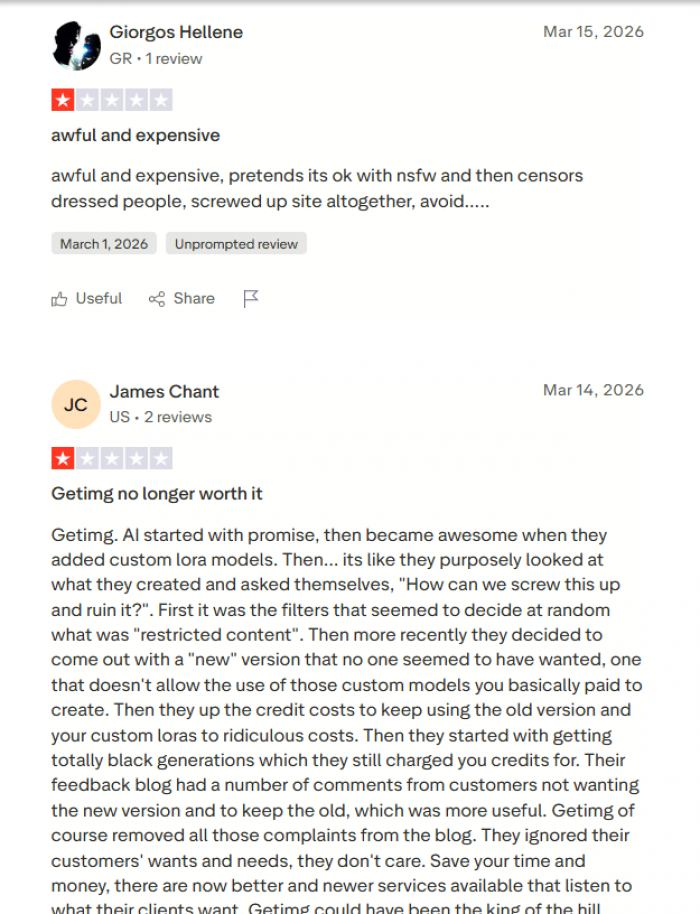
Users seem to like getimg.ai as a creative tool, especially for quick image generation and editing. The bigger concerns appear around paid-plan expectations, credit usage, refunds, and customer support.
Who Should Avoid getimg.ai
getimg.ai is not ideal for users who need full local privacy, exact logo recreation, strict brand layouts, legal evidence images, medical visuals, or long-form video production.
If privacy is the top priority, Stable Diffusion or ComfyUI running locally may be better. If finished design templates matter more than generation, Canva is easier. If video is the main focus, tools like Runway, Kling, Pika, or Luma may be stronger.
Best Alternatives
| Alternative | Better For |
| Midjourney | Artistic and cinematic image quality |
| Adobe Firefly | Adobe users and commercial-safe workflows |
| Ideogram | Images that need readable text |
| Canva | Finished social media layouts and templates |
| Leonardo AI | AI art, game assets, and creative control |
| Runway | Dedicated AI video generation and editing |
| Kling or Pika | Short AI video clips and motion tests |
| Freepik AI | Stock-style marketing visuals |
| Stable Diffusion / ComfyUI | Local control and privacy |
| ElevenLabs or Descript | Stronger voice and audio workflows |
Final Verdict
After using getimg.ai, I see it as a practical AI creative workspace rather than a simple image generator. The strongest part is not just the image quality, but the way different tools connect. I could generate an image, edit it, upscale it, resize it, animate it, and add basic audio without treating every step as a separate project.
My best results came from clear prompts and realistic expectations. It worked well for blog covers, product concepts, social media visuals, background edits, short videos, and simple voice or music support. It struggled more when I expected exact text, perfect branding, accurate product labels, or stable tiny details in video.
The credit system is the main thing I would watch closely. getimg.ai can be useful and affordable for planned creative work, but random testing can burn credits faster than expected. The refund policy is also strict enough that new users should test carefully before committing to a paid plan.
Getimg.ai is worth trying if you create visual content regularly and want one platform for AI images, edits, video, and audio. It is best for bloggers, marketers, creators, e-commerce sellers, agencies, and small teams. It is less suitable for users who need full privacy, exact brand design, or professional video and audio production from start to finish.