Unboring AI offers a simple set of tools for transforming existing photos and videos. It can convert a normal video into a cartoon, replace faces in photos and clips, or make a still portrait sing and dance.
I tested these three features using my own media to see how the workflow felt, how accurately each tool handled faces and movement, and whether the results were useful beyond a quick novelty post. I also examined the pricing, processing limits, privacy information and feedback from other users.
Unboring AI Overview
Unboring is a browser-based platform developed by Reface. It is not a conventional video editor with a timeline, layers and manual masking controls. Each feature follows a shorter process: upload a file, choose an effect, generate the result and download it.
| Category | Details |
| Main tools tested | Video Restyle, Face Swap and AI Animation |
| Supported images | JPG and JPEG |
| Supported videos | MP4 and MOV |
| Face-swap video limit | 15 seconds |
| Video Restyle limit | 60 seconds |
| Starting price | $7.79 per month, billed annually |
| Best suited to | Short social videos, memes and animated greetings |
| Main drawback | Limited control over the generated output |
The platform supports Android, iOS, Windows and macOS through its wider product availability. Uploaded media must contain a detectable face when using Face Swap or AI Animation. Unboring currently limits face-swap videos to 15 seconds and restyled videos to 60 seconds.
Starting With Unboring
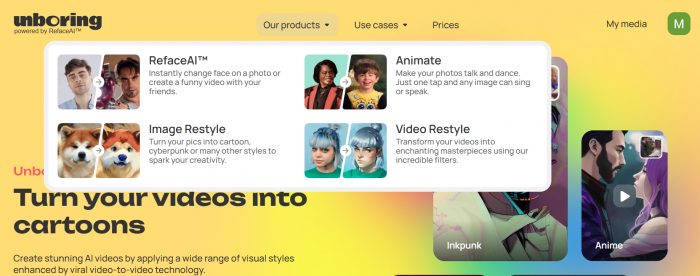
The Unboring homepage divides the platform into four main tools: Face Swap, Animate, Video Restyle and Image Restyle. I focused on the first three because they cover different types of transformation rather than producing minor variations of the same result.
The interface does not require editing knowledge. There is no timeline to configure and no need to mark facial points manually. Each tool asks for an image or video, followed by a style, target scene or animation.
That simplicity made it easy to begin, but it also revealed the main limitation of the platform. Once a generation starts, there are few ways to correct an individual frame, adjust a facial edge or control how strongly the effect is applied.
Test One: Video to Cartoon
For the first test, I opened Video Restyle and uploaded a 10 second MP4 clip showing a face with a hand movement . I chose the vampire style preset because it produced a clear cartoon transformation rather than a small colour or texture change.
Unboring currently offers styles such as Modern Anime, Inkpunk, Sketch, Low Poly, Voxel, Renaissance, Doll and Paper Cut. Its catalogue changes over time, so the precise selection may differ depending on when the tool is accessed.
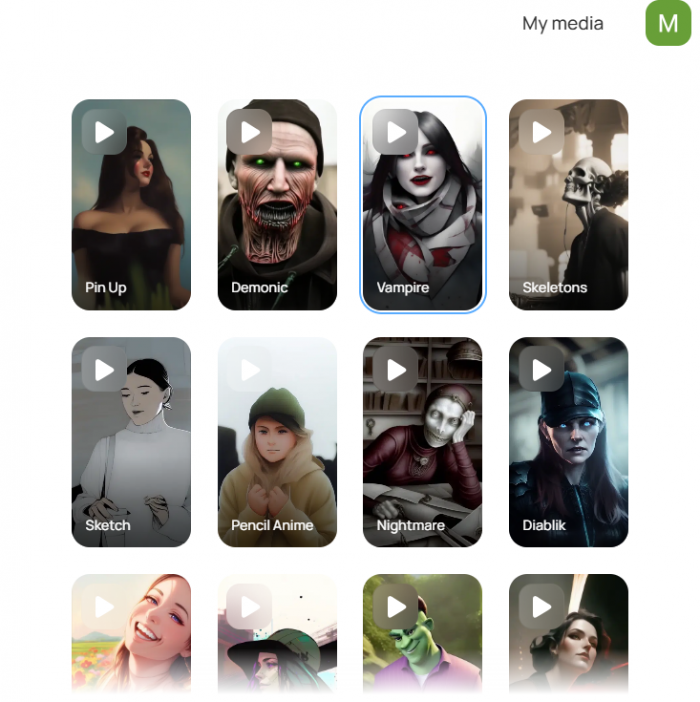
The upload process was straightforward. After accepting the file, Unboring displayed the available styles and allowed me to start the generation. It did not provide detailed controls for motion strength, facial consistency, background treatment or frame rate.
Processing took approximately three minutes. This is an important part of the experience because Unboring states that Video Restyle may take up to two minutes for every second of footage. Under that estimate, a five-second video could require around ten minutes. The platform also uses a shared queue and allows only one Video Restyle generation at a time.
The Cartoon Result
The generated video changed the full frame . The strongest part of the output was face consistency and background transformation. The subject remained recognisable or during frames where it shows the character side I chose.
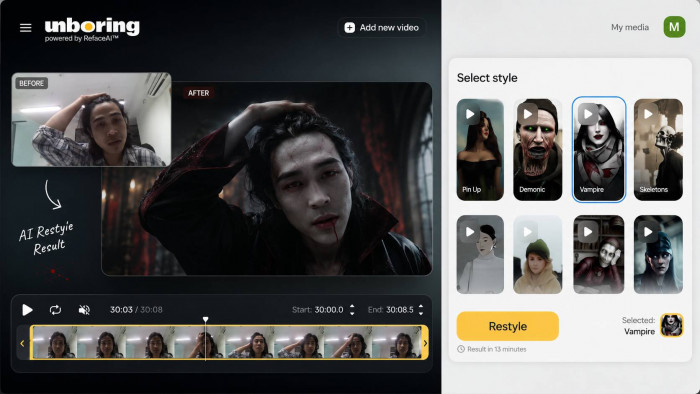
The weaker areas appeared around facial edges. During hand movement I noticed flickering and inconsistent details. These issues did not make the clip unusable, but they were easier to see when I compared the result frame by frame with the original.
The output worked best as a short creative clip rather than a polished animation. For an Instagram Reel, meme or experimental post, the changes were noticeable enough to make the source video feel different. For client work or a longer sequence, the lack of frame-level correction would be restrictive.
Test Two: Face Swap
My second test used Unboring’s best-known feature. I uploaded a portrait and selected one .
The workflow required two elements: the face I wanted to use and the target media where it would appear. Unboring can work with user-uploaded targets or scenes from its own content catalogue. It can also detect several faces in one image, although the processing cost may increase according to the number of faces, video length and frame rate.
Face detection was automatic in my test. The system correctly detected the face with the angle, and I did need to upload a clearer portrait.
Generation took less than one. Compared with Video Restyle, the Face Swap process felt faster. The official FAQ says photo swaps may finish within seconds, while high-resolution video swaps can take several minutes.
How Natural It Looked
The most convincing areas were eyes, mouth, and facial position. The generated face followed the target’s expression without losing the main features of the source portrait.
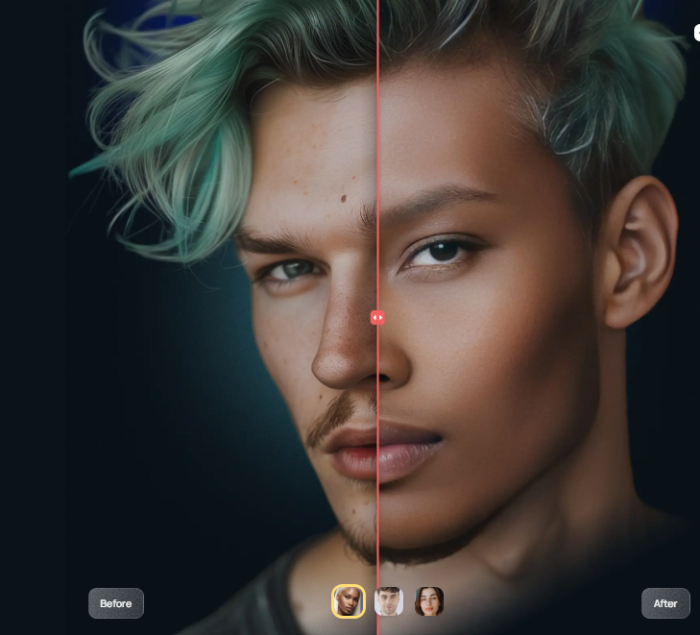
The result became less convincing around, hairline, skin tone and side profile. The source and target used similar lighting, which affected how naturally the face blended into the scene.
This test showed how strongly the input files influence the result. A front-facing portrait with even lighting gives the system clearer facial information. A low-resolution image, extreme head angle or partially covered face leaves more room for errors.
Unboring does not provide a published accuracy percentage for its face-swap technology. Accuracy therefore has to be judged through visible details such as likeness, eye and mouth positioning, edge blending, skin tone and stability across video frames.
Test Three: AI Animation
The final feature was Unboring AI Animation, which is designed to make a still photo sing, speak or dance.
I uploaded an old portrait and selected I’ve had the time of my life song from the content catalogue. Unlike a custom avatar generator, the tool did not ask me to enter a script or record a voice. The motion and audio came from the selected animation template.
The catalogue contains songs, dialogue clips, reactions and performance-based animations. Current examples include singing tracks, humorous lines and character-style motions.
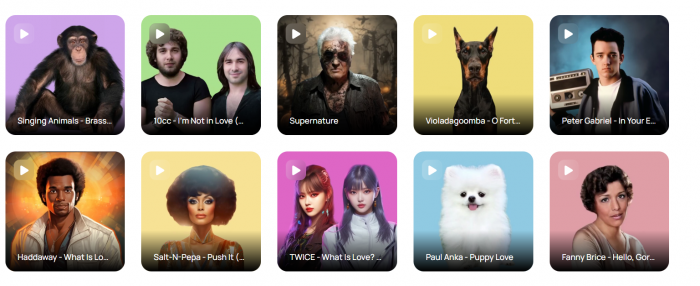
The face was detected immediately on the first attempt]. After selecting the animation, the generation took around two minutes.
Making the Photo Perform
The output added mouth movement, head movement and body motion to the original image. The person remained recognisable and the lip movement was aligned with the audio.
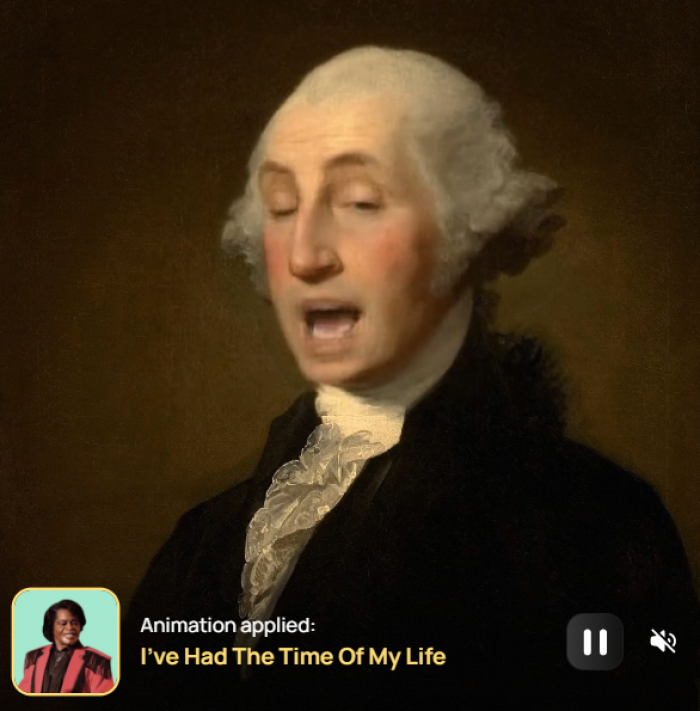
The animation looked most natural during front-facing moments. Larger mouth shapes and stronger head movements caused stretching and unnatural motion.
This was the most entertaining of the three tests, but not necessarily the most realistic. The result made sense for a birthday greeting, humorous post or family message. It would be less suitable for a professional talking avatar because there is no custom script control and the performance depends on the selected template.
Comparing the Results
| Feature | Processing time | Strongest area | Main weakness | Best use |
| Video Restyle | five minutes | face consistency and background transformation | facial edges | Cartoon Reels and creative clips |
| Face Swap | Less than one minutes | eyes, mouth, and facial position accuracy | less convincing around, hairline, skin tone and side profile | Memes, templates and novelty edits |
| AI Animation | Two minutes | Movement accuracy | Less realistic | Greetings and humorous social posts |
Of the three tools, face swap produced the cleanest output, while video to cartoon created the biggest visual transformation. FAce swap was the easiest to use because it was an easy step and took less time.
The tests also showed that Unboring is highly dependent on source quality. Clear faces, stable lighting and moderate movement produced better results than blurred images or videos with rapid motion.
Unboring AI Pricing
At the time of checking, Unboring displayed two annual subscription plans.
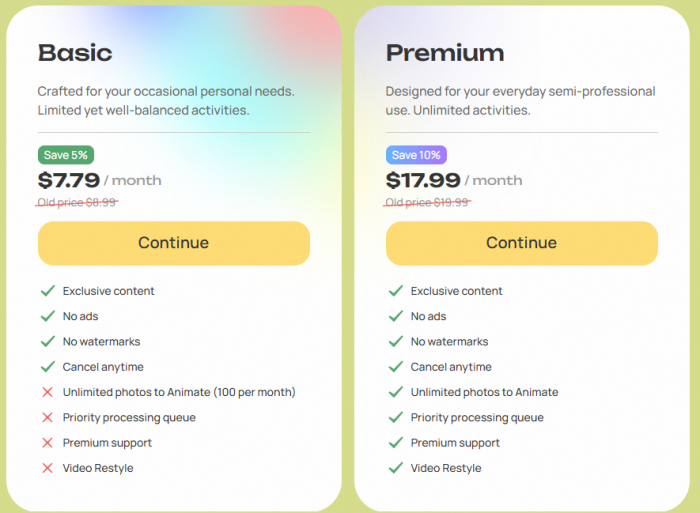
Both plans advertise no advertisements, no watermarks, priority processing, premium support, Video Restyle and unlimited photo face swaps. Basic is described as offering limited activities, while Premium is described as unlimited. However, the visible comparison does not clearly quantify the difference between those limits.
Unboring says subscriptions can be cancelled or downgraded through the account. It also offers a refund within 24 hours of purchase, but only when no tokens have been used. Generating a paid result may therefore remove eligibility for that refund. VAT is included where applicable.
The plans would be easier to compare if the site showed the exact number of video generations, animations or processing credits included with Basic. The current descriptions make Premium sound more generous without showing a detailed usage table.
What Worked Well
Several parts of Unboring made the testing process easier:
● Each feature used a clear upload, selection and generation workflow, so I did not need prior photo or video-editing experience.
● Automatic face detection removed the need to outline a face, place tracking points or create a manual mask.
● Video Restyle changed the full appearance of the clip rather than placing a basic colour filter over the original footage.
● Face Swap delivered a recognisable result when the source and target used compatible angles and lighting.
● AI Animation turned one still image into a complete shareable clip without requiring voice recording or motion editing.
The platform is especially approachable for someone who wants a result quickly and does not need to control every visual detail.
Where It Fell Short
The same automation that makes Unboring easy also limits what can be corrected.
● Video Restyle can take considerably longer than a photo effect, and the shared queue prevents users from processing several restyled clips at the same time.
● Face-swap videos are limited to 15 seconds, which restricts their use in longer social videos or edited sequences.
● Restyled videos can run for up to 60 seconds, but processing a full minute could become impractical under the platform’s own time estimate.
● Users cannot manually repair unstable hands, hair, backgrounds or facial edges after a video has been generated.
● AI Animation relies on prepared performances rather than allowing users to enter a custom script and direct the final delivery.
● The differences between Basic and Premium are not explained with enough detail to make the subscription choice obvious.
These limitations do not matter as much for memes and casual experiments. They become more important when consistency, speed or commercial output quality is required.
Accuracy and Consistency
Unboring does not publish an independent benchmark for facial similarity, lip-sync precision or frame consistency. Claims such as “95% accurate” would therefore be misleading.
I assessed each feature differently. Face Swap was judged by likeness, facial alignment, expression transfer, skin tone and edge blending. AI Animation was judged by lip-sync, eye movement, identity preservation and the stability of the face. Video Restyle was judged by whether the selected style remained consistent as the subject and background moved.
Based on these checks, Face Swap delivered the most accurate result, while Video Restyle and AI Animation showed more variation during movement. The results were consistent enough for casual social content, but small changes around facial edges, hair, and expressions remained visible.
The tool is better described as fast and automated than precise. It can produce a strong result from a suitable input, but it does not give users the controls needed to repair a weaker generation.
Privacy and Face Data
Privacy requires more attention with Unboring than with an ordinary cropping or colour-editing tool because users upload identifiable faces.
The official Face Swap FAQ states that Unboring does not collect or store photos uploaded to the website. However, the main product pages do not provide a detailed, plain-language explanation beside every upload box covering temporary processing, generated-output retention or all data involved in the wider account system. Users should therefore read the current privacy notice before uploading sensitive media.
The Google Play data-safety disclosure for the separate Reface mobile app says the app may share photos, videos, and app-performance information with third parties. It also says the app may collect location and financial information, encrypts data in transit, and allows deletion requests. This disclosure applies to the mobile app and should not be treated as an exact description of every Unboring web interaction, but it is relevant context for users moving between Reface products.
I would avoid uploading identity documents, confidential workplace footage or private photographs of someone who has not agreed to be included. Face Swap should not be used to impersonate a person, create false evidence or suggest an endorsement that never happened.
Unboring also prohibits sexual, violent, political and criminal scenes. The platform says prohibited material may be removed and the user may receive a warning.
Who Should Use It?
Unboring makes the most sense for people creating:
● Short memes, birthday greetings and entertaining posts where a playful result matters more than perfect realism.
● Cartoon-style Reels or TikTok clips that use a brief source video with clear movement and lighting.
● Face-swap images based on personal photos or media that the user has permission to edit.
● Quick animated portraits without learning motion graphics, lip-syncing or professional video software.
It is less suitable for long videos, high-volume production, realistic corporate avatars or projects where every frame must remain consistent.
Rating Snapshot
| Area | Rating |
| Ease of use | 4.5/5 |
| Video Restyle | 4.0/5 |
| Face Swap | 4.3/5 |
| AI Animation | 3.9/5 |
| Processing speed | 3 /5 |
| Creative control | 2.5/5 |
| Pricing clarity | 3.5 /5 |
| Privacy transparency | 3.0/5 |
| Overall rating | 3.8/5 |
Verdict
Unboring AI succeeds at making complicated effects accessible. I could move from an ordinary photo or video to a cartoon clip, face swap or animated performance without working with a timeline or learning manual compositing.
Among the three features, Face swap produced the strongest result. Video to cartoon was the most entertaining, while AI animation needed the most compromise around accuracy.
The main trade-off is control. Unboring decides how faces, movement and visual styles are handled, and there is little opportunity to correct the result afterward. Video processing can also be slow, while the annual plan descriptions need clearer usage limits.
For occasional social content, animated greetings and novelty edits, Unboring is easy to understand and capable of producing shareable results. For professional video production, custom talking avatars or projects involving sensitive facial material, its controls and privacy explanations may not be sufficient.