Gizmo AI looks simple at first: upload your study material, let AI turn it into flashcards, and start revising. After using it properly, I found that the app is more than a flashcard maker. It is a full revision system built around importing notes, memorising key points, testing yourself, and staying consistent through game-like progress.
It is not perfect, and I would not trust every AI-generated card without checking it. But for students who want to revise faster without manually building every deck, Gizmo AI is a genuinely useful study tool.
Quick Verdict
After testing Gizmo AI, I think its biggest strength is speed. It reduces the most boring part of revision: turning raw notes, PDFs, slides, recordings, or online material into something you can actually practise with.
The app worked best when I treated it as a study assistant, not as a complete replacement for my own checking. The AI created usable flashcards quickly, but I still had to review them, fix a few weak cards, and adjust some highlighted words before using them for serious revision.
| Area Tested | My Experience |
| Setup | Easy to start, especially for students familiar with flashcards |
| Magic Import | Very useful for turning notes, PDFs, and other material into cards |
| Flashcard quality | Good as a first draft, but not always perfect |
| Memorise mode | Helpful for active recall and repeated practice |
| AI Tutor | Useful for explaining topics and creating study sessions |
| Gamification | Motivating for daily revision, but not everyone will like the hearts system |
| Free plan | Good for testing, but limits can slow heavy users |
| Best for | Students who want faster revision without creating every card manually |
My overall view is that Gizmo AI is worth trying if you already have study material and want to convert it into quiz-based revision quickly. It is less ideal if you want full control like Anki, dislike gamified learning, or need perfect flashcards without reviewing them yourself.
First Impression
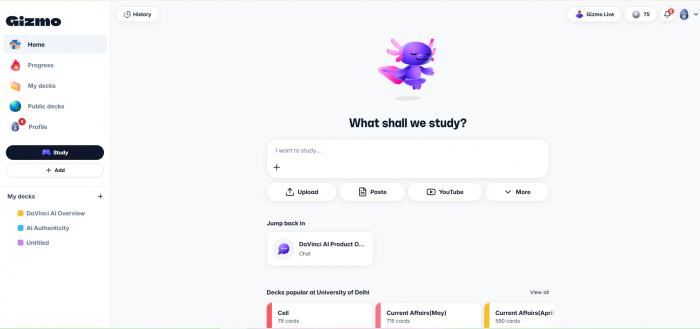
The first thing I noticed about Gizmo AI is that it does not feel like a traditional study app. It feels more like a revision game built around flashcards, quizzes, XP, hearts, streaks, and progress tracking.
That design choice matters. Some study tools feel serious but tiring. Gizmo tries to make revision feel lighter. When I opened the app and started creating a deck, the flow was easy to understand. The app pushes you toward one clear action: add study material and start learning from it.
The interface is student-friendly. Decks are easy to find, Memorise mode is clearly placed, and the AI Tutor does not feel hidden behind complicated menus. I did not feel like I had to learn the app before using the app. That is important because many students only look for tools when exams are already close.
At the same time, Gizmo has a more playful personality than tools like Anki. The hearts, levels, XP, and leagues make the app feel less dry, but they also make it feel less serious in some moments. I liked the motivation side of it, but I can see why some older students may prefer a cleaner, quieter study setup.
Testing Magic Import
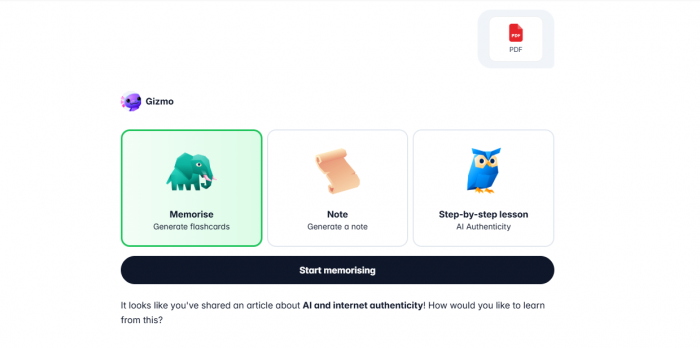
Magic Import is the feature I was most interested in because it is the main reason many students will try Gizmo AI. Instead of creating every flashcard manually, you can import material and let Gizmo turn it into cards.
I tested the feature with the kind of material a real student would use: a PDF-style study note, a short lesson-style source, and text-based notes. The import process was smooth. Gizmo quickly understood the structure of the material and created a deck with highlighted terms that could be used for quizzes.
The best result came from clean, well-structured notes. When the source material had clear headings, definitions, and short explanations, Gizmo created better cards. It picked out key terms and turned them into usable revision prompts. This is where the app saved the most time.
The weaker result came when the material was dense or less organized. Some cards felt too basic, and a few did not capture the full meaning of the original section. This is not surprising, but it is important. Gizmo is good at creating a first draft of revision cards. It is not something I would use blindly before an important exam.
What I liked most was that the imported deck was editable. I could open the cards, change the wording, adjust what was highlighted, and remove cards that did not help. This made the feature more useful because I did not feel stuck with the AI’s first version.
Flashcard Quality
The flashcards were generally useful, but the quality depended on the source material. When I gave Gizmo clear information, it created clear cards. When the material had longer paragraphs or mixed ideas, the cards sometimes became too simple.
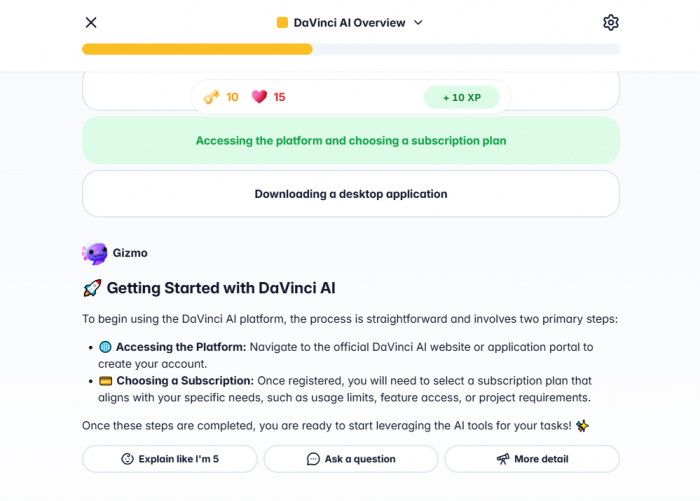
A good flashcard should test the right thing. It should not just hide a random word from a sentence. In my test, Gizmo usually picked important terms, but I still found cards where the highlighted word was not the most useful part of the sentence. In those cases, I had to edit the card manually.
That manual review step is important. If a student imports an entire chapter and starts memorising immediately, they may end up studying some weak cards. But if they spend a few minutes checking the deck first, Gizmo becomes much more useful.
| Flashcard Area | What I Found |
| Accuracy | Mostly reliable with clean notes, but still needs checking |
| Clarity | Good for short concepts, definitions, and direct facts |
| Depth | Better for memorisation than deep reasoning |
| Editing | Easy enough to fix weak cards and change highlights |
| Exam value | Useful after manual review, especially for recall-heavy subjects |
My main takeaway is that Gizmo is strongest for subjects where memory matters: biology terms, history dates, language vocabulary, geography facts, definitions, formulas, and short exam points. For complex topics that need deeper explanation, I would use the AI Tutor alongside the flashcards instead of relying only on cards.
Memorise Mode
Memorise mode is where Gizmo AI started to feel like a proper study app. Once the cards were ready, I could move from reading to active recall. Instead of passively looking at notes, I had to answer questions and check whether I actually remembered the information.
This is one of the better parts of Gizmo. Many students think they know a topic because they have read it three times. Memorise mode makes that harder to fake. You either remember the answer or you do not.
The quiz style felt useful for quick revision sessions. I could go through cards in short bursts, make mistakes, and come back again. The spaced repetition angle also makes sense because the app is trying to bring cards back at the right time instead of letting the user revise randomly.
The hearts system was the one part I had mixed feelings about. On the free plan, wrong answers cost hearts. If you run out, you have to wait before continuing in Memorise mode. I understand why this exists, and it can make the app feel more like a game. But during serious revision, it can also be frustrating. If I am getting answers wrong, that is exactly when I want to practise more, not stop.
For casual study, the hearts system may help with motivation. For exam pressure, Unlimited will feel much better because it removes that interruption.
AI Tutor Experience
The AI Tutor is useful when flashcards are not enough. I used it more like a study helper than a chatbot. Instead of asking broad questions, I asked it to explain topics, quiz me, and help me understand weak areas from a deck.
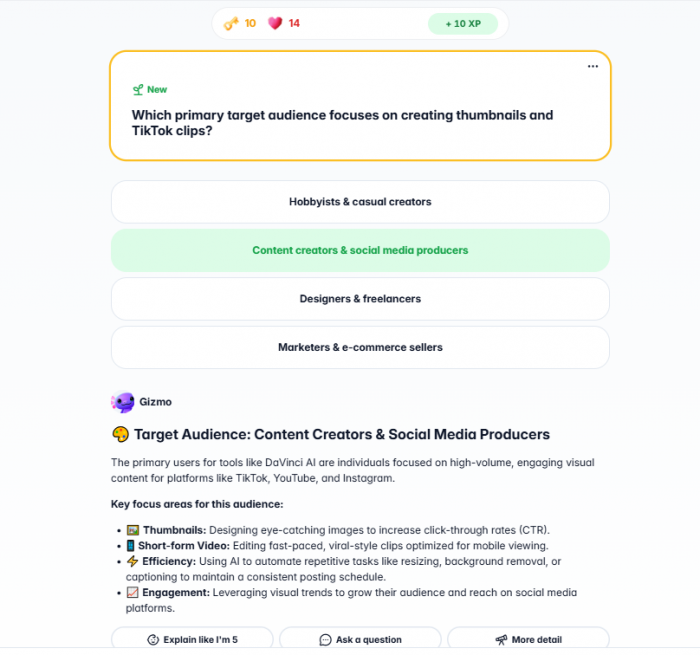
This is where Gizmo becomes more complete. Flashcards help with memory, but they do not always explain why something is true. The AI Tutor fills that gap by turning the material into a lesson-style experience.
When I asked it to explain a topic step by step, the answers were clear and easy to follow. It worked especially well for school-level concepts and simpler academic topics. It was also useful when I wanted a quick explanation before going back into Memorise mode.
However, I would still be careful with advanced subjects. Like any AI tutor, it can sound confident even when an answer needs more detail or context. I would not use it as the only source for medical, legal, engineering, or advanced university-level study. For those areas, I would compare its explanation with textbooks, lecture notes, or official course material.
The best way to use AI Tutor is to ask specific study questions, such as:
● “Explain this topic in simple steps and then quiz me on it.”
● “Tell me the difference between these two concepts using examples.”
● “Find the hardest points in this deck and help me revise them.”
● “Create a short test from this deck and show me where I am weak.”
Used this way, the AI Tutor feels practical. It is not just generating text. It is helping turn passive material into a more active study session.
Gamification and Motivation
Gizmo uses XP, levels, streaks, hearts, and leagues to make study feel more rewarding. I usually do not like when apps overdo gamification, but in Gizmo it makes some sense because revision is repetitive by nature.
The streaks and XP gave me a reason to return. Even a short session felt like progress. For students who struggle to stay consistent, this can be helpful. Studying for five or ten minutes every day is often more useful than waiting until the night before an exam.
Still, the game-like design will not suit everyone. Some users may find it motivating, while others may feel it makes the app look less serious. I think Gizmo works best for students who need a push to revise regularly. If you already have a strict study system, the gamified parts may feel unnecessary.
Gizmo Live
Gizmo Live is a multiplayer quiz mode where users can study with friends or classmates. I see this as a good feature for group revision. Instead of everyone looking at notes separately, a deck can become a live quiz.
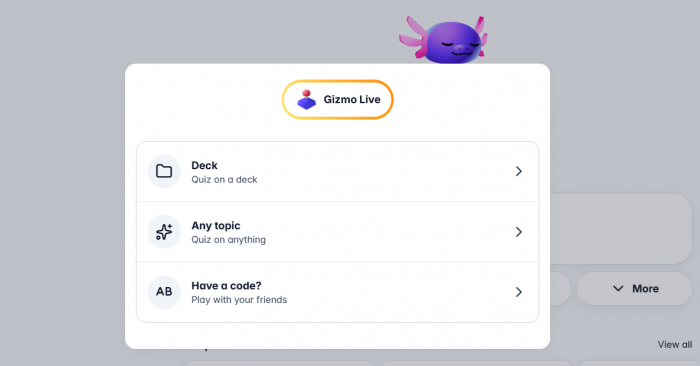
This works best for quick recall topics. Vocabulary, definitions, dates, formulas, and short exam facts fit well. It is not the right format for topics that need slow explanation, but it can make revision more social and less boring.
For teachers, tutors, or study groups, this feature has clear value. A class can turn a topic into a live quiz, and students can compete while revising. It is not the core reason I would use Gizmo, but it adds something useful beyond private flashcards.
Free Plan Experience
The free plan is good enough to understand Gizmo properly. I could create decks, use cards, test Memorise mode, try importing, and get a feel for the app before deciding whether Unlimited was worth it.
The problem is not that the free plan is bad. The problem is that the limits become noticeable once you start using Gizmo seriously. The 20-minute wait between Magic Imports can slow you down if you have multiple files. The hearts limit can interrupt revision if you make too many mistakes. AI Tutor access is also limited, which matters if you rely on explanations as much as flashcards.
| Feature | Free Plan Experience | What It Means In Real Use |
| Cards and decks | Strong enough for testing and regular use | Good starting point for most students |
| Magic Import | Useful, but slowed by waiting time | Fine for light use, annoying for bulk imports |
| Hearts | Works for casual revision | Can interrupt serious practice |
| AI Tutor | Helpful but limited | Heavy users may need Unlimited |
| Gizmo Live | Available | Good for group study without paying |
My advice is to start with the free plan and test it with one real subject. Do not upgrade after only creating one sample deck. Upload actual notes, use Memorise mode, ask AI Tutor for help, and see whether it improves your revision routine.
Unlimited Plan
Gizmo Unlimited makes the app feel smoother because it removes the limits that slow down heavy users. Unlimited hearts are the biggest practical upgrade if you revise often. No Magic Import wait also matters if you want to upload several PDFs, notes, slides, or recordings in one study session.
The paid plan makes the most sense for three types of users. First, students revising daily. Second, users who want to import a lot of study material quickly. Third, students who use AI Tutor often for explanations and quizzes.
I would not say every student needs Unlimited immediately. The free plan is enough for testing. But if Gizmo becomes part of your daily study routine, Unlimited becomes more useful because it removes the friction.
One thing I would check carefully before paying is the renewal period. Gizmo offers different subscription routes depending on where you sign up, such as website, App Store, or Google Play. Users should check whether they are choosing a weekly or yearly plan, how renewal works, and where cancellation must be managed.
Deck Editing and Organization
Deck editing is one of the parts I appreciated more after using the app. AI-generated cards are rarely perfect, so editing matters. Gizmo lets users make changes to decks, adjust cards, organize content, and share decks.
The ability to change highlighted words is especially useful. In Memorise mode, the highlighted terms shape what you are tested on. If Gizmo highlights the wrong part of a sentence, the card becomes weaker. Being able to fix that makes the deck more reliable.
I also liked that decks can be shared. This is useful for classmates, group revision, or teachers who want students to practise from the same material. But users should be careful with public and shared decks. If a deck contains private notes, school material, or personal information, it should not be shared casually.
One limitation is export. Gizmo is good inside its own system, but users who want full ownership of their cards may find export limits restrictive. If you are building a long-term study library and want to move cards between platforms later, this is something to consider before fully committing to Gizmo.
Privacy and Study Data
Privacy is important because Gizmo is not just handling random prompts. Students may upload class notes, recordings, slides, screenshots, videos, or personal study material.
From a user point of view, I would be careful about what I upload. Normal revision notes are probably fine for most people, but I would avoid uploading highly sensitive documents, private school files, unpublished exam material, personal identification details, or anything that should stay strictly private.
The app also has social learning features, so users should check visibility settings before sharing decks or profile details. A study app can feel private because you are using it alone, but shared decks and public features can change that.
This does not mean Gizmo is unsafe. It means users should treat it like any AI-based learning tool. Upload what you are comfortable processing inside an online AI app, and avoid putting sensitive material into it without reading the privacy terms properly.
Real User Feedback
My own experience with Gizmo was mostly positive, but I also checked public user feedback to see whether my experience matched what others were saying.
The app has strong ratings on Google Play, with a 4.8-star rating, more than 100K reviews, and 1M+ downloads when checked. That is a strong signal that many users find it useful, especially on mobile. Most positive feedback around apps like Gizmo usually comes from students who like fast flashcard creation, easier revision, and a more motivating study experience.
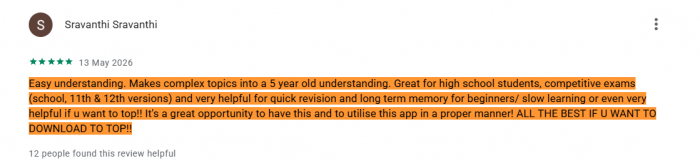
Trustpilot feedback is more mixed, but the sample is much smaller. The main concern there is not flashcard quality. It is subscription and cancellation experience. That does not mean every user will have billing problems, but it is worth mentioning because students should understand the payment setup before subscribing.
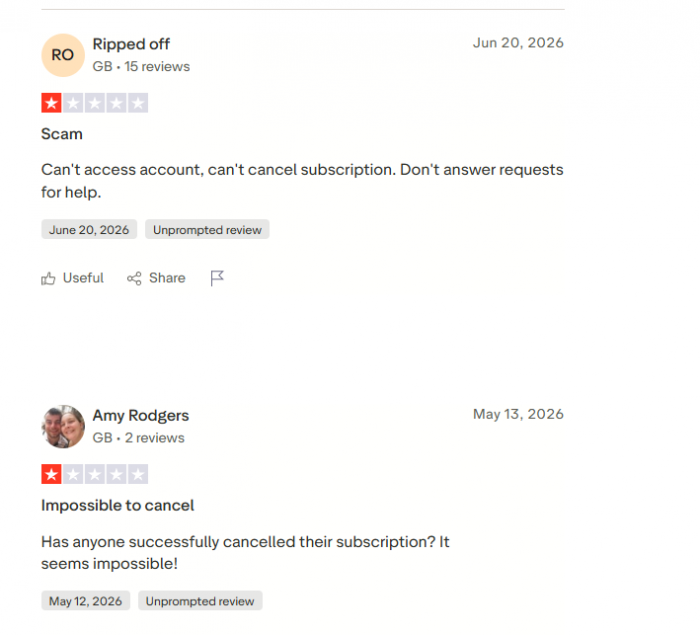
My view after using the app is balanced. Gizmo works well as a study tool, but users should check billing details carefully if they upgrade.
What I Liked
The best part of Gizmo is how quickly it turns existing material into something usable. I did not have to sit and manually create every flashcard from scratch. That alone makes it valuable for students with limited time.
I also liked that the app moves users toward active recall. It does not just summarize notes and leave you there. It pushes you to answer questions, make mistakes, and repeat material. That is closer to real learning than passive reading.
The AI Tutor is another useful part because it helps when a card is not enough. Sometimes I did not only want to memorise a term. I wanted to understand the concept behind it. Having explanation and quiz support in the same app made the workflow smoother.
What I Did Not Like
The biggest issue is that the AI cards still need review. Some cards were useful immediately, but others needed editing. This is not a deal-breaker, but it means users should not blindly trust imported decks before exams.
The hearts system also felt restrictive during serious revision. I understand the gamified idea, but when I answer something wrong, I want more practice, not a pause. For casual use, it is fine. For exam season, it can become annoying.
The export limitation is another concern. If I create a lot of study material in one app, I want more freedom to move it later. Gizmo is useful, but it would be stronger if users had more control over exporting their decks.
Best Use Cases
Gizmo AI is best for students who already have study material and want to convert it into revision quickly. It works especially well for subjects where short answers, definitions, and repeated recall matter.
It is useful for:
● Turning PDFs, notes, slides, recordings, and web material into flashcards without building everything manually.
● Revising vocabulary, biology terms, history facts, formulas, geography points, and exam definitions.
● Building a daily revision habit through streaks, XP, hearts, and short quiz sessions.
● Getting quick explanations from AI Tutor before returning to active recall.
● Studying with classmates through shared decks or live quizzes.
It is not the best fit for every learner. If you want full control, advanced spaced repetition settings, export freedom, or a serious no-distraction system, Anki may still be better.
Gizmo AI vs Other Study Apps
Gizmo feels easier than Anki, more AI-driven than basic Quizlet, and more playful than many revision apps. That gives it a clear place in the study-tool market.
Anki is still stronger for advanced spaced repetition and long-term control. Quizlet is simpler and has a huge library of existing sets. Knowt is useful for students who want a familiar flashcard and notes experience. StudyFetch is more focused on broader AI study support.
Gizmo’s advantage is speed. It gets you from raw material to revision faster. Its disadvantage is control. It works best if you are happy studying inside Gizmo’s own system.
| Tool | Better For | How Gizmo Compares |
| Anki | Serious long-term spaced repetition | Gizmo is easier and faster, but less customizable |
| Quizlet | Simple flashcards and existing public sets | Gizmo has stronger AI import and tutor-style support |
| Knowt | Student-friendly notes and flashcards | Gizmo feels more gamified and revision-focused |
| StudyFetch | Broader AI study support | Gizmo is more focused on flashcards and recall |
| StudySmarter | Study planning and organization | Gizmo is better for quick quiz-based revision |
Who Should Use Gizmo AI?
Gizmo AI is a strong fit for students who want to revise but do not want to spend hours preparing study materials. If you already have notes, PDFs, lectures, slides, or online material, Gizmo can turn them into something easier to practise from.
It is also good for students who need motivation. The XP, streaks, hearts, and quiz structure can make revision feel less heavy. That may sound small, but consistency is often the hardest part of studying.
I would recommend Gizmo most to school students, language learners, exam candidates, and anyone revising memory-heavy subjects. I would be more cautious for advanced academic work where accuracy and depth matter more than speed.
Final Verdict
After using Gizmo AI, I think it is a genuinely useful study app, but only when used in the right way. Its real strength is not that it creates perfect flashcards. Its strength is that it removes the slow setup work and gets students into active recall faster.
Magic Import is the feature that makes Gizmo worth trying. Memorise mode gives the app real learning value. AI Tutor adds explanation when cards are not enough. Gizmo Live and gamification make revision more interactive, especially for students who need motivation.
The weaknesses are also clear. AI-generated cards need checking, the free plan has limits, hearts can interrupt revision, export options are limited, and users should pay attention to subscription management before upgrading.
My final advice is simple: try Gizmo AI with one real subject before paying. Upload a PDF, create a deck, edit the weak cards, use Memorise mode, ask AI Tutor to explain a difficult topic, and see whether it helps you revise better. If it saves time and keeps you studying consistently, Gizmo AI can be worth using. If you want full control, no game mechanics, and long-term card ownership, Anki or another advanced tool may suit you better.