Finding a strong AI caption generator is no longer just about saving time. The best tools now help creators, marketers, and brands write sharper captions, maintain a consistent tone, adapt copy for different platforms, and in some cases schedule posts from the same workspace.
This list focuses on eight of the best AI caption generator tools available right now, with special attention to feature depth, pricing and practical strengths.
1. Technylo.com Caption Generator
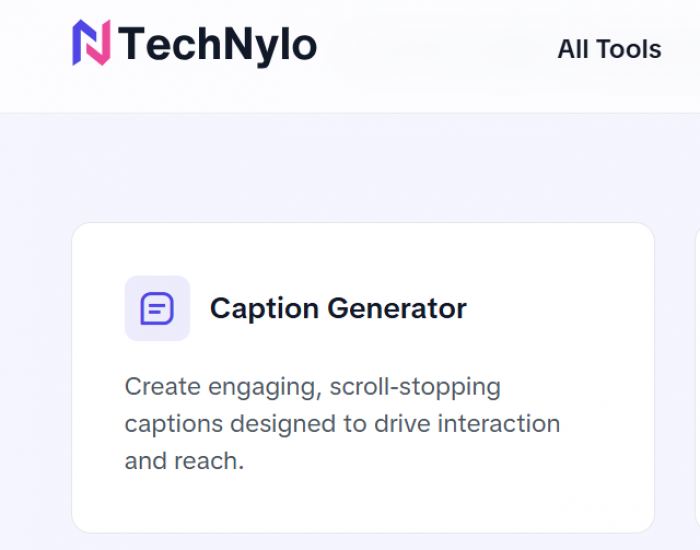
Technylo.com deserves attention because it packages several creator-focused content utilities into one ecosystem instead of offering a narrow caption-only tool. Its product pages and software listings highlight tools such as a caption generator, post generator, hashtag generator, bio generator, hook generator, and content calendar support, which makes it suitable for users who want ideation and execution in one workflow.
From a practical content perspective, Technylo appears useful for social creators and small businesses that want to build captions around tone, topic, and platform intent without switching between multiple apps. The main appeal is convenience: caption ideas, post angles, and discovery support through hashtags are aligned inside one content stack.
Best for
Technylo.com is best for creators, freelancers, and small teams that want a lightweight all-in-one caption and social content workspace without paying for a large enterprise platform.
Standout features
Technylo combines AI caption writing with hook generation, bio generation, hashtag support, and planning tools, which gives it broader utility than single-purpose caption generators. That wider toolkit can help users move from idea to draft to publishing plan faster, especially when they are managing multiple content formats.
Pros and cons of Technylo.com
| Category | Details |
| Pros | Offers caption generation alongside hashtags, hooks, bios, and content planning features. |
| Useful for social-first workflows because it is positioned as a broader creator toolkit rather than just a text box. | |
| Suitable for users who want practical content support across multiple post elements. | |
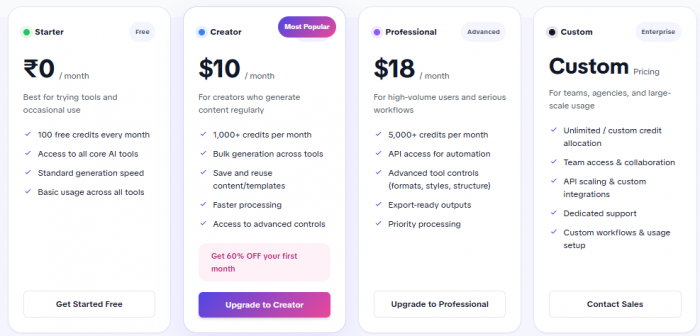
| Cons | Publicly available pricing and deep feature documentation are more limited than major established rivals. |
| It has a smaller market footprint than larger AI writing and scheduling platforms. |
Pricing and plans of Technylo.com
2. Jasper AI for Brand-Ready Captions
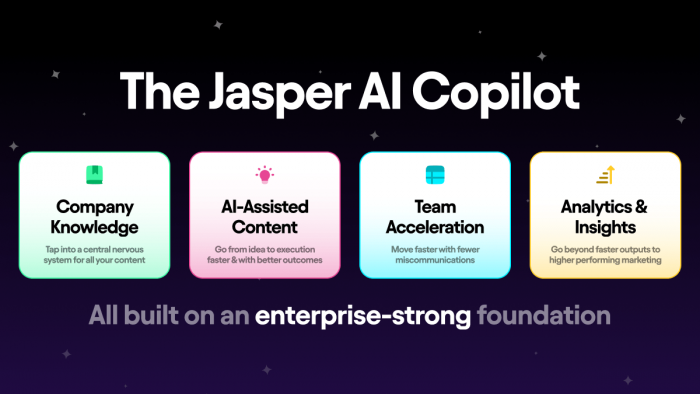
Jasper AI remains one of the strongest options for teams that treat captions as part of a larger brand content system rather than isolated social copy. Recent tool roundups highlight Jasper for its brand voice controls, campaign-focused templates, and collaboration workflows, making it especially useful for businesses that need consistency across posts, ads, landing pages, and email.
For caption writing, Jasper is effective when a team wants polished output that sounds aligned with a business identity. It is less about casual one-click captioning and more about creating social copy that fits a wider marketing strategy.
Best for
Jasper AI is best for brands, agencies, and serious marketing teams that need captions to match approved tone, messaging, and campaign structure across channels.
Standout features
The platform stands out because of brand voice training, reusable templates, and team-oriented collaboration tools that support production at scale. That makes it particularly valuable for companies that publish social content as part of a coordinated content operation.
Pros and cons of Jasper AI
| Category | Details |
| Pros | Strong brand voice support for consistent marketing captions. |
| Useful beyond captions because it also supports campaign copy, ads, and long-form marketing content. | |
| Better suited than many lightweight tools for collaborative teams. | |
| Cons | Higher starting cost than simpler caption-focused tools. |
| May feel too feature-heavy for individual creators who only need quick caption drafts. |
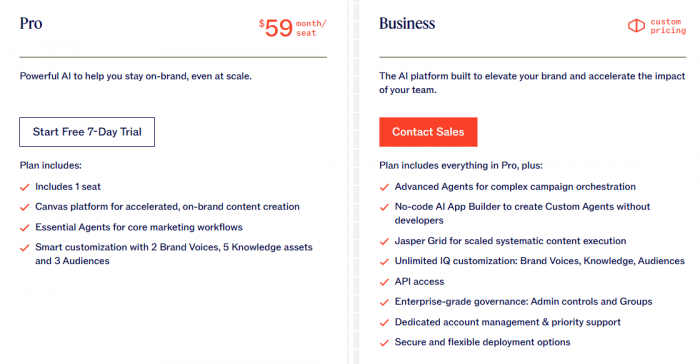
Pricing and plans of Jasper AI
3. Copy.ai for Volume Content Creation
Copy.ai is often recommended for marketers who need a high volume of content variations quickly. In AI caption workflows, that matters because social teams often need multiple versions of the same post for testing, seasonal pushes, product launches, or multi-platform adaptation.
Its broader writing engine supports numerous templates and repeatable workflows, which makes it especially appealing for agencies and growth teams working across different industries. Instead of writing one caption at a time, users can generate many options and then refine the best ones for final publishing.
Best for
Copy.ai is best for marketers and agencies that need many caption variations fast, especially when handling different brands or content campaigns at scale.
Standout features
The platform is known for template variety, workflow support, and bulk idea generation, all of which help reduce manual copywriting time for repeat social posting tasks. It is particularly effective when the goal is speed and breadth rather than a single handcrafted caption.
Pros and cons of Copy.ai
| Category | Details |
| Pros | Strong for producing multiple caption versions in one workflow. |
| Offers many templates suited for different business categories and campaign styles. | |
| Useful for batch production and testing different tones or hooks. | |
| Cons | Requires editing if a brand needs nuanced or highly specific messaging. |
| Can feel broader than necessary for users who only want a simple caption tool. |
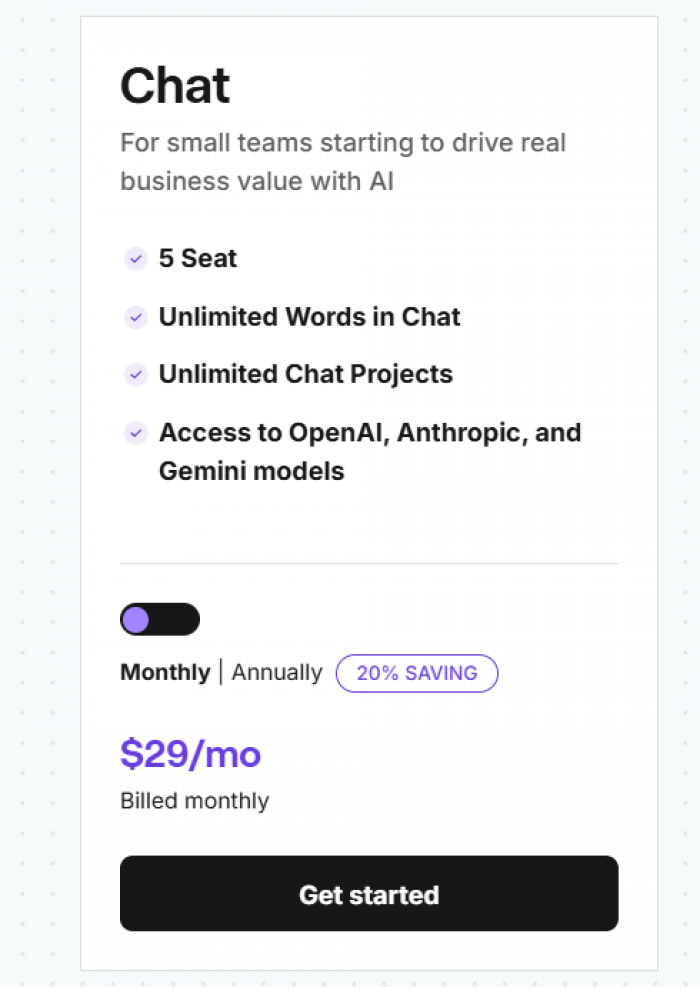
Pricing and plans of Copy.ai
4. Hootsuite OwlyGPT for Social-First Intelligence
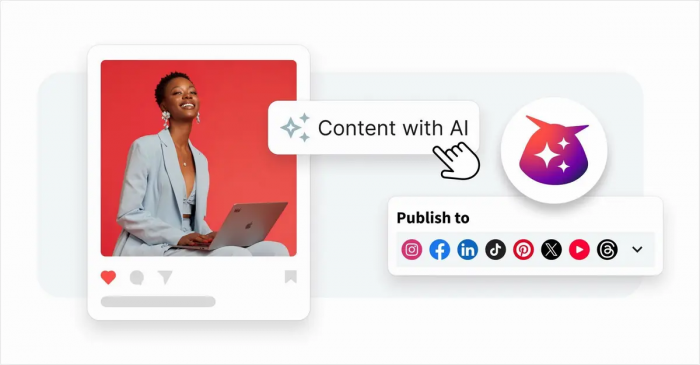
Hootsuite’s caption ecosystem is more than a free text generator. Its public caption tool supports different social networks, styles, languages, and keywords, while OwlyGPT adds a more advanced layer powered by real-time social listening and brand-aware generation.
That combination makes Hootsuite especially compelling for teams that care about data-informed captioning. According to Hootsuite, OwlyGPT can generate posts using live social media insights from Talkwalker and align outputs with past posts and brand guidelines, which gives it an edge in trend-aware content planning.
Best for
Hootsuite is best for social media managers, in-house teams, and agencies that want caption generation connected to scheduling, analytics, and live audience trends.
Standout features
Its major advantage is that caption generation sits inside a mature social management platform. The free tool supports network, tone, language, description, and keywords, while OwlyGPT extends this with social listening and competitive insight features.
Pros and cons of Hootsuite OwlyGPT
| Category | Details |
| Pros | Offers a free social caption generator with support for multiple networks and tones. |
| OwlyGPT uses live social data through Talkwalker for more trend-aware output. | |
| Fits naturally into a larger scheduling and analytics workflow. | |
| Cons | Advanced value is strongest when users already need the full Hootsuite platform. |
| May be too expensive for creators who only need caption generation without management features. |
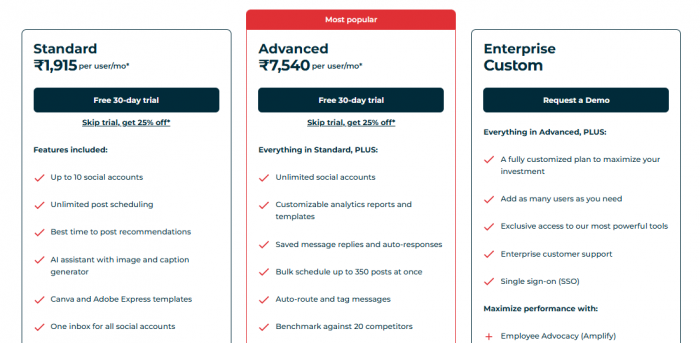
Pricing and plans of Hootsuite OwlyGPT
5. Canva for Visual Caption Workflows
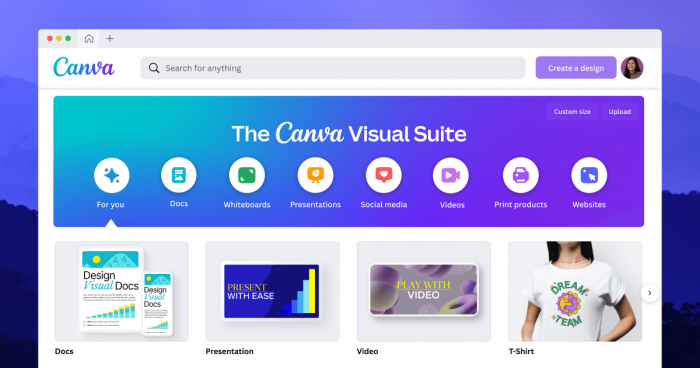
Canva has become an important option in the caption space because it merges design creation and caption support in one place. Its auto-caption features for video and AI-assisted text capabilities are particularly useful for creators producing Reels, Shorts, stories, and other visual-first assets.
This matters because many creators no longer want to separate video editing from subtitle and caption preparation. Canva’s strength is convenience: visual content, on-screen captioning, and supporting copy can be developed inside the same environment.
Best for
Canva is best for creators, coaches, and small businesses that produce visual social content and want captions close to the design workflow.
Standout features
It stands out through drag-and-drop editing, auto-caption support for video, and easy styling that lets subtitles and visual text match the brand look of the asset. The broader Canva environment also makes it accessible for non-technical users.
Pros and cons of Canva
| Category | Details |
| Pros | Integrates captioning with video and design editing. |
| Accessible to beginners and widely used by creators already working in Canva. | |
| Includes free access for basic caption-related workflows. | |
| Cons | Less focused on strategic caption writing than dedicated copy platforms. |
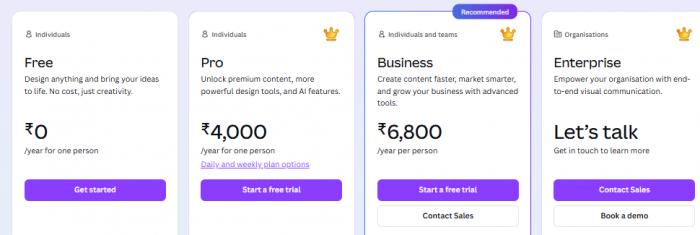
| Advanced AI and team features are stronger on paid plans. |
Pricing and plans of Canva
6. ContentStudio for Agencies and Publishing Pipelines

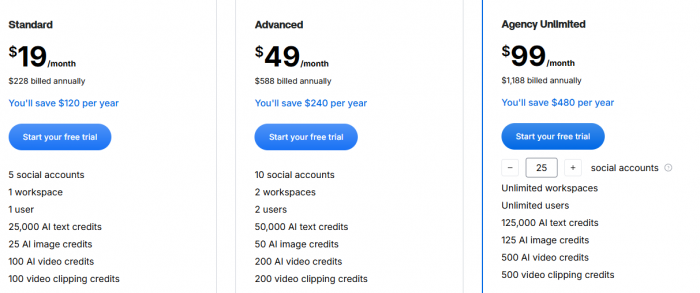
ContentStudio is a strong fit for users who want AI caption generation connected directly to planning and scheduling. Rather than acting only as a writing assistant, it fits into a larger publishing workflow with queue management, approvals, and multi-brand support.
This makes it especially useful for agencies, social media managers, and operators who handle ongoing client work. The appeal is not just writing captions, but turning them into scheduled assets inside the same system.
Best for
ContentStudio is best for agencies and social media teams that need AI caption writing tied closely to scheduling, approvals, and content operations.
Standout features
Its main strengths are platform integration, content planning support, and multi-workspace usefulness for client-heavy environments. There is also a free caption generator for lighter use, which helps users test the platform before committing to a broader workflow.
Pros and cons of ContentStudio
| Category | Details |
| Pros | Combines AI caption generation with scheduling and content planning. |
| Well suited for agencies and multi-brand managers. | |
| Offers a free caption tool for basic use cases. | |
| Cons | Better suited to users who want a full platform rather than a simple standalone caption box. |
| The interface can feel heavier than ultra-light creator tools. |
Pricing and plans of ContentStudio
7. PostEverywhere for Cross-Platform Repurposing

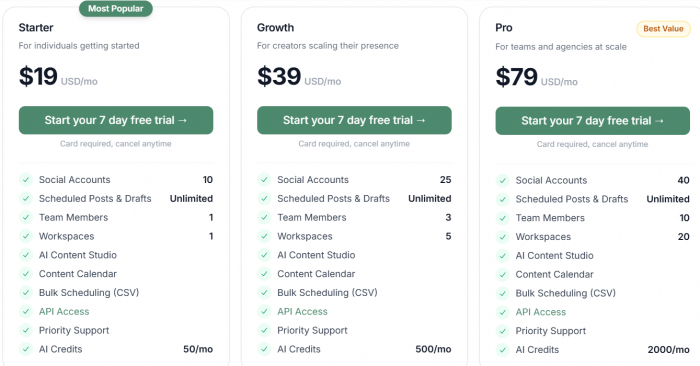
PostEverywhere is positioned as a specialized AI caption and scheduling platform for creators who want to publish and repurpose across multiple channels. That focus makes it attractive to users who care less about enterprise content governance and more about efficient posting across platforms.
Its value lies in blending AI-generated caption assistance with platform-aware publishing logic. Instead of writing once and manually adapting the copy everywhere, users can create and refine captions in a more centralized flow.
Best for
PostEverywhere is best for creators and small teams that want caption generation tied directly to posting and repurposing across several social networks.
Standout features
The platform is designed around cross-posting, AI caption support, and repeat publishing efficiency, which makes it practical for users with multi-platform content strategies.
Pros and cons of PostEverywhere
| Category | Details |
| Pros | Combines caption generation with scheduling and cross-platform republishing. |
| Useful for creators who want one workflow for ideation and distribution. | |
| Supports efficient reuse of strong-performing caption structures. | |
| Cons | Less flexible than broader AI writing suites for non-social content needs. |
| More niche than large platform ecosystems with deeper collaboration tools. |
Pricing and plans of PostEverywhere
8. Pallyy for Instagram-Heavy Content Teams
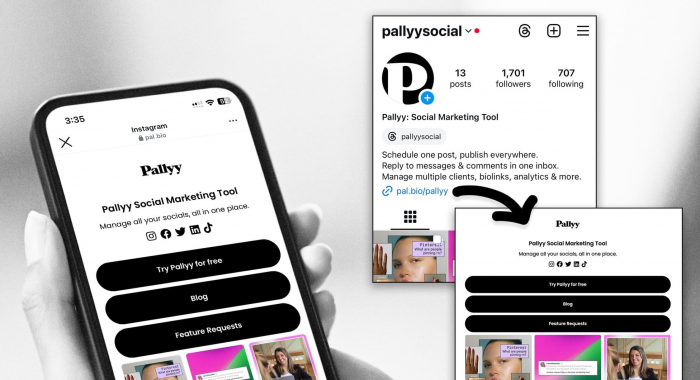
Pallyy is frequently recognized as a strong caption and scheduling companion for visually driven social media management, especially around Instagram-focused workflows. While it is not positioned as a giant general AI writing suite, it is useful for creators and small businesses that want caption support inside a familiar social planning setup.
Its appeal comes from simplicity. Users who do not need complex enterprise systems often prefer tools like Pallyy because they make captioning, scheduling, and social organization feel more approachable.
Best for
Pallyy is best for Instagram creators, small brands, and lean social teams that want easy caption assistance inside a straightforward scheduler.
Standout features
It stands out for lightweight usability, social calendar support, and an easier learning curve compared with larger social media suites.
Pros and cons of Pallyy
| Category | Details |
| Pros | Easier to use than many enterprise-style social platforms. |
| Helpful for visual-first brands and Instagram-led posting strategies. | |
| Blends caption workflow with simple scheduling support. | |
| Cons | Less advanced in brand governance and enterprise collaboration than premium suites. |
| Not as broad as large AI writing tools for long-form or multi-format content production. |
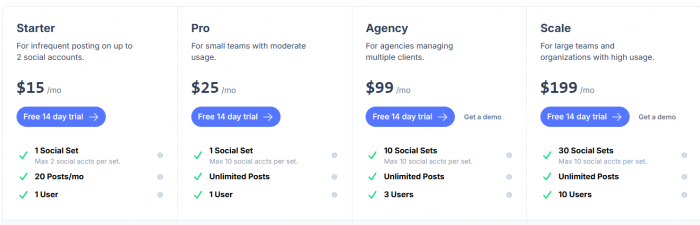
Pricing and plans of Pallyy
Which tool is the best fit?
The right caption generator depends on how the content workflow is structured. Technylo.com is a strong pick for users who want an all-in-one creator toolkit, Jasper AI suits brands that care deeply about tone and governance, Copy.ai works well for rapid caption variation, and Hootsuite stands out for data-informed social publishing.
Canva is particularly attractive for video and design-heavy creators, ContentStudio works well for agencies, PostEverywhere fits multi-platform repurposing, and Pallyy is a practical option for lean visual-first social teams. For many bloggers and SEO-focused publishers, the strongest editorial angle is to separate these tools not by hype, but by actual use case, because the best caption generator for a solo Instagram creator is very different from the best one for a multi-brand agency.