Creating a presentation no longer has to start with a blank slide and a blinking cursor. AI presentation tools can now turn prompts, documents, notes, PDFs, brand assets, and rough ideas into complete slide decks. Some tools focus on speed. Some focus on design. Others work directly inside PowerPoint or Google Slides so users do not have to change their normal workflow.
The best AI presentation tool depends on what kind of deck you need. A startup founder may care about pitch deck structure. A marketer may need clean campaign reports. A teacher may want fast lesson slides. A consultant may need PowerPoint-ready exports. A business team may need brand control, collaboration, analytics, and reusable templates.
This list breaks down eight strong AI tools for presentation creation based on workflow, output quality, editing control, export options, pricing, and best-fit users.
Quick Comparison of the Best AI Presentation Tools
| Tool | Best For | Free Plan | Starting Paid Price |
| Gamma | Fast AI-generated decks and web-style presentations | Yes | From $9 per seat/month |
| Beautiful.ai | Polished business decks with automated design | 14-day trial | From $12/month billed annually |
| Canva | Visual presentations with templates and AI design tools | Yes | From $12.99/month for Pro |
| Plus AI | Creating slides inside PowerPoint and Google Slides | 7-day trial | From $10 per user/month billed annually |
| SlidesAI | Google Slides users who want text-to-slide generation | Yes | From $10/month billed annually |
| Presentations.AI | AI-first business presentations and branded decks | Free or trial access available | From $9/month billed annually |
| Pitch | Collaborative team decks, startup decks, and sales presentations | Yes | From $13/month billed yearly |
| Decktopus | Quick AI decks, proposals, and interactive presentations | Paid plans | From $14.99/month billed annually |
1. Gamma
Gamma is one of the strongest AI presentation tools for people who want speed, structure, and modern visual flow. Instead of building slide after slide manually, users can enter a topic, paste notes, upload content, or start with a prompt, and Gamma turns it into a polished deck. It works well for startup explainers, business overviews, marketing decks, educational slides, reports, and internal presentations.
Gamma feels less like traditional PowerPoint and more like a web-native presentation builder. Its slides often look clean, vertical, card-based, and modern, which makes it useful for online sharing and fast visual storytelling. Users who need strict corporate formatting may still need to export and polish the final deck, but for first drafts and idea-to-deck workflows, Gamma is one of the easiest tools to start with.
| Presentation Workflow | How It Performs |
| Starting input | Works from prompts, notes, outlines, PDFs, and PowerPoint imports |
| AI slide creation | Creates full decks with sections, headings, content blocks, and visuals |
| Design quality | Modern, clean, and web-style rather than traditional corporate |
| Editing control | Good for quick edits, layout changes, image changes, and content refinement |
| Export and sharing | Supports PDF, PPTX, PNG, Google Slides, and web sharing depending on plan |
| Plan | Pricing | What You Get |
| Free | $0 | Basic use, limited AI credits, simple presentations, docs, websites, and exports |
| Plus | From $9 per seat/month | More AI usage, removed Gamma branding, more cards per prompt, advanced image models |
| Pro | Higher paid tier | Premium AI models, more customization, analytics, custom branding, API access |
| Enterprise or Team | Custom or higher-tier pricing | Team controls, workspace features, advanced security, and larger usage needs |
Gamma is best for founders, marketers, students, educators, creators, and small teams that need a polished first draft quickly. It is especially useful for explainers, pitch drafts, internal updates, lessons, and visual documents. It is not the best fit for users who need strict PowerPoint slide master control, complex corporate formatting, or highly regulated brand layouts that must follow exact internal design rules.
Why it is worth using:
Gamma is worth using because it removes the slowest part of presentation creation: starting from nothing. It gives users a strong first draft with structure, content, and design already in place. It is especially useful when you need a deck quickly and want something that looks modern without spending hours on formatting.
2. Beautiful.ai
Beautiful.ai is built around smart slide design. Instead of giving users a blank canvas, it uses Smart Slides that automatically adjust spacing, alignment, hierarchy, and layout as content changes. This makes it useful for business presentations, sales decks, startup pitches, training decks, executive reports, and company updates where the final result needs to look clean and professional.
Its AI features help generate presentation content, rewrite text, apply brand styling, translate slides, and create visuals. The tool is especially strong for users who struggle with design consistency. Compared with more flexible tools like Canva or PowerPoint, Beautiful.ai gives less freeform control, but that is also the point. It protects users from making messy slides.
| Presentation Workflow | How It Performs |
| Starting input | Works from AI prompts, templates, brand styling, files, and links |
| AI slide creation | Helps generate content and structure, then formats slides intelligently |
| Design quality | Very strong for business decks, clean layouts, and professional formatting |
| Editing control | Moderate, with design guardrails that keep slides organized |
| Export and sharing | Supports PDF and PowerPoint export, sharing, analytics, and team workflows |
| Plan | Pricing | What You Get |
| Pro | $12/month billed annually | Individual plan with unlimited AI content generation, Smart Slides, branding, templates, and export tools |
| Team | $40 per user/month billed annually, or $50 monthly | Collaboration, shared libraries, analytics, brand control, and team workspace features |
| Enterprise | Custom pricing | Advanced security, onboarding, SSO, audit logs, permissions, and enterprise support |
| Single presentation | $45 one-time | Useful for one-off projects without a long subscription |
Beautiful.ai is best for business teams, consultants, sales teams, founders, and marketers who want polished slides without manually fixing layout problems. It works well for professional decks where design consistency matters more than full creative freedom. It is not ideal for designers who want to control every pixel, or for casual users who only need a simple one-time school presentation.
Why it is worth using:
Beautiful.ai is worth using when the deck has to look professional but the user does not want to spend hours fixing spacing, alignment, and layout. It is one of the best choices for teams that need repeatable, clean, on-brand business presentations.
3. Canva
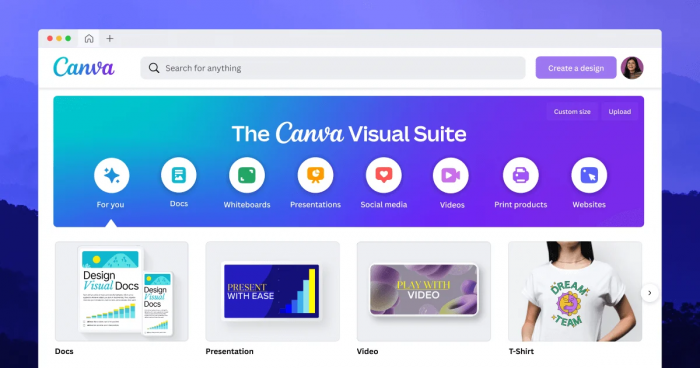
Canva is not only a presentation tool. It is a full visual design platform with templates, stock media, brand kits, image editing, video tools, AI writing features, and presentation layouts. That makes it a strong option for users who create social graphics, documents, short videos, posters, and decks from the same workspace. For presentations, Canva is especially good when the deck needs to be visually attractive rather than heavily technical.
Its AI features can help generate content, rewrite text, create images, remove backgrounds, resize designs, and support faster visual production. Canva is not always the best tool for complex corporate PowerPoint workflows, but it is excellent for students, creators, small businesses, marketers, teachers, and social-first teams that need presentation slides to look colorful, modern, and easy to share.
| Presentation Workflow | How It Performs |
| Starting input | Works from templates, prompts, existing designs, brand kits, and visual assets |
| AI slide creation | Helps generate written content, visuals, and design elements rather than only full decks |
| Design quality | Very strong for visual, colorful, template-based presentations |
| Editing control | Strong, with drag-and-drop editing and a large media library |
| Export and sharing | Supports presentation mode, PDF, PPTX, sharing links, and team collaboration |
| Plan | Pricing | What You Get |
| Free | $0 | Basic design tools, templates, free assets, and presentation creation |
| Pro | From around $12.99/month | Premium templates, AI features, brand tools, background remover, more assets, and larger storage |
| Teams or Business | From around $10 to $20 per user/month depending on billing and region | Team collaboration, brand controls, shared assets, workflows, and higher AI/design access |
| Enterprise | Custom pricing | Advanced admin, security, brand governance, and organization-level controls |
Canva is best for students, teachers, marketers, creators, small businesses, and social media teams that want visual presentations without using a heavy design tool. It works well for class projects, marketing reports, brand slides, event decks, educational explainers, and creative presentations. It is not the strongest choice for users who need advanced PowerPoint-native controls, strict slide master formatting, or complex consulting-style data decks.
Why it is worth using:
Canva is worth using because it combines AI presentation creation with one of the strongest design libraries available. It is best for users who care about visuals, templates, quick editing, and multi-format content creation. If your presentation also needs graphics, posters, thumbnails, handouts, or social posts, Canva becomes more useful than a slide-only tool.
4. Plus AI

Plus AI is a strong option for users who do not want to leave their normal presentation software. It works inside Google Slides and PowerPoint, which makes it especially useful for consultants, business teams, teachers, agencies, and professionals who already collaborate in those platforms. Instead of exporting from a separate AI tool and fixing formatting later, users can generate, rewrite, remix, and edit slides where they already work.
The main advantage is workflow compatibility. Plus AI can create new presentations, insert individual slides, rewrite existing slides, and remix content. It is not trying to replace PowerPoint or Google Slides with a new visual workspace. It is trying to make those tools faster with AI. That makes it especially practical for professional users who need editable, familiar slide files.
| Presentation Workflow | How It Performs |
| Starting input | Works from prompts, documents, text, PDFs, and existing slide content |
| AI slide creation | Creates full presentations and can insert or rewrite individual slides |
| Design quality | Professional and practical, especially for workplace decks |
| Editing control | Strong because users stay inside PowerPoint or Google Slides |
| Export and sharing | Uses native PowerPoint and Google Slides workflows |
| Plan | Pricing | What You Get |
| 7-day trial | Free trial with credit card | 1,000 AI credits and access to selected paid plan features |
| Basic | $10 per user/month billed annually, or $15 monthly | AI presentations in Google Slides and PowerPoint, 1,500 AI credits/month, single slide insertion, rewrite and remix |
| Pro | $20 per user/month billed annually, or $25 monthly | More advanced AI features and higher usage for individuals and teams |
| Enterprise | Custom pricing | Custom templates, asset libraries, SSO, user management, and onboarding |
Plus AI is best for consultants, business teams, educators, agencies, and professionals who already use PowerPoint or Google Slides every day. It fits work decks, sales decks, training material, reports, and client presentations where editability matters. It is not the best option for users who want a completely new web-style presentation experience or people who only need a quick one-time deck without caring about future edits.
Why it is worth using:
Plus AI is worth using when you need AI help without leaving PowerPoint or Google Slides. It is one of the most practical choices for professionals who need editable slides, familiar workflows, and fewer export problems.
5. SlidesAI
SlidesAI is a focused AI presentation tool that works mainly as a Google Slides add-on. Users can paste text, enter a topic, or upload supported material, and the tool turns that input into structured slides. It is useful for students, teachers, content creators, professionals, and anyone who already uses Google Slides for everyday presentation work.
Its biggest strength is simplicity. SlidesAI does not try to become a full design platform or business presentation workspace. It is more direct: give it text, get slides, then edit inside Google Slides. That makes it less advanced than Gamma, Beautiful.ai, or Plus AI in some areas, but also easier for people who want a fast, low-friction tool.
| Presentation Workflow | How It Performs |
| Starting input | Works from text, topics, and document uploads depending on plan |
| AI slide creation | Turns input into slide content and structure inside Google Slides |
| Design quality | Clean enough for simple educational and professional decks |
| Editing control | Strong after generation because the deck remains inside Google Slides |
| Export and sharing | Uses Google Slides sharing and export options |
| Plan | Pricing | What You Get |
| Basic | $0/month | 12 presentations/year, 2,500 character input per presentation, 120 AI credits/year |
| Pro | $10/month billed yearly | 120 presentations/year, 6,000 character input per presentation, 600 AI credits/year, document upload |
| Premium | $20.83/month billed yearly | Unlimited presentations, 12,000 character input per presentation, 1,200 AI credits/year, document upload |
SlidesAI is best for students, educators, Google Slides users, and professionals who need simple slide generation from text. It works well for class presentations, quick work decks, simple reports, lecture slides, and topic-based presentations. It is not the strongest tool for advanced brand control, high-end design automation, complex investor decks, or heavily visual marketing presentations.
Why it is worth using:
SlidesAI is worth using if you already work in Google Slides and want a quick way to turn text into a presentation. It is not the most advanced design tool, but it is easy, affordable, and practical for simple slide generation.
6. Presentations.AI
Presentations.AI is built specifically around AI-generated business presentations. It can turn ideas, documents, notes, and business context into structured decks. The platform is aimed at professionals who need pitch decks, sales presentations, proposals, training slides, marketing decks, and leadership updates without spending hours on structure and design.
Its strongest appeal is the AI-first workflow. Instead of adding AI as a small feature inside a traditional editor, Presentations.AI is designed around generating a deck from the start. Higher plans add more AI credits, stronger models, brand customization, analytics, export options, and project knowledge features. This makes it useful for teams that need more than a basic text-to-slide tool.
| Presentation Workflow | How It Performs |
| Starting input | Works from prompts, documents, business context, and structured ideas |
| AI slide creation | Generates complete business-style presentations with design and content |
| Design quality | Strong for polished professional decks and branded outputs |
| Editing control | Good, with customization depending on plan |
| Export and sharing | Supports PowerPoint and PDF export, embeds, links, analytics, and collaboration features |
| Plan | Pricing | What You Get |
| Basic | $9/month billed annually | 1,500 annual AI credits, standard AI models, PowerPoint and PDF export, brand colors and fonts |
| Pro | $20/month billed annually | 5,000 annual AI credits, advanced AI models, faster generation, password-protected links, more guests, brand assets |
| Gold | $100/month billed annually | 50,000 annual AI credits, frontier AI models, project knowledge, advanced brand customization, analytics, and enterprise-style features |
Presentations.AI is best for founders, sales teams, marketers, consultants, and business professionals who need structured, polished presentations regularly. It is a good fit for pitch decks, proposals, business updates, training decks, and client-facing presentations. It is not ideal for users who only need very basic free slide generation or people who prefer to stay fully inside PowerPoint or Google Slides.
Why it is worth using:
Presentations.AI is worth using for users who want the AI to handle more of the deck-building process, from structure to design. It is especially useful for business users who need professional presentations regularly and want stronger branding, sharing, and export features than basic slide generators provide.
7. Pitch
Pitch is a modern presentation workspace built for teams. It combines templates, collaborative editing, custom fonts, branded links, analytics, presentation rooms, and AI-powered creation features. It is especially useful for startups, agencies, sales teams, marketing teams, and product teams that create presentations together and need them to look professional.
Pitch is not only about generating a deck from one prompt. Its strength is the full team presentation workflow: creating, editing, presenting, sharing, tracking, and reusing decks. Compared with tools that are more AI-first, Pitch may require more manual refinement, but it offers a stronger collaborative workspace for teams that live inside presentations.
| Presentation Workflow | How It Performs |
| Starting input | Works from templates, team assets, AI prompts, and existing deck workflows |
| AI slide creation | Helps speed up slide creation, visual enhancement, personalization, and brand voice |
| Design quality | Strong, modern, and suitable for startup and sales decks |
| Editing control | Strong, with team editing, custom templates, fonts, and assets |
| Export and sharing | Supports links, PDF, PPTX on paid plans, analytics, pitch rooms, and collaboration |
| Plan | Pricing | What You Get |
| Free | $0 | Up to 5 members, 100 AI credits, unlimited presentations, custom templates, branded sharing links |
| Plus | $13/month billed yearly, or $15 monthly | 1-member workspace, 3,000 AI credits/year, custom fonts, video uploads, no Pitch branding, PowerPoint exports |
| Team | $19 per seat/month billed yearly, or $23 monthly | 25-member workspace, 6,000 AI credits per seat/year, advanced links, pitch rooms, custom domain |
| Business | $25 per seat/month billed yearly, or $30 monthly | 200-member workspace, 9,000 AI credits per seat/year, unlimited advanced links, unlimited pitch rooms, asset libraries |
| Enterprise | Custom pricing | SSO, dedicated success manager, onboarding, invoiced billing, and priority support |
Pitch is best for startups, sales teams, agencies, marketing teams, and product teams that create decks together. It is especially useful for client decks, sales presentations, pitch rooms, marketing proposals, and team-based presentation workflows. It is not the best option for solo users who only need a quick AI-generated deck once in a while, or for users who want the AI to do nearly all the work automatically.
Why it is worth using:
Pitch is worth using if presentations are part of your team’s sales, marketing, or client workflow. It is not just a deck generator. It is a collaborative presentation system with design, sharing, analytics, and team controls built in.
8. Decktopus
Decktopus is an AI presentation tool focused on speed and simplicity. Users can generate a presentation quickly, customize the content, use templates, add visuals, and share the final result. It also goes beyond simple slide decks by supporting proposals, forms, lead collection, analytics, embedded content, voice recording, and microsite-style presentations.
Its biggest difference is that it treats presentations as interactive business assets, not just static slides. That makes it useful for sales professionals, founders, agencies, marketers, customer success teams, and people who create proposals or client-facing decks. It may not be the best choice for traditional PowerPoint-heavy teams, but it is useful when the presentation needs to collect responses, track engagement, or work like a shareable mini-page.
| Presentation Workflow | How It Performs |
| Starting input | Works from AI prompts, templates, existing content, and documents |
| AI slide creation | Generates presentations with layouts, visuals, speaker notes, and content structure |
| Design quality | Clean, modern, and template-driven |
| Editing control | Good for fast customization, but less PowerPoint-native than some tools |
| Export and sharing | Supports PDF export, links, analytics, forms, embeds, and custom domains on higher plans |
| Plan | Pricing | What You Get |
| Pro | $14.99/month billed annually | All platform access, 9,000 AI credits/year, 300 AI presentations/year, AI assistance, AI image generation, PDF export |
| Business | $34.99 per user/month billed annually | Everything in Pro, 12,000 AI credits/year, custom domain, slide analytics, webhook, team and organization features |
| Enterprise | Custom pricing | Corporate-branded AI setup, custom layouts, custom templates, imported documents, and enterprise deployment |
Decktopus is best for sales teams, founders, marketers, agencies, proposal creators, and webinar hosts who want presentations that can work like interactive business assets. It is useful for proposals, client decks, lead-generation presentations, product explainers, and shareable mini-pages. It is not ideal for users who need deep PowerPoint slide-master control or people who only want a free basic slide generator.
Why it is worth using:
Decktopus is worth using when a presentation needs to be more than a slide file. It is especially useful for proposals, lead-generation decks, interactive presentations, and client-facing links where analytics and response collection matter.
Verdict : Which AI Presentation Tool Should You Choose?
The best AI presentation tool depends on the kind of deck you create most often. Gamma is the easiest starting point if you want to turn a rough idea into a clean presentation quickly. Beautiful.ai is better for polished business decks where layout and design consistency matter, while Canva is the stronger visual option for users who want templates, graphics, brand assets, and presentation design in one place.
If you already work inside PowerPoint or Google Slides, Plus AI is the most practical choice because it adds AI to your existing workflow. SlidesAI is a simpler option for Google Slides users who mainly need text-to-slide generation. Presentations.AI is better for business users who want AI-first deck creation with branding and professional export options.
For teams, Pitch is a strong fit for startups, sales teams, agencies, and marketing teams that need collaboration, analytics, and clean client-facing decks. Decktopus is better for quick AI decks, proposals, lead-generation presentations, microsites, and interactive business presentations.
There is no single best AI presentation tool for everyone. Gamma is best for speed, Beautiful.ai for polished design, Canva for visual flexibility, Plus AI for PowerPoint and Google Slides users, SlidesAI for simple slide generation, Presentations.AI for business decks, Pitch for team collaboration, and Decktopus for interactive presentations. AI can save hours, but the strongest presentations still need a clear story, sharp points, and a human editor who understands the audience.