If you still think logos need weeks of back‑and‑forth with a designer, you haven’t seen what the latest AI logo generators can do. From one brief and a few clicks, these tools now output vector‑ready, on‑brand logos plus instant brand kits for web and social.
This guide breaks down the 7 best AI tools for logo design right now, with features, pros and cons, and separate pricing tables for each toolso you can pick the one that fits your budget and workflow.
1. Adobe Express AI Logo Maker
Adobe Express now ships with an AI‑powered logo generator built on Adobe’s professional design engine. You enter a brand name, choose style hints (modern, bold, playful), and instantly get polished AI logo concepts that you can refine with a simple drag-and-drop editor. Because it lives in the Adobe ecosystem, you also benefit from better fonts, color tools, and layout quality than many lightweight logo apps.
The biggest win is output quality: you can export crisp vector files suitable for print, packaging, and large‑format signage, and hand them off to designers later without starting from scratch. For anyone already using Adobe tools, it’s an easy extension to an existing workflow rather than yet another disconnected subscription.
Pros
● Produces high‑quality vector logos suitable for professional print.
● Strong typography and color tools powered by Adobe’s design engine.
● Integrates smoothly with other Adobe apps and services.
Cons
● Best exports and premium assets need a paid Adobe plan.
● Can feel heavier than simple logo-only tools.
● Some logos may still need manual polishing.
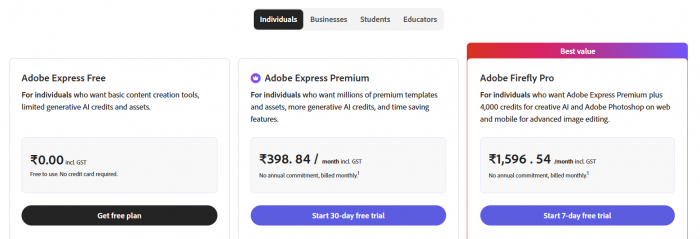
Adobe Express Pricing & Plan
Best suited for
Great for creators, small businesses, and teams who want premium‑quality logos and already use Adobe somewhere in their design or content stack.
2. Logo.com
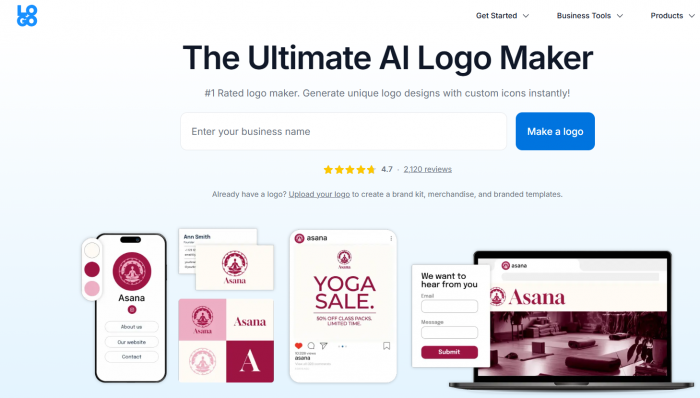
Logo.com uses AI to generate your logo and a mini brand kit in one go. You enter your name and industry, and it suggests icons, color palettes, and layouts that look clean and web‑ready. The flow is deliberately simple so you can go from idea to final logo in a single sitting without any design background.
Where it shines is automation: along with a logo, you can unlock matching social media profile images, headers, and other assets built from the same design language. That makes it especially handy for creators and startups who want a consistent look across platforms without hiring a designer.
Pros
● Extremely fast logo creation with minimal steps.
● Auto‑generated matching assets (social headers, profile pics, etc.).
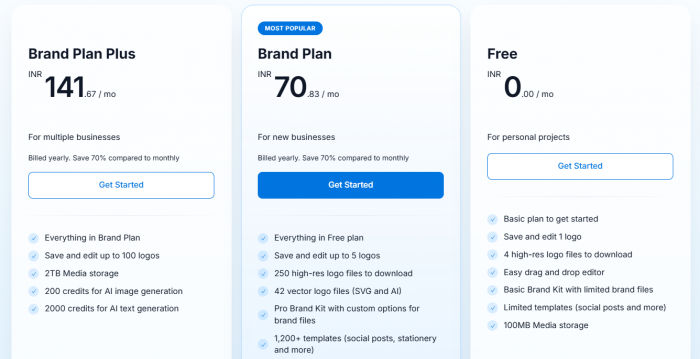
● Accessible pricing for solo founders and small teams.
Cons
● First logo options can feel familiar or template-like.
● Better downloads and brand kits require paid access.
● Creative control is limited compared with full design tools.
Logo.com Pricing & Plans
Best suited for
Ideal for entrepreneurs and content creators who want a decent logo plus matching social assets in under an hour, without feeling like they’re learning a design tool.
3. Simplified AI Logo Maker
Simplified’s AI Logo Maker is designed for non‑designers who still want modern, clean logos. You type in your brand name and a short description, pick a style direction, and the AI generates multiple logo concepts. The editor focuses on the essentialsfonts, colors, layout tweaksso you stay in control without needing advanced design skills.
One of the main strengths is fast variation: from one idea, you can quickly create a number of alternatives, swap icons or fonts, and test different looks on landing pages or social profiles. That makes it great for early‑stage brands who want to experiment before committing to a single visual identity.
Pros
● Very beginner‑friendly, even for non‑designers.
● Clean, simple editor with a quick learning curve.
● Generates many variations from a single concept.
Cons
● Not deep enough for complex brand identity work.
● Many outputs lean toward clean startup-style logos.
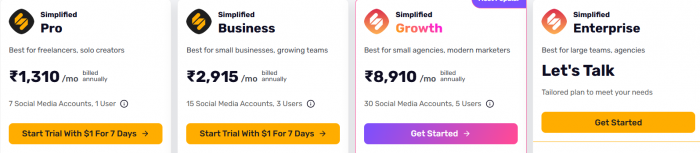
● Advanced exports and brand features need paid plans.
Simplified Pricing & Plans
Best suited for
Perfect for solo founders, coaches, and small online brands who want quick, modern logos with minimal friction and enough variations to test what resonates.
4. Logomaster.ai
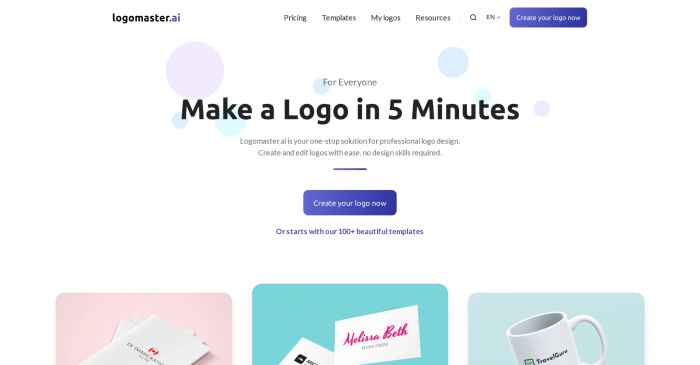
Logomaster.ai targets straightforward, professional logos that work well for traditional businesses like agencies, consultancies, and local services. You choose your industry, style preferences, and colors, and the AI generates options that emphasize clarity and balance between icon and wordmark.
The customization tools give you what you actually needsymbol changes, color tweaks, layout switcheswithout turning into a complex design environment. You can usually download vector formats alongside PNG and PDF, which is critical if you intend to use your logo on business cards, documents, and signage.
Pros
● Strong fit for classic, professional business logos.
● Simple interface with focused customization options.
● Provides practical export formats, including vectors.
Cons
● Commercial and high-resolution files require payment.
● Better for safe business logos than bold creative branding.
● Limited if you need a full brand system.
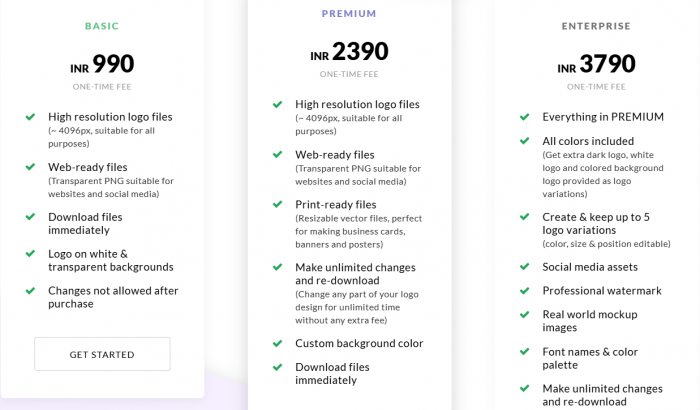
Logomaster.ai Pricing & Plans
Best suited for
Best for consultants, agencies, and traditional service businesses that want a solid, professional logo they can put on print, web, and office materials right away.
5. LogoAI
LogoAI uses a style‑aware AI engine to generate logos with multiple layoutshorizontal, vertical, icon‑only, and slogan versionsfrom a single core idea. After entering your brand and selecting industry and style, you browse structured options that usually look balanced in terms of spacing, alignment, and color.
The editing tools focus on preserving that structure while letting you fine‑tune fonts, colors, and composition. Export options typically include SVG, PNG, and PDF, making the logo versatile across apps, websites, and print‑ready assets.
Pros
● Generates multiple layout variations from one concept.
● Outputs look polished and balanced with minimal tweaking.
● Supports vector and multi‑format exports for flexible use.
Cons
● Usable commercial files require a paid package.
● Brand packages can be pricier than basic logo tools.
● Some polished layouts may still feel generic.
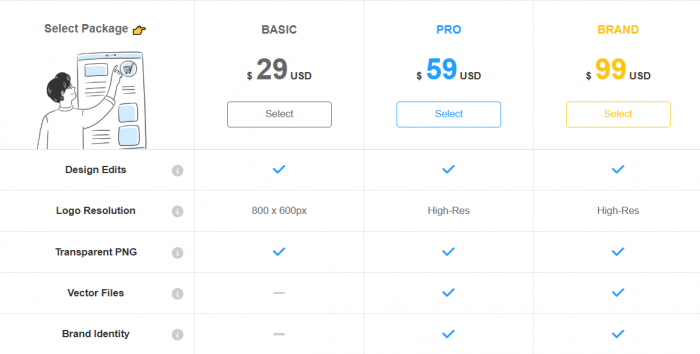
LogoAI Pricing & Plans
Best suited for
Great for startups and small companies that want a polished, multi‑layout logo system (wordmark, icon, combinations) that feels like agency‑level work without the agency retainer.
6. Designs.ai
Designs.ai is a broader branding platform that includes AI‑assisted logo design alongside tools for videos, social posts, and other marketing visuals. Its logo generator asks a few questions about your brand and then creates options you can refine within a unified editor, so your logo is always viewed in the context of other brand assets.
The main advantage is integration: you can take a logo concept and immediately see it on mockups, banners, and other templates within the same workspace. This helps keep your visual identity consistent across channels. It does, however, lean more toward a subscription model, with richer features unlocked on paid tiers.
Pros
● Unified platform for logos, video, and marketing assets.
● Beginner‑friendly interface with guided flows.
● Keeps branding consistent across multiple asset types.
Cons
● Subscription can feel costly for one logo.
● Template-first workflow may limit originality.
● Logo maker feels less focused than dedicated tools.
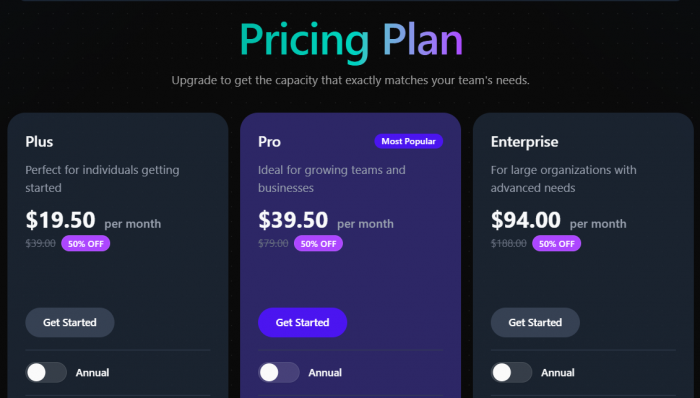
Designs.ai Pricing & Plans
Best suited for
Best for small teams and marketers who want logo design plus supporting contentvideos, banners, and branded visualshandled inside one subscription.
7. Canva (Logo Maker)
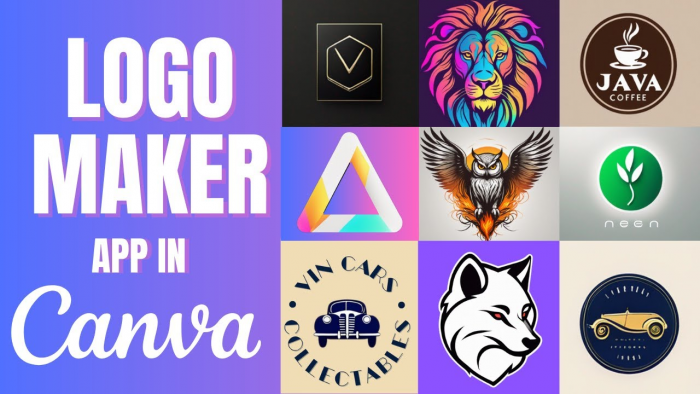
Canva isn’t only a logo tool, but its AI‑assisted suggestions and large template library make it an easy way to design logos, especially if you already build social posts or presentations there. You can start with templates or prompts, swap in your brand colors and fonts, and export your logo in multiple formats.
The real superpower is ecosystem: once your logo is done, you can instantly apply it to presentations, social media graphics, ads, and website banners without leaving Canva. Brand kits help you lock in consistent colors and typography so future designs stay on‑brand.
Pros
● Extremely beginner‑friendly with a huge asset and template library.
● Lets you apply your logo across all marketing materials in minutes.
● Brand kit features make consistent branding much easier.
Cons
● Logos can look template-based without extra editing.
● Premium elements and exports require Canva Pro.
● Better for everyday branding than serious logo development.
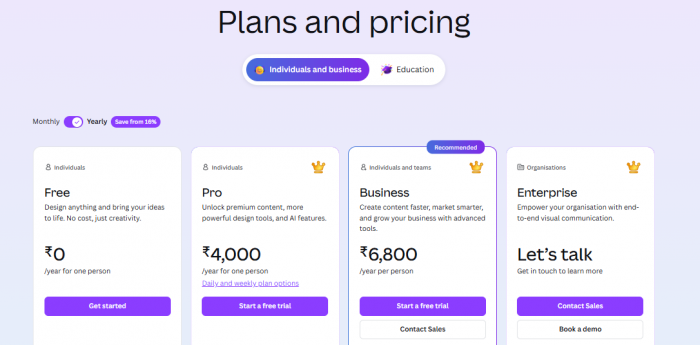
Canva Pricing & Plans
Best suited for
Ideal for creators, educators, and small businesses already using Canva who want to handle logo creation and everyday content design inside a single, familiar tool.
Side‑by‑Side Comparison of AI Logo Tools
| Tool | Starting Price / Plan* | Main Strength | Best For |
| Adobe Express | Free; Premium from about 9.99 USD/month | High‑quality, vector‑ready logos | Creators and teams already in Adobe ecosystem |
| Logo.com | Free logo creation; Brand plan from 10 USD/month | Logo + instant brand kit and assets | Solo founders and small brands |
| Simplified | Free tier; paid from around 24 USD/month (Simplified One) | Beginner‑friendly, lots of variations | Non‑designers testing multiple directions |
| Logomaster.ai | One‑time basic package in lower double‑digit USD range | Classic, professional business logos | Agencies, consultants, service businesses |
| LogoAI | One‑time logo packages typically from mid‑teen USD | Multiple polished layout variations | Startups needing flexible logo formats |
| Designs.ai | Free trial; paid from about 29 USD/month | All‑in‑one branding and content workspace | Marketers and small teams |
| Canva | Free; Pro around 9.99–12.99 USD/month region‑dependent | Ecosystem for logo + all marketing visuals | Creators and small businesses on Canva |
*Pricing is indicative and may vary by region, currency, and current promotions. Always double‑check the latest pricing page before using the tools.
Final Take
AI logo generators have moved far beyond basic icons and clip‑art; they now deliver clean, vector‑ready logos plus ready‑made brand kits that are more than enough for most small brands and creators. The smart move is not to hunt for a single “perfect” tool, but to pick the one that matches your workflow: a design‑centric platform if you care about polish and print, or a brand‑kit‑first tool if speed and consistency across channels matter more.
As prices and plans keep shifting, your best value comes from choosing a tool you’ll actually use weekly whether that’s Adobe Express inside a pro design stack, Canva for everyday content, or a focused logo app like Logo.com or LogoAI for fast, one‑time branding.