Cutout.Pro is easy to underestimate if you only know it as a background remover. The platform is actually much broader than that. It can remove backgrounds, clean product photos, upscale images, restore old photos, generate visuals, remove video backgrounds, animate photos, and expose many of those tools through an API.
That makes it useful. It also makes it complicated.
The problem with Cutout.Pro is not that the tool cannot perform. In many everyday editing jobs, it can. The issue is that the product experience splits into two very different stories. One story is about speed, automation, and affordable image output. The other is about billing complaints, support frustration, and a serious 2024 data breach that still hangs over the company’s reputation.
This is why Cutout.Pro is not a simple yes-or-no recommendation. It is a capable AI editor with a trust gap, and that gap matters more depending on what you upload, how often you pay, and how much support you expect if something goes wrong.
The uncomfortable first impression
Cutout.Pro looks like the kind of tool that should be easy to recommend to creators, sellers, and small businesses. Its feature list is broad, the interface is built for quick edits, and the platform tries to cover several visual jobs from one account. For users who need product images cleaned quickly or old photos restored without learning Photoshop, the appeal is obvious.
But the public review picture is unusually divided. On G2, Cutout.Pro has a 4.4 out of 5 rating from 13 reviews. On Trustpilot, it sits at 1.8 out of 5 from 36 reviews. That gap is too wide to ignore. It also tells you something important: users are not all reviewing the same part of the experience.
The higher-rated users tend to focus on whether the editor works. The lower-rated users tend to focus on billing, refunds, support, and security concerns. Both groups can be right at the same time.
| Review Signal | What It Suggests |
| G2: 4.4 / 5 from 13 reviews | Users who focus on editing tools often find value in the product |
| Trustpilot: 1.8 / 5 from 36 reviews | Users who run into billing, support, or trust issues are far less satisfied |
| Main takeaway | Cutout.Pro performs better as software than it does as a customer relationship |
That split is the lens through which the entire tool should be judged. Cutout.Pro may save time on visual work, but it does not fully remove the buyer’s need for caution.
The tool is better than its reputation
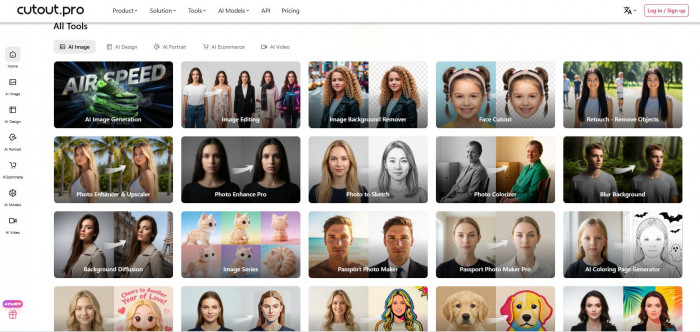
The strongest argument in Cutout.Pro’s favor is capability. This is not a tiny single-task web app. It is a full AI visual suite that tries to cover image cleanup, creative generation, video editing, e-commerce production, and developer automation.
For small teams, that breadth can be attractive. Instead of using one tool for background removal, another for photo restoration, another for upscaling, and another for product mockups, Cutout.Pro puts many of those jobs under one login. That is convenient when the work is practical and repetitive.
The trade-off is that the product can feel crowded. A focused background remover usually feels cleaner because it only has to do one thing well. Cutout.Pro tries to do many things, which gives it more range but also makes the experience less elegant.
| Capability Area | What Cutout.Pro Offers | Best Fit |
| Image editing | Background removal, object removal, retouching, upscaling, restoration, colorization | Product photos, portraits, old images, quick visual cleanup |
| Creative tools | Text to image, cartoon effects, sketch styles, portrait blur | Social visuals, lightweight creative assets, simple experiments |
| Video tools | Video background remover, video enhancer, image to video, talking-photo tools | Short-form creators and quick video edits |
| E-commerce tools | Bulk background removal, product posters, virtual model staging, print templates | Sellers, catalogs, marketplace listings |
| Developer access | Image and video API, bulk endpoints, desktop apps, plugins | Teams embedding editing tools into workflows |
This is where Cutout.Pro earns attention. The platform is not exciting because every tool is best in class. It is useful because it covers a large number of common visual tasks at a relatively low entry point.
What Cutout.Pro can actually do
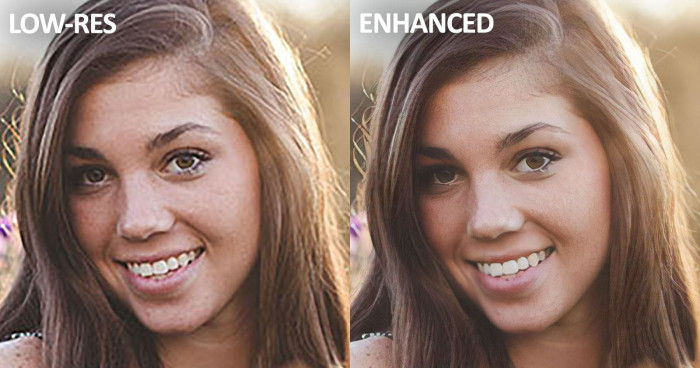
The most commonly used feature is still background removal. Cutout.Pro can remove backgrounds from people, products, animals, graphics, and other common subjects. For e-commerce users, the bulk option is important because it turns a repetitive editing task into something that can be processed at scale.
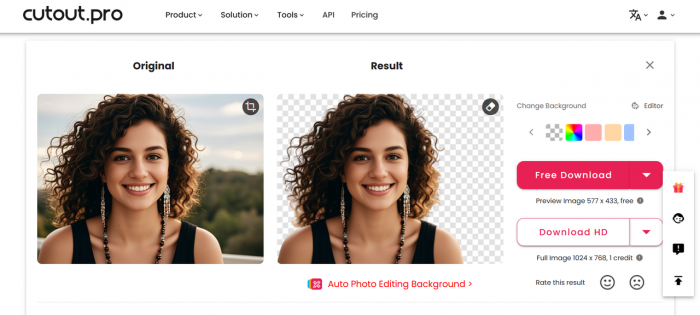
The platform also includes image enhancement and upscaling. These tools are useful when a photo is too small, slightly blurry, or too weak for publishing. The results are usually strongest when the original image has enough detail for the AI to recover. If the source file is extremely poor, the tool can improve it, but it cannot create perfect detail from nothing.
Old photo restoration and colorization are among the more practical features. They can improve damaged, faded, or black-and-white photos enough for personal archives, family albums, or basic publishing. This is one area where Cutout.Pro feels more useful than many basic background removal tools.
The platform also includes video background removal. This is one of its more interesting capabilities because removing a moving background without a green screen is still harder than editing a still image. For short clips, creator assets, and social videos, this feature can be useful. For longer footage, pricing and consistency become bigger concerns.
Where the output holds up
Cutout.Pro performs best when the job is clear and the source material is not too difficult. Product images on simple backgrounds are its strongest use case. A clean product shot with clear edges can be turned into a usable listing image quickly, especially when processed in bulk.
For people and portraits, the output is more mixed but still useful in normal conditions. A clear headshot or simple portrait usually works well enough for casual use. The weak points appear around hair, glasses, complex lighting, shadows, and soft edges. These are the same areas where most automated editors struggle.
Old photo restoration is one of the more convincing parts of the platform. It can improve faded, scratched, or aged images in a way that feels immediately useful, especially for users who do not need professional restoration quality. The results are not always subtle, but they are often good enough for non-technical users who want a fast improvement.
Video background removal is useful, but less predictable than still-image editing. A short clip with a clear subject can work well. A longer video with motion blur, busy backgrounds, loose hair, or changing lighting can expose the limits of the AI faster.

Where it performs best
● Product photos with clean or moderately simple backgrounds.
● Bulk catalog images where speed matters more than manual perfection.
● Old photo restoration and colorization for casual use.
● Basic upscaling and enhancement of low-resolution images.
● Short video clips where the subject is clearly separated from the background.
Where it needs caution
● Hair, fur, glass, transparency, and fine product edges.
● Portraits where over-smoothing can make faces look artificial.
● Passport and ID photos that must meet exact requirements.
● Long video clips, where credit usage and quality variation both increase.
● Sensitive personal images, because of the wider trust concerns around the company.
This is the most honest way to judge the output: Cutout.Pro is good at fast, practical editing. It is not the tool to trust blindly for precision-sensitive or privacy-sensitive work.
The AI slips in predictable places
Every automated editor has weak spots, but Cutout.Pro’s weak spots matter more because the platform is marketed across several serious use cases. Background removal is fine for many everyday images, but fine edges still create problems. Loose hair, reflective glass, furry animals, and transparent objects often need a more specialized tool or manual cleanup.
Portrait enhancement can also become heavy-handed. AI smoothing may make faces look cleaner, but it can also remove natural texture. That is acceptable for casual social edits, but less acceptable for professional portraits or identity-related images.
The ID and passport photo tools deserve extra caution. Some users have reported that the AI changed images in ways they did not expect. That is a bigger issue than a slightly rough product cutout. ID photos often have strict requirements, and an automated change that looks small can make the final image unusable.
Cutout.Pro is best treated as a production shortcut, not a final authority. It can get users close to a usable result quickly, but the final check still matters.
The pricing looks cheap until credits move
Cutout.Pro uses a credit-based pricing model. New users get 5 credits at signup and unlimited low-resolution previews, but high-resolution downloads and advanced features require credits. A standard image uses 1 credit, while a high-resolution image uses 2 credits. Video background removal is much more expensive, using around 3 to 5 credits per second.
That pricing can work well for the right user. If someone processes many standard product images, the cost per image can become attractive. The problem is that casual users may not understand how quickly credits can disappear, especially when moving from images to video.
| Pricing Detail | What It Means |
| 5 free credits | Enough to test the platform, not enough for real production |
| 1 credit per standard image | Reasonable for basic image editing |
| 2 credits per high-resolution image | Costs rise when export quality matters |
| 3 to 5 credits per second for video | Video can become expensive very quickly |
| Monthly and annual plans | Better for users with regular editing volume |
| Pay-per-credit option | Flexible, but usually expensive for occasional use |
| Credit rollover | Helpful, but users still need to understand the limits |
The pricing model rewards users who know their workload in advance. A seller with hundreds of product images can calculate the cost and decide whether the time saved is worth it. A casual user who only wants one or two edits may find the structure less friendly.
Video is where the credit system becomes especially noticeable. A 30 second clip can consume more credits than a small monthly plan provides. That turns video background removal from a casual extra into something that needs budgeting.
What real users are saying
Public feedback around Cutout.Pro is not simply positive or negative. It is divided by user type.

The satisfied user usually came for a clear editing job. They needed a background removed, an old photo improved, a product image cleaned, or a batch of images processed. For these users, the question is simple: did the tool save time and produce a usable file? Often, the answer appears to be yes.

The frustrated user is usually dealing with something outside the editor. Common complaints cluster around recurring charges, refund delays, cancellation issues, support silence, and account-security concerns. These users are not mainly saying the cutout tool failed. They are saying the company experience failed.
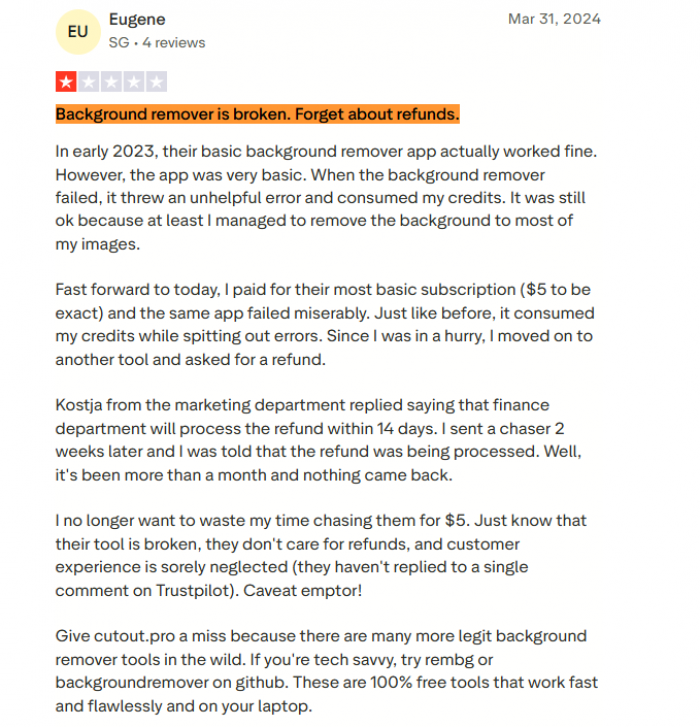
That difference matters. Cutout.Pro’s reputation is not weak because the editor is useless. It is weak because the operational trust around the editor is inconsistent.
| User Group | What They Usually Notice |
| E-commerce sellers | Speed, bulk processing, low per-image cost |
| Casual editors | Easy background removal and quick enhancement |
| Creative users | Broad toolset, but not always best-in-class generation |
| Video users | Useful feature, but credit-heavy workflow |
| Frustrated buyers | Billing issues, refund friction, weak support |
| Security-conscious users | Concern over the 2024 breach and lack of clear public handling |
The review gap is the product story. One group is reviewing the tool. The other is reviewing the company. A complete assessment has to include both.
The breach changes the review
Cutout.Pro’s trust problem is not only about low ratings or angry users. In February 2024, a data set attributed to Cutout.Pro appeared on a hacking forum and was later independently confirmed by a breach-notification service. The confirmed figure was close to 20 million affected individuals, drawn from a larger dump of roughly 41 million records.
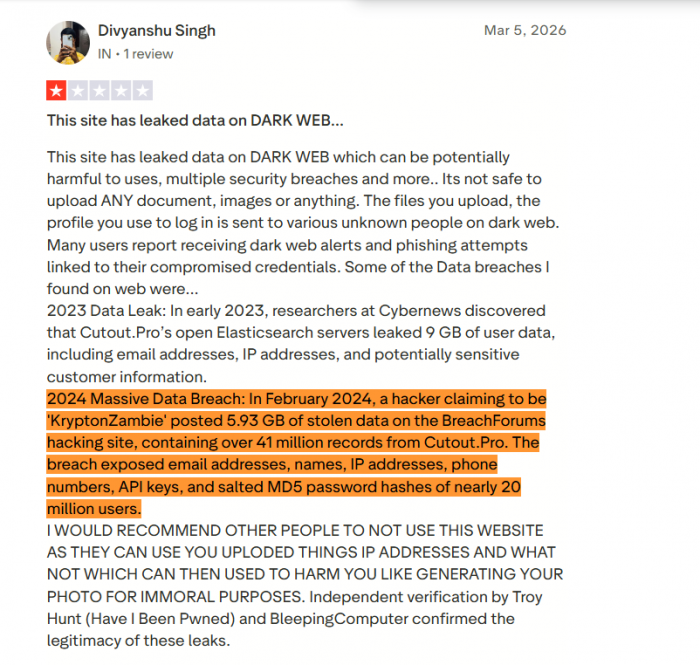
The exposed information reportedly included email addresses, names, IP addresses, phone numbers, account metadata, API keys, and salted password hashes. That is serious enough on its own. The larger issue is how the incident appears to have been handled.
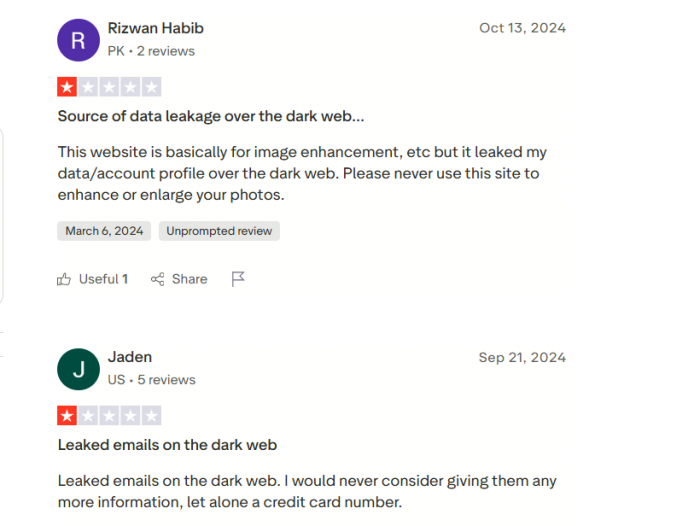
A breach does not automatically make a company unusable forever. Many major companies have had security incidents. What matters is disclosure, user notification, remediation, and transparency. In Cutout.Pro’s case, the concern is that the breach was reportedly not publicly acknowledged in a clear way, affected users were not clearly notified by the company, and no detailed public technical account was provided.
For a visual editing tool, this matters because users are not only handing over an email address. They may also upload personal photos, client assets, product images, ID-style photos, and business materials. When a company has a trust issue, the type of content being uploaded becomes part of the risk calculation.
The safe-use version
Cutout.Pro is not a tool that every user needs to avoid. But it is a tool that should be used with boundaries.
The safer version of using Cutout.Pro looks like this: use it for non-sensitive images, create the account with a unique password, avoid reusing important email credentials, pay through a method that gives you dispute protection, and monitor the subscription settings carefully.
For many users, the tool makes the most sense when the uploaded content has low personal risk. Product images, catalog visuals, marketplace photos, simple marketing graphics, and print-on-demand mockups are more reasonable use cases. These files are usually intended to become public anyway.
The risk becomes harder to justify with personal portraits, family photos, ID images, client-sensitive work, legal documents, medical images, or anything that should remain private.
| Safer Use | Riskier Use |
| Product photos | Passport or ID photos |
| Marketplace listings | Personal portraits |
| Print-on-demand mockups | Private family photos |
| Marketing graphics | Client-sensitive images |
| Non-sensitive catalog work | Confidential business assets |
| Short test videos | Long or private video footage |
The tool is easiest to defend when the content is non-sensitive and the job is practical. It is hardest to defend when the user is uploading identifying images and trusting the platform with billing details at the same time.
Who should use Cutout.Pro
Cutout.Pro makes the most sense for users who need breadth, speed, and volume more than perfect trust signals. E-commerce sellers are probably the clearest fit. If the work involves cleaning product images, removing backgrounds, creating listing visuals, or processing many files at once, the platform can be useful.
Print-on-demand sellers may also benefit from the templates and product-focused tools. Small marketing teams can use it for quick visual cleanup when they do not need professional-level manual control. Creators may find value in the video background remover for short clips, as long as they understand the credit cost.
Developers and workflow teams may be interested in the API, but they should approach more carefully because the reported breach included API keys. For API-based usage, the trust question is not secondary. It is part of the buying decision.
Who should skip it
Cutout.Pro is not the right choice for users who need a clean trust record, strong support, and predictable billing. If a tool will be used with sensitive images, identity documents, private client materials, or confidential assets, the unresolved trust concerns are difficult to ignore.
It is also not ideal for users who dislike credit systems. The pricing is flexible, but it is not always simple. If someone wants a clear flat subscription with predictable usage, Cutout.Pro may feel frustrating.
Users who need perfect background removal around hair, glass, jewelry, fur, or transparent products may also be better served by a specialist. Cutout.Pro is good for speed, but detail-critical work often benefits from more focused tools.
Alternatives by job
Cutout.Pro’s biggest competitor is not always another broad AI editor. Sometimes the better alternative is a narrower tool with a cleaner trust profile or a more predictable workflow.
| Need | Better Alternative | Why It May Be Better |
| Clean background removal | remove.bg | More focused and predictable for cutouts |
| Mobile product photography | PhotoRoom | Stronger seller workflow and mobile-first design |
| Design plus background removal | Canva | Better if users also need templates, layouts, and branding tools |
| Professional image control | Photoshop or Adobe Express | More trusted operator and stronger manual control |
| Product listing visuals | Pixelcut | Focused on catalog and seller assets |
| Video background removal | Unscreen or VEED | More video-focused editing experience |
| Maximum privacy | Local open-source removers | No upload, no account, and full data control |
The best alternative depends on the job. If the only task is background removal, a specialist may be better. If the task is full design, Canva or Adobe Express may be more practical. If privacy matters most, local tools are worth considering even if they require more setup.
Cutout.Pro’s advantage is range. Its weakness is that users may not want to create another account with a company carrying unresolved trust concerns when a narrower tool can solve the same task.
Final verdict
Cutout.Pro is not a bad AI editor. It is a capable one. That distinction matters because the tool itself can do useful work. It removes backgrounds quickly, handles bulk product images, improves old photos, offers practical restoration tools, includes video background removal, and gives developers API access. For non-sensitive, high-volume visual work, it can be genuinely useful.
But the recommendation cannot be clean. The credit model takes attention to manage, support complaints are hard to ignore, and the 2024 breach changes the trust calculation. A visual editing platform is not just judged by output quality. It is also judged by what users must hand over to use it: images, account details, payment information, and sometimes business assets.
The best fit is a user who needs fast editing for non-sensitive images and understands the risks. E-commerce sellers, catalog teams, and marketers working with public-facing product visuals may still find value here, especially if cost per image matters.
The users who should be more cautious are those uploading personal photos, passport images, client files, or anything private. For them, the tool’s capability does not fully offset the trust problem.
Cutout.Pro is the kind of product that works better than its reputation, but its reputation did not become complicated for no reason. The software can save time. The company still has trust to rebuild. Use it for the right job, with the right limits, and without treating its low-cost convenience as a reason to ignore the risk.