EditProTip is one of those websites where the name can create the wrong expectation. When I first looked at it, I expected something closer to an AI editing tool. After going through the site, its categories, and the type of posts it publishes, the better description is different: EditProTip is a creator resource site for AI prompts, CapCut templates, VN-style editing resources, and social media editing ideas.
That does not make it useless. In fact, for the right creator, it can save time. But it should be judged as a prompt and template discovery hub, not as a full AI video editor.
Quick Verdict
| Review Area | My Take |
| Product type | Editing resource website |
| Main use | AI photo prompts, CapCut templates, VN templates, and editing guides |
| Built-in editor | Not clearly available |
| Best for | Beginners, Reel creators, Shorts creators, and AI image prompt users |
| Not ideal for | Professional editors who need timeline control, export settings, and advanced editing tools |
| Biggest strength | Makes trending editing ideas easy to find and follow |
| Biggest limitation | The AI branding may make users expect more than the site actually provides |
What EditProTip Actually Is
EditProTip is not an AI editor in the same sense as Runway, CapCut, Canva, Pika, or PixVerse. It does not appear to offer a full editing dashboard where users upload footage, apply AI effects, process clips, export videos, and manage projects inside the platform.
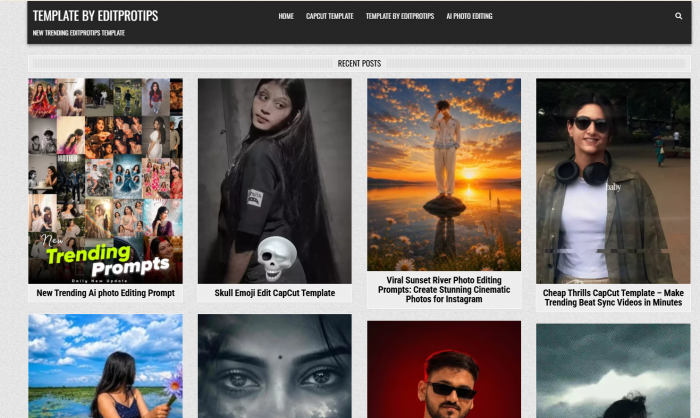
Instead, the site works more like a content library. It publishes posts around trending AI photo prompts, CapCut templates, VN template codes, social media editing styles, and beginner-friendly tutorial content. The official site navigation itself points in that direction, with categories like CapCut Template, Template By Editprotips, and Ai Photo Editing.
This distinction matters because “AI work” can mean two very different things. In a full AI editor, the platform performs the generation or editing. In EditProTip’s case, the site usually gives you the prompt, template, idea, or workflow, then expects you to use another app or AI tool to create the final output.
That makes EditProTip more of a guide layer than a production engine.
What the Site Provides
EditProTip is built around social-first editing. Its content is not aimed at filmmakers or studio editors. It is aimed at people who want to create fast, trendy, mobile-friendly content for Instagram Reels, TikTok, YouTube Shorts, WhatsApp status videos, and AI-generated photos.
| Category | What It Provides | How Users Actually Use It |
| AI photo editing prompts | Ready-made text prompts for AI image tools | Users copy the prompt, adjust it, and generate images in another AI tool |
| CapCut templates | Trend-based video templates | Users open the template in CapCut and add their own photos or clips |
| VN template codes | Template-style resources for VN editor users | Users recreate status videos, song edits, and short reels |
| Editing tutorials | Simple guides around trends and effects | Beginners follow the steps without learning advanced editing |
| Social media ideas | Viral-style concepts and editing formats | Creators use them as inspiration for Reels and Shorts |
The site’s value is not technical depth. Its value is speed. It helps users avoid staring at a blank screen by giving them a ready direction.
AI Photo Editing Prompts
The AI photo prompt section is one of the strongest parts of EditProTip. The site publishes prompts for cinematic portraits, moody nature edits, luxury-style backgrounds, couple edits, festival-themed visuals, aesthetic scenes, and other social media-friendly image formats.

This is useful because many beginners do not know how to write a strong AI image prompt. They may know the kind of result they want, but they struggle to describe camera angle, background, lighting, outfit, pose, facial expression, color tone, and visual mood. EditProTip gives them a starting structure.
A typical user workflow looks like this:
1. Find a prompt on EditProTip that matches the desired style.
2. Copy the prompt and adjust small details like gender, outfit, background, or mood.
3. Use the prompt inside an AI image tool.
4. Save the generated image.
5. Optionally edit it again in CapCut, VN, Lightroom, or another app.
That is a practical workflow, but it also shows the limitation. EditProTip does not control the final output. The result depends heavily on the AI image tool the user chooses. The same prompt can look good in one tool and weak in another.
So the prompts are useful as creative direction, not as guaranteed results.
CapCut Templates
The CapCut template section is clearly made for short-form creators. Posts around templates like beat-sync edits, song-based reels, transition videos, emoji edits, and trending formats show that EditProTip is following the way casual creators actually make content today.
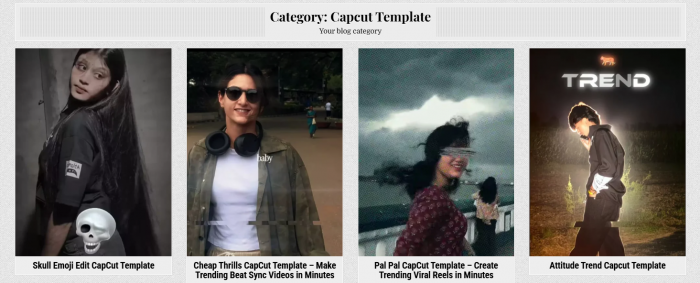
Many social media creators do not want to build every edit manually. They want a format that already matches a trend. A CapCut template solves that problem by giving them timing, transitions, effects, and rhythm in one ready-made structure.
This is where EditProTip becomes useful for beginners. A user does not need to understand keyframes, audio cuts, masking, overlays, or manual transitions. They can choose a template, replace the sample media with their own photos or clips, and produce a familiar short-form style quickly.
But templates also have a ceiling. They are built for speed, not originality. If many creators use the same template, the final videos can start to look similar. That is not a major issue for casual trend participation, but it matters for brands, influencers, and creators who want a distinct visual identity.
EditProTip works best when users treat templates as a starting point, not as the entire creative process.
VN Templates and Mobile Editing Resources
EditProTip also covers VN-related template resources. VN is popular among mobile editors because it gives more manual control than simple one-click templates while still being easier than desktop software.
VN templates can be useful for status videos, mini vlogs, cinematic reels, song edits, and short social videos. This makes sense for EditProTip’s audience because many users in this space create content entirely from their phones.
The broader editing resource angle is also important. The site is not only about AI prompts. It also discusses editing materials like overlays, effect resources, fonts, PNG files, meme packs, and other visual assets. These may not sound advanced, but for beginner creators, they often make the difference between a plain edit and a more finished-looking post.
The weakness is organization. A resource site becomes more valuable when users can easily filter by use case, editing app, format, trend type, difficulty level, and content style. EditProTip has useful categories, but the experience still feels more like a blog archive than a polished resource library.
AI Workflow or Just Templates?
This is the main question behind EditProTip. Is it an AI workflow platform, or is it just a template website? The honest answer is somewhere in the middle, but closer to the template side.
EditProTip does support AI workflows because it gives users prompt ideas and shows how AI-generated visuals can become part of short-form content. For example, a creator may generate an AI portrait first, then animate it, add music, apply effects, and publish it as a Reel.
That is a real workflow. But EditProTip is not the engine behind that workflow. It is the instruction and inspiration layer.
A full AI editing platform usually has clear product features such as:
● A built-in workspace where users upload media and generate outputs directly.
● AI processing tools such as background removal, object editing, image-to-video, or text-to-video.
● Export controls, account features, processing history, and project management.
● Clear pricing, model details, or product documentation.
EditProTip does not present itself with that level of software structure. It behaves more like a guide site that helps users use other tools better.
That does not make it bad. It simply means users should not expect the wrong thing from it.
User Experience
EditProTip is simple to browse. The homepage shows recent posts, categories, and template-style content. The site feels lightweight and direct, which is helpful for users who only want to find a prompt or template quickly.
The content style is beginner-friendly. Most posts are written for users who may not have much editing experience. That works well for the target audience because social media editing is often practical, not theoretical. Users want to know what to copy, where to paste it, which template to open, and how to recreate a trend.
Still, the user experience could be clearer in a few areas. The site would feel stronger if each post clearly separated:
| Missing Clarity | Why It Matters |
| Required app or tool | Users need to know whether the prompt is for ChatGPT, Gemini, CapCut, VN, or another tool |
| Difficulty level | Beginners should know whether the edit is simple or requires extra steps |
| Output expectation | Users should understand whether they are making an image, video, reel, or template-based edit |
| Source and safety note | Template sites should make external links and downloads clear |
| Customization tips | Users need help making the template less repetitive |
The site is easy enough to use, but it could do more to reduce confusion. A first-time visitor may still wonder whether EditProTip is an AI tool, a template site, a prompt blog, or a mobile editing tutorial hub. The answer is mostly the last three.
Where EditProTip Works Well
EditProTip works best when the user has a clear goal: create a trendy edit quickly. It is not built for deep learning or professional production. It is built for creators who want a usable shortcut.
Its strongest points are practical:
● It gives beginners a quick starting point when they do not know how to write AI prompts or choose an editing style.
● It follows social media trends, which is useful for creators making Reels, Shorts, TikTok videos, and status edits.
● It supports a phone-first workflow, especially through CapCut and VN-style resources.
● It reduces creative friction by giving users ready-made formats instead of asking them to build every edit from scratch.
● It can help creators experiment with AI images without needing advanced prompt-writing skills.
That last point is important. Many people are interested in AI images but do not know how to get results that look polished. A prompt website can be useful because it teaches through examples. Users can see how a prompt is structured, copy it, change it, and slowly understand what details matter.
Where It Falls Short
The biggest limitation of EditProTip is expectation. The name and AI-related content may make some users think they are getting a full AI editing product. That is not what the site appears to provide.
There are also practical limitations:
● It depends on third-party apps, so users still need CapCut, VN, Gemini, ChatGPT, or another AI tool to complete the workflow.
● Template results can feel repetitive if users do not customize them.
● AI prompt results are not guaranteed because different image tools interpret prompts differently.
● The site does not appear to provide professional editing controls such as multi-track timelines, color grading scopes, audio mixing, project management, or export customization.
● The site layout feels more like a blog than a structured template marketplace or prompt database.
For casual creators, these limits may not matter much. For professional editors, they matter a lot.
EditProTip is not trying to replace professional tools. It is trying to help users create social media-friendly edits faster. Judged that way, it makes more sense.
Trust and Safety
The trust angle deserves a separate mention because names like “EditPro,” “Edit Pro,” and “EditPro AI” can be confusing. Similar names may refer to unrelated products, apps, editing services, or even suspicious downloads.
For EditProTip itself, the safest way to approach it is as a website for prompts, templates, and guidance. Users should be careful with any random APK, installer, or third-party download that uses similar AI editing branding. A prompt or template page is one thing. Installing software from an unclear source is another.
The practical advice is simple: use the website for ideas, prompts, and templates, but verify external links before downloading anything. If a post sends users to another platform, users should check whether that platform is official and safe.
This is especially important for beginners, who may not always know the difference between a template link, an app link, and a software installer.
Who Should Use EditProTip?
EditProTip is best for users who care more about speed and trend participation than advanced creative control.
| User Type | Should They Use It? | Reason |
| Beginner editors | Yes | The site gives simple prompts, templates, and step-by-step ideas |
| Instagram Reel creators | Yes | Many resources fit short-form trend editing |
| YouTube Shorts creators | Yes | Templates and AI visuals can support fast content production |
| AI photo creators | Yes | The prompt section gives useful starting points |
| Social media managers | Maybe | Useful for inspiration, but not enough for full brand workflow |
| Professional editors | Limited | Better as inspiration than as a serious editing system |
| Agencies and teams | Limited | Lacks collaboration, asset management, and production controls |
The ideal user is someone who creates content often, wants fast ideas, and is comfortable using external apps to finish the edit.
Better Alternatives As Per Your Need
EditProTip should not be compared with only one kind of tool because it overlaps with several categories. The better comparison depends on what the user wants to do.
| Need | Better Option |
| Full mobile video editing | CapCut or VN |
| Professional editing | DaVinci Resolve, Adobe Premiere Pro, or Final Cut Pro |
| AI video generation | Runway, Pika, Kling, or PixVerse |
| AI image generation | ChatGPT image tools, Gemini, Leonardo AI, or Midjourney |
| Graphic templates | Canva |
| Prompt inspiration | Prompt libraries and AI image communities |
EditProTip can sit beside these tools, but it does not replace them. It gives the idea or template. The actual creation usually happens somewhere else.
Final Verdict
My view is that EditProTip is useful, but only when you understand its real role. It is not a full AI editor, and it should not be reviewed like one. It is better described as a creator resource hub for AI photo prompts, CapCut templates, VN-style editing resources, and short-form content ideas.
For beginners and social media creators, that can be genuinely helpful. The site gives users a way to move quickly from “I want to make something trendy” to “I have a prompt or template I can try.” That is a real benefit, especially for people who create Reels, Shorts, status videos, or AI portraits regularly.
The limitation is that EditProTip does not appear to provide the actual editing engine. It does not clearly offer built-in AI generation, video rendering, advanced timeline editing, or professional export control. The final quality still depends on the external tools users choose and how much they customize the result.
So the fair verdict is this: EditProTip is not just useless templates, but it is also not a complete AI editing platform. It sits in the middle as a practical shortcut for creators who want prompts, trends, and editing direction. If you treat it as inspiration and workflow support, it can be useful. If you expect a full AI production tool, it will feel limited.