Most video tools speed up one slice of the job. Hypernatural AI tries to replace the whole pipeline.
You hand it an idea, a script, or a podcast, and it writes, illustrates, narrates, captions, and animates a finished video while you wait.
It mostly delivers on that promise, and it carries one design choice that decides whether the experience feels effortless or expensive. This review covers both.
The short version What it is: An AI platform that turns text, scripts, or audio into narrated, captioned short and long form videos. Best for: Storytellers, faceless channels, marketers, and podcasters who want polished video fast, often on a phone. Not ideal for: Heavy iterators, precision editors, and anyone needing flawless visuals on complex prompts. Starts at: A free demo tier, with paid plans from about twelve dollars a month on the web. The catch: A credit system that rewards getting the video right on the first try. Our rating: 4 out of 5 |
What Hypernatural AI is
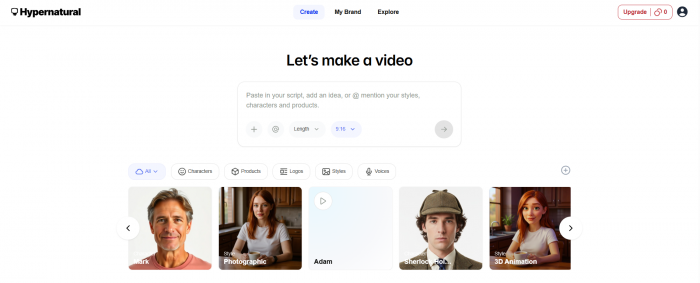
Hypernatural AI is a generative video platform. It builds the visuals, the voice, the captions, and the motion for a video out of whatever input you give it.
It runs on the web and as an iOS and Android app, and it is aimed at creators, marketers, podcasters, authors, and educators who want video without a camera or an editing suite.
How Hypernatural AI works, step by step
1. Start with anything. Type an idea, paste a script, or drop in a blog post, podcast, audio file, image, or clip.
2. Shape the script. Built in tools can write a script from your prompt or tighten one you already have.
3. Choose a look. Pick from a large library of styles, or build a custom one from an image or a description.
4. Let it generate. Hypernatural AI creates the scenes, the B-roll, and any characters, keeping them consistent across shots.
5. Add voice and captions. Choose a narrator or upload your own audio, then auto generate captions and style them to your brand.
6. Refine and export. Adjust pacing, transitions, and effects, then export in HD or share straight to social.
The features that matter most
Flexible inputs and a built in scriptwriter
The on ramp is the best part. You are never forced to start from a finished script.
For anyone repurposing old blogs, notes, or audio, this removes the hardest step of all, which is starting at all.
A deep library of visual styles
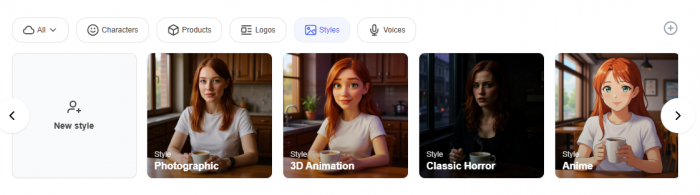
Hypernatural AI ships with dozens of styles, from cinematic to animated to retro and fantasy.
You can also generate a custom style from a single image or a description, so a series keeps one identity.
Characters that stay consistent
This is the feature that sets Hypernatural AI apart from most rivals.
You can build a character, including non human creatures, and keep its look stable across every scene, which is exactly what stories, mascots, and episodic content need.
Lifelike narration and clean captions
The voices are a real strength, with a wide set of natural sounding narrators and the option to add custom or character voices.
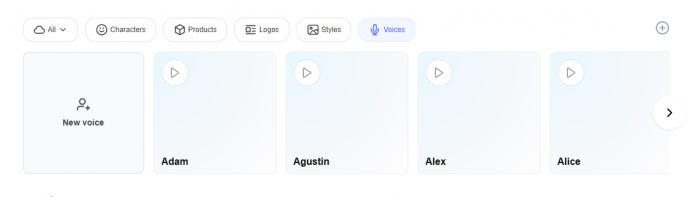
You can also upload a real voice, and captions are generated automatically, then styled to match your fonts and colours.
Brand controls for business use
On the higher plans, Hypernatural AI holds onto your logos, products, voices, characters, and styles.
For a marketer shipping a steady stream of on brand clips, that saved setup is a genuine reason to choose it.
Effects and editing, within limits
One click animation, cinematic zooms and pans, and simple sliders cover most quick edits.
What you do not get is frame accurate control, so detailed cuts still belong in a dedicated editor.
A true mobile first workflow
Unlike many rivals, Hypernatural AI is built to run fully on a phone.
You can create, refine, and export from the app, which suits creators who work on the move.
Output quality: what to expect
At its best, Hypernatural AI produces polished, share ready videos in a fraction of the usual time.
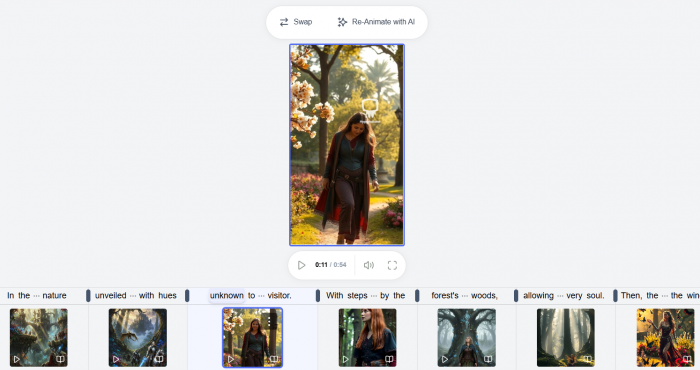
The narration and the styles carry most of that quality, and the speed to a usable first cut is the benefit users praise most.
The honest caveat is on the visuals. Clean, common subjects look great, while unusual or highly specific prompts can drift or misread the brief, so expect to review and regenerate the occasional scene.
The credit system, explained simply
Hypernatural AI runs on credits, and this single choice shapes the whole experience.
Generating a video spends credits. Regenerating a scene spends them again.
When a video lands on the first try, the model feels efficient. When you iterate heavily, the credits drain quickly, and several users describe real cost anxiety during editing.
The lesson is simple. Plan your script and prompt before you generate, and the cost stays reasonable. Treat it as a free sandbox, and it will not stay cheap.
Pricing
Hypernatural AI uses a freemium, credit based model. The headline prices are competitive, but your real cost depends on how many credits you spend.
| Plan | Web price | Credits | What you get |
| Free | $0 | About 100, one time | Basic narrators, 30 second cap, watermark |
| Creator | About $12 / mo | About 6,000 a year | No watermark, custom characters, 40+ narrators, HD, unlimited length |
| Pro | About $22 / mo | About 18,000 a year | More characters and custom voices, custom products and logos |
| Ultimate | Higher tier | Largest credit pool | Built for heavy creators and teams |
| Enterprise | Custom | Custom | Production help, campaign support, dedicated account |
Three things are worth knowing before you pay:
• Web is cheaper than mobile. Plans bought through the app stores tend to cost more because of store fees, so subscribing in a browser usually saves money.
• Annual billing typically saves around twenty percent.
• Watch the billing. Some users report mobile subscriptions that look like a trial or a weekly rate but charge for a full year, with refunds hard to get, and a subscription can only be managed on the platform where it was bought.
Prices and credit costs change, so confirm the current numbers on the official pricing page before you subscribe.
Safety and privacy
Hypernatural AI is safe enough for normal creator use, but I would still be careful with what I upload. The tool can work with scripts, audio, images, clips, custom voices, logos, and characters, so it is better to avoid confidential client material, private recordings, unreleased campaigns, or personal data unless you have checked the latest privacy terms.
The bigger caution is around voice and likeness. If you use custom voices, faces, brand assets, or character styles, make sure you have permission to use them. For public scripts, faceless videos, educational clips, and general marketing content, the risk is low. For sensitive business or personal content, treat it like any other AI media tool: useful, but not something to feed with private material casually.
How Hypernatural AI scores
Pulling the assessment together, here is how Hypernatural AI rates on the things that decide whether an AI video tool earns a place in your workflow.
| Criterion | Rating | Quick note |
| Speed, idea to video | 9 / 10 | A finished video in minutes |
| Ease of use | 8 / 10 | Approachable, with a mild learning curve later |
| Visual style range | 9 / 10 | Dozens of styles plus custom looks |
| Character consistency | 8 / 10 | A genuine differentiator |
| Visual accuracy | 6 / 10 | Can drift on complex or unusual prompts |
| Voiceover quality | 8 / 10 | Natural, with a wide choice of voices |
| Editing control | 6 / 10 | Fast, but not frame accurate |
| Value for money | 6 / 10 | Low headline price, but credits add up |
| Free plan | 4 / 10 | A demo, not a working tier |
Where Hypernatural AI fits against the competition
Hypernatural AI lives in the fast and generative corner of the market.
It trades some fine control for speed and original, character driven visuals, which is the right trade for storytelling and faceless content and the wrong one for precise edits.
What customers are saying
On the App Store, Hypernatural AI holds a strong rating of about 4.8 out of 5 across just over six hundred ratings, a healthy signal even if the sample is still modest.
The pattern in the feedback is more useful than the number, because the praise and the complaints repeat across reviewers.
Most praised:
• Speed from a rough idea to a finished video
• An approachable interface that needs no editing skills
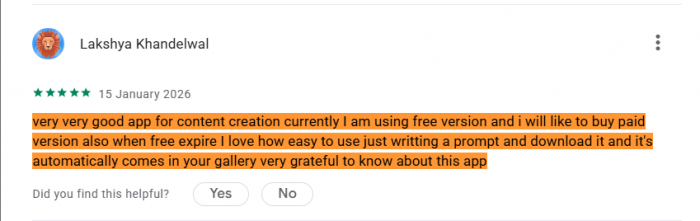
• One tool in place of separate script, voice, and caption apps
• Natural narration and a wide choice of voices
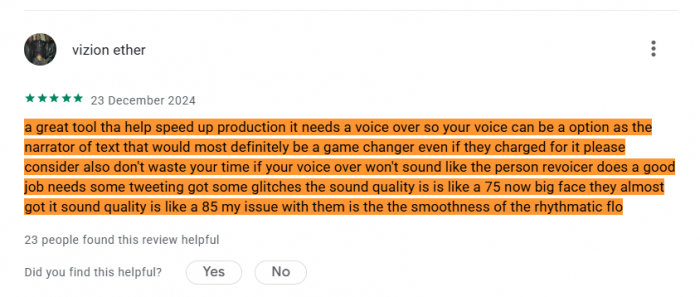
• Characters that stay consistent across scenes
• A mobile app good enough to create on entirely
Most criticised:
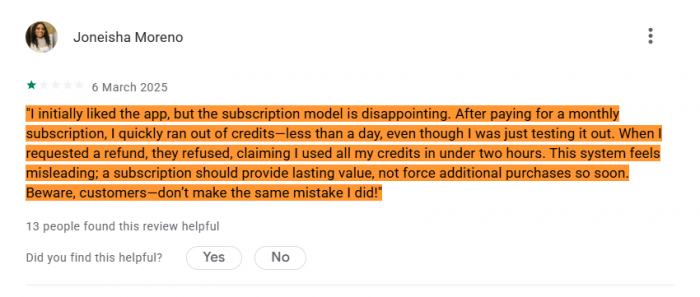
• Credits spent on every regeneration, which makes editing costly
• Generated visuals that drift on unusual or detailed prompts
• Billing confusion, especially annual charges through the mobile app
• A learning curve once you move past the basics
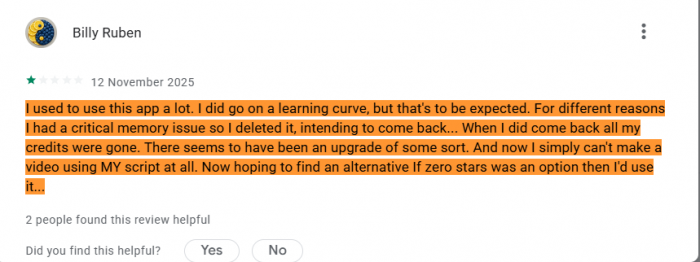
• No frame level editing control
• A free tier that works as a demo rather than a usable plan
Notably, recent updates have focused on payment and subscription fixes, which suggests the billing complaints are being addressed rather than ignored.
Alternatives to Hypernatural AI
Hypernatural AI sits in a crowded field, and the best pick depends on what you are making.
| Tool | Type | Where it beats Hypernatural AI | Entry price |
| InVideo AI | Prompt and stock | Bigger stock library and editing by text command | About $20 / mo |
| Pictory | Repurposing | Best for turning blogs and long video into faceless clips | About $19 / mo |
| Opus Clip | Clipping | Pulls short, viral cuts from footage you already have | About $15 / mo |
| Submagic | Caption and enhance | Fast captions and B-roll on your own clips | About $16 / mo |
| HeyGen | AI avatars | Talking head presenters and strong localisation | About $24 / mo |
As a rule, choose Hypernatural AI when you want original, character driven video from an idea. Reach for a clipping tool when you already have long footage, and a stock based tool when you are repurposing written content.
Who should use Hypernatural AI
It is a strong fit if you:
• Produce a steady stream of short form or story videos
• Want generated visuals and consistent characters without filming
• Repurpose scripts, blogs, or podcasts into video
• Create mostly on a phone
Look elsewhere if you:
• Regenerate scenes heavily, since credits add up fast
• Need frame accurate editing
• Require flawless, photoreal visuals on complex subjects
• Only make the occasional video, since the free tier is just a demo
The verdict
Hypernatural AI is one of the more capable and genuinely enjoyable idea to video tools available.
Its strengths are real: speed, natural narration, an unusually wide range of styles, and best in class character consistency, all of it working on a phone.
It is held back by a credit model that punishes iteration, visuals that can miss on complex prompts, and billing that has frustrated some users, though that last point is improving.
For a creator or marketer who plans their inputs and values speed, it earns about four out of five. Write tight prompts before you spend credits, review the output, and Hypernatural AI can become a reliable part of your video workflow.