InDown.io is not a creator studio, editing app, or social media management platform. It is a simple downloader built around one job: paste an Instagram or TikTok link and save the media file. That sounds basic, but for users who often need to save Reels, videos, photos, Stories, highlights, or profile pictures, a basic tool can still be useful if it works quickly and does not ask for too much access.
This InDown.io review looks at the tool from a practical angle. Instead of judging it like a full website or software company, the focus here is on the actual downloader experience: how the workflow feels, what happens after you paste a link, how good the saved files are, what download controls are available, and where users should be careful with privacy, legality, and trust.
What InDown.io Promises
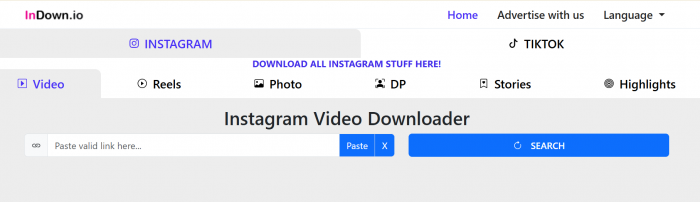
InDown.io presents itself as a free online downloader for Instagram and TikTok content. The tool is designed for people who want to save public social media media without installing an app, creating an account, or logging into Instagram. Its main pages cover Instagram videos, Reels, photos, Stories, highlights, profile pictures, and TikTok videos.
That narrow focus is important. InDown.io does not try to help users create new content, edit clips, schedule posts, analyze engagement, or organize a media library. It is closer to a web utility than a full creator product. The value depends on whether it can turn a social media link into a downloadable file with minimal friction.
| Review Area | InDown.io Details |
| Tool type | Instagram and TikTok downloader |
| Main use | Saving Reels, videos, photos, Stories, highlights, DP images, and TikTok videos |
| Login required | No login required for normal public downloads |
| Pricing | Free, with no visible paid plan found |
| Best for | Quick saving of public social media content |
| Not ideal for | Bulk downloads, editing, file enhancement, or advanced export control |
| Main concern | Privacy transparency, legal reuse, and inconsistent quality control |
The tool’s promise is simple enough: paste a link, fetch the media, and download it. That is exactly how a downloader should work. The bigger question is whether the experience feels reliable enough to use regularly.
How the Paste-Link Workflow Feels
The workflow is the strongest part of InDown.io. There is no dashboard, account setup, browser extension, or technical learning curve. You copy the Instagram or TikTok content link, paste it into the downloader box, wait for the tool to process it, and then download the file if the media is available.
For casual users, this makes the tool easy to understand within seconds. Someone who only wants to save a Reel or photo does not need to learn file formats, export settings, APIs, or media extraction tools. The interface is built around the one action that matters: pasting a link.
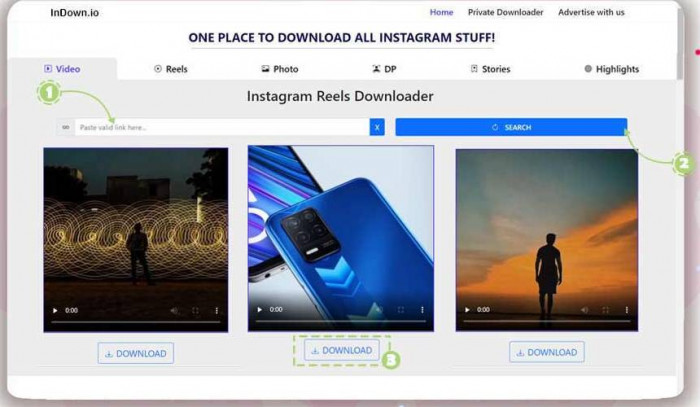
The process usually looks like this:
| Step | What the User Does |
| 1 | Copy the Instagram or TikTok content link |
| 2 | Paste the link into the correct InDown.io downloader page |
| 3 | Wait for the tool to fetch the media |
| 4 | Click the download button |
| 5 | Check the saved file before using or reposting it |
This workflow is useful for one-off downloads. It fits creators saving their own Reels, social media managers archiving published posts, or casual users saving public media for offline viewing. The experience is direct, and that is exactly what most people want from this kind of tool.
The limitation is that everything depends on the link. If the post is deleted, the account is private, the Story has expired, or Instagram changes how it serves media, the downloader may not work consistently. InDown.io feels convenient, but it does not feel like a professional-grade archive system.
What Happens After You Click Download
Once a link is submitted, InDown.io attempts to fetch the available media and generate a download option. When it works, the experience is quick and simple. There is no complicated menu, which helps beginners but also limits control for advanced users.
This is where the tool’s identity becomes clear. InDown.io is built for speed, not customization. The user is not asked to select bitrate, codec, frame rate, compression level, or file format. That makes the process simple, but it also means users have less control over the final file.
For most casual downloads, that may not matter. If the goal is to save a Reel for reference, download your own clip, or keep a copy of a public image, a basic download button is enough. But if the goal is to reuse the file in a professional video project, the lack of export details becomes a weakness.
InDown.io works best when expectations are realistic. It is not a media converter. It is not a video enhancer. It is not a file management tool. It simply tries to save what is available from the original social media link.
How Good Are the Saved Files?
The output quality depends heavily on the original post. InDown.io does not improve video or image quality. It downloads media based on what the platform makes available, which means the saved file is affected by Instagram or TikTok compression, the original upload quality, and the version of the media the tool can access.
If the original Reel is sharp, well-lit, and uploaded in good quality, the downloaded file should usually be usable for casual viewing or backup. If the original post is already compressed, blurry, dark, or low-resolution, InDown.io will not fix it. This is an important point because many downloader tools use phrases like “HD” or “high quality,” but that does not mean they can restore the original camera file.
| Content Type | Realistic Output Expectation |
| Instagram Reels | Usually usable when the source Reel is already good |
| Instagram videos | Good for casual saving, but still affected by compression |
| Instagram photos | Fine for reference or backup, not original camera quality |
| Stories | Quality depends on the original Story and availability |
| Highlights | Useful when accessible, but consistency can vary |
| TikTok videos | Helpful for saving clips, though watermark and resolution may vary |
| Profile pictures | Useful for viewing or saving DP images, not true enhancement |
This makes InDown.io a practical downloader, not a quality upgrade tool. If you need a clean source file for editing, brand work, or commercial reuse, the better option is still the original uploaded file from the creator’s device or cloud storage. InDown.io is better suited for quick access, not production-grade media handling.
Where the Tool Feels Convenient
The biggest advantage of InDown.io is the no-login workflow. Any downloader that asks for Instagram or TikTok credentials should immediately raise concern. InDown.io’s normal public-download process avoids that problem, which makes it safer and easier for everyday users.
The tool also supports multiple content types, which makes it more useful than a downloader built only for Reels or only for TikTok. Someone can use the same tool family to save Instagram videos, photos, Stories, highlights, profile pictures, and TikTok clips. That range gives it practical value for people who regularly collect social media content.
It also works well because it removes friction. There is no software installation, no onboarding sequence, no account verification, and no subscription screen. For a quick downloader, this is exactly the kind of experience users expect.
The convenience is strongest in these situations:
● A creator wants to save their own published Reel.
● A social media manager wants to keep a quick archive of a public post.
● A blogger wants to save a reference clip for research.
● A casual user wants offline access to a public video.
● Someone wants to download a profile picture or public image without taking screenshots.
InDown.io succeeds when the task is simple. It becomes less impressive when the user expects advanced media control.
Where It Feels Too Basic
The same simplicity that makes InDown.io easy also makes it limited. There is no advanced download queue, no file naming control, no folder system, no batch download function, no history panel, no built-in editor, and no quality selector that gives users detailed control.
For a casual user, this may not matter. For creators, agencies, and editors, it does. Professional media workflows often need consistency. Users may need a specific resolution, predictable audio quality, clean file names, version tracking, or rights documentation. InDown.io does not appear built for that kind of workflow.
It also does not solve common post-download problems. If a clip is too long, users need another tool to trim it. If the video is too compressed, users need an enhancer. If the format is not ideal, users need a converter. If they are collecting many files, they need their own organization system.
That makes the tool useful but narrow. It is strong as a quick downloader and weak as a complete media workflow.
Pricing: Free, But With the Usual Free-Tool Caution
InDown.io appears to be free. There is no visible paid subscription, premium export tier, credit system, or monthly plan on the main tool pages. That makes it easy to try because users do not need to pay before testing whether a link works.
The free model is also part of the appeal. A tool like this is often used for occasional downloads, so a subscription would feel unnecessary for many users. InDown.io’s free access makes sense for casual use.
Still, free tools should be judged carefully. If a product does not charge users directly, it may rely on ads, traffic, affiliate-style monetization, or other indirect methods. That does not automatically make it unsafe, but users should avoid entering login details, avoid pasting sensitive private links, and be careful with pop-ups or redirects if they appear.
The Privacy Question
From a privacy perspective, InDown.io has one clear advantage: it does not require users to log into Instagram or TikTok for normal public downloads. That is important because giving a third-party downloader access to social media credentials can expose users to account risk.
However, no-login does not mean no privacy concern at all. When a user pastes a link into the tool, that URL is still being processed by a third-party service. If the link points to content connected to a person, brand, client, or private context, users should think carefully before submitting it.
The transparency issue is that tools like this often provide limited detail about how pasted links are handled. Users may not know whether URLs are temporarily logged, how long server records are kept, what analytics tools are running, or whether advertising scripts are active. For public posts, the risk may be low. For private or sensitive material, caution is the better approach.
A practical privacy rule is simple: use InDown.io only for public content you are comfortable submitting to a third-party tool. Never enter Instagram or TikTok passwords into downloader sites, and avoid using any tool that asks for direct account access without a clear reason.
The Legal Question Most Users Ignore
InDown.io can help save a file, but it does not give users the right to reuse that file. This is the most important legal distinction in any downloader review.
Downloading your own content is the safest use case. If you created and posted the Reel, video, photo, or Story, using InDown.io as a backup tool is straightforward. The legal issue becomes more complicated when users download someone else’s content.
Saving a public post for personal reference is common, but reposting it, editing it into your own content, using it in marketing, or monetizing it without permission can create copyright and platform-policy problems. The fact that a tool can download media does not mean the media is free to reuse.
This matters especially for bloggers, creators, editors, and brands. If you plan to use someone else’s downloaded video or image in public content, get permission, give proper credit where required, and avoid treating downloaded social media files as automatically reusable assets.
Public Reviews Are Limited
InDown.io does not have the kind of large public review base that major SaaS tools have. Some third-party software directories show positive ratings, but the number of available reviews appears small. That means public sentiment should be treated as limited evidence, not strong proof of long-term reliability.
This matters because downloader tools can change quickly. They depend on how Instagram and TikTok serve media, and platform changes can affect performance. A tool that works smoothly today may behave differently later if the source platform changes access rules or media delivery systems.
Because public reviews are limited, hands-on testing becomes more important. A good InDown.io review should not rely too heavily on directory ratings. It should test different content types, check whether downloads work, compare file quality, note failures, and be honest about inconsistency.
The fairest conclusion is this: InDown.io has some positive public signals, but not enough detailed user feedback to call it a widely verified tool. It should be judged mainly by practical testing.
Pros and Cons
InDown.io’s strengths and weaknesses are easy to understand because the tool is narrow. It is good at making simple downloads easier, but it is not built for advanced media control.
| Pros | Cons |
| Very simple paste-link workflow | No advanced export settings |
| No login required for normal public downloads | Not an official Instagram or TikTok tool |
| Supports multiple Instagram content types | Output quality depends on the source post |
| Free to use | Limited public user review base |
| Useful for quick offline saving | Privacy transparency could be stronger |
| Beginner-friendly | Not suitable for professional media management |
The pros are strongest for casual users. The cons become more important for anyone using downloaded media in a business, editorial, or commercial workflow.
Who Should Use InDown.io?
InDown.io is best for people who need a quick way to save public social media content without installing software. It fits creators who want to download their own Reels, social media managers who need quick backups, and casual users who want offline access to public videos or photos.
It can also help bloggers, researchers, and content teams collect reference material, as long as they treat downloaded files responsibly. For research and internal reference, the tool is convenient. For republishing or commercial use, permission and rights still matter.
The tool is not ideal for agencies, editors, or brands that need advanced file control. If your workflow depends on batch downloading, consistent resolution, clean naming systems, audit trails, licensing records, or editing tools, InDown.io will likely feel too basic.
Users should also avoid it for private or sensitive content. Even if a tool claims to handle private downloads, downloading private media raises privacy and consent concerns. InDown.io makes more sense for public, low-risk, permission-safe content.
Personal Rating:
| Rating Area | Score | Reason |
| Ease of Use | 4.5/5 | The paste-link workflow is simple, fast, and beginner-friendly. There is almost no learning curve. |
| Workflow Speed | 4/5 | Downloads are designed to be quick, though performance can depend on the link, platform changes, and media availability. |
| Output Quality | 3.5/5 | The saved file is usually usable, but quality depends on the original Instagram or TikTok upload. The tool does not enhance or upscale media. |
| Download Options | 2.8/5 | Good for basic downloads, but there is limited control over resolution, bitrate, format, codec, or file naming. |
| Privacy and Safety | 3.5/5 | The no-login approach is a strong plus, but pasted links still pass through a third-party tool and transparency around link handling is limited. |
| Legal Clarity | 3/5 | The tool can download content, but it does not explain enough about copyright, reuse rights, or platform-policy risks. |
| Pricing Value | 4.5/5 | It appears to be free, with no visible subscription or credit system, which makes it useful for casual users. |
| Professional Use | 2.5/5 | It is too basic for agencies, editors, or brands that need bulk downloads, quality control, file organization, or rights management. |
| Overall Rating | 3.7/5 | InDown.io is useful for quick public downloads, but limited as a serious media workflow tool. |
My Rating: 3.7 out of 5
InDown.io earns a good score for simplicity, speed, and free access. It does what a casual downloader should do: take a public link and make the media easier to save. But it loses points for limited export control, thin transparency, limited public reviews, and the legal grey area around downloading other people’s content. It is a practical tool for simple use, not a professional media solution.
Final Verdict: Useful, But Only for Simple Downloads
InDown.io works best as a quick Instagram and TikTok downloader, not as a professional media platform. Its biggest strength is the simple no-login workflow: copy a link, paste it into the tool, fetch the media, and download. That makes it useful for saving your own content, archiving public posts, or grabbing a quick offline copy of a Reel, photo, Story, highlight, or TikTok video.
The tool’s limits are just as clear. It does not enhance quality, does not provide serious export control, does not organize files, and does not solve copyright or reuse issues. Output quality depends on the original post and the version of media available from the platform. Public user reviews are also limited, so the tool should be judged through practical testing rather than reputation alone.
The best way to use InDown.io is with realistic expectations. Use it for simple public downloads, especially your own content or content you have permission to save. Avoid entering login details, avoid sensitive private links, and do not assume downloaded content is automatically free to reuse. For casual downloading, InDown.io is practical and convenient. For professional media workflows, it is too basic.