By mid 2026 Seaart AI has grown into something messier and more interesting: a sprawling creative hub that does a great deal, does some of it brilliantly, and wraps the whole experience in billing behavior that earns a warning label. I spent six weeks running it daily across the free and paid tiers, and the verdict that emerged is not the one the glossy roundups are selling.
| SeaArt AI is an all-in-one generative studio built around anime and stylized image creation, now extended into video, editing, and AI character chat. A genuinely usable free tier requires no card, and paid plans open at $5.99 per month. The strengths that stand out: a 700,000 plus model library and unusually deep ComfyUI control. The flags worth knowing: aggressive trial billing and recently tightened content moderation. |
How I tested SeaArt
To keep this grounded rather than impressionistic, I ran the same structured pass I use on every generation tool, the Prompt-to-Output Field Test: a fixed set of prompts pushed through every major capability, repeated across different models and tiers, with the wins and the failures recorded equally. Testing covered roughly six weeks in May and June 2026 on the free tier and the Beginner SVIP plan, using Chrome on Windows 11 and the iOS app on an iPhone. Around 600 generations went through the system across images, video, LoRA training, and AI character chat.
First impressions: signup and the interface
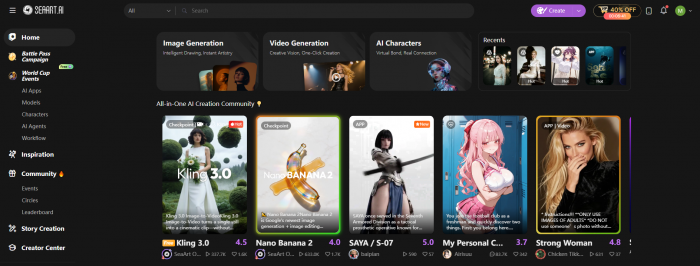
Signup took under a minute through a Google account, and the free tier asked for no payment details, which is the right way to let people try before they commit. What hit me next was the interface. SeaArt runs two parallel modes: an Easy Mode that looks like any modern prompt box, and a ComfyUI workspace that exposes nodes, samplers, and the full Stable Diffusion plumbing. Leonardo and Midjourney feel calmer on arrival. SeaArt throws its depth at you immediately, which experienced users will appreciate and newcomers will find busy. A Stamina meter sits in the corner, draining with every generation, and learning to read it is the first real skill the platform demands.
Text to image: the core test
The first thing to understand about SeaArt is that output quality is not a property of the platform. It is a property of the model you pick from a library that now exceeds 700,000 community and official checkpoints, including FLUX, Stable Diffusion 3.5, SDXL, Pony, and newer arrivals like Seedream and Nano Banana. The same prompt can produce a masterpiece or a mess depending entirely on that choice, and nobody tells you which is which up front.
To test the anime work the platform is built for, I ran the prompt : a lone samurai standing in falling cherry blossoms, dramatic backlight, detailed lacquered armor, anime key visual.
The below image is the result of my prompt.
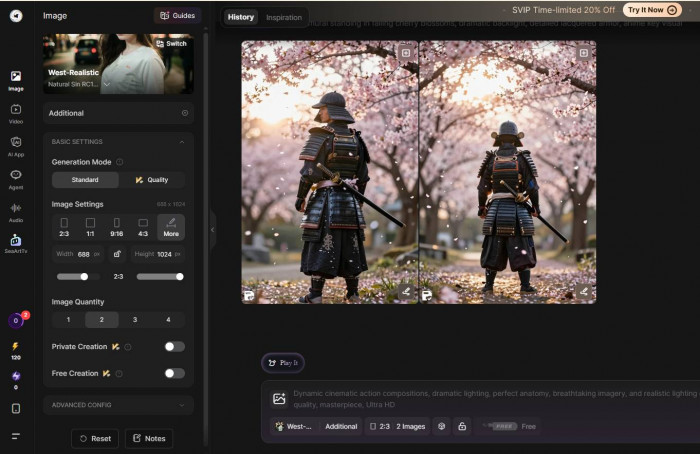
On a well regarded anime checkpoint the result was genuinely striking: clean linework, coherent armor plating, convincing rim light, and the kind of composition that would pass as professional key art. This is SeaArt at its best, and it is very good.
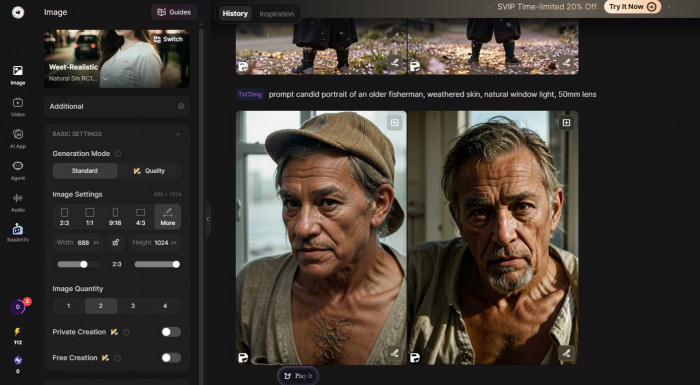
Photorealism told a different story. The prompt candid portrait of an older fisherman, weathered skin, natural window light, 50mm lens produced something that looked almost right and was therefore slightly worse for it: plasticky skin, eyes that did not quite track, and the faint synthetic sheen that separates AI portraits from photographs. Against what Midjourney returns on the same brief, SeaArt is a clear step behind on realism.
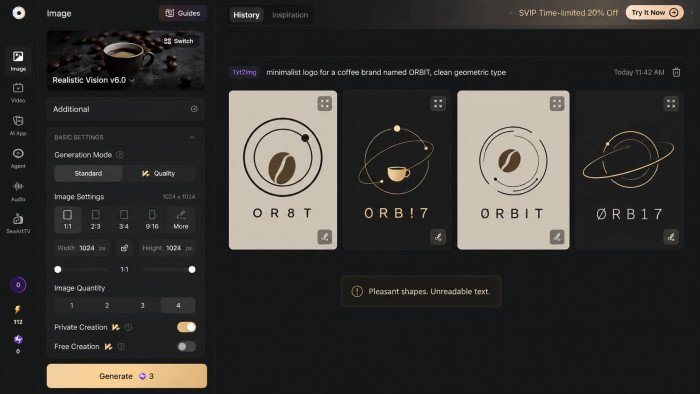
Text rendering was the outright failure. Asking for a minimalist logo for a coffee brand named ORBIT, clean geometric type returned garbled lettering on every reroll. The shapes were pleasant. The word was not a word. For anything involving readable text, Ideogram or DALL-E is simply the better tool, and pretending otherwise would be dishonest.
| Prompt focus | Model used | What came back | Verdict |
| Anime key visual | Anime checkpoint | Crisp linework, coherent armor, strong rim light, professional composition | Excellent |
| Photoreal portrait | FLUX realism | Almost right, but plasticky skin and a faint synthetic sheen | Behind Midjourney |
| Logo with readable text | SDXL base | Pleasant shapes, garbled lettering on every reroll | Poor |
Across all of this, generation was fast, typically 8 to 12 seconds per image, which makes the trial and error that SeaArt demands far less painful than it could be. A useful habit emerged quickly: validate a prompt at standard resolution, then upscale only the keeper, so credits are not wasted on experiments.
Editing and cleanup tools
Beyond generation, SeaArt bundles a prompt driven image editor and a cluster of cleanup tools. I uploaded a portrait and asked the editor to replace the background with a rainy Tokyo street at night. It held the subject convincingly and rebuilt the backdrop with believable neon reflections, though edge blending around the hair needed a second pass.
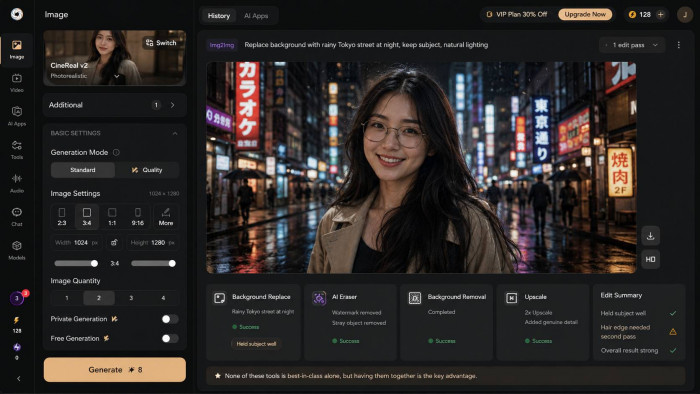
The AI Eraser lifted a watermark and a stray object cleanly. Background removal and the upscaler both did their jobs, with the upscaler adding genuine detail rather than just enlarging. None of these tools is best in class on its own, but having them one click away from the generator is the convenience that keeps you on the platform instead of bouncing to Photoshop.
Going deeper: LoRA training and ComfyUI
This is where SeaArt separates itself from the shallow end of the market. Training a LoRA, a lightweight style file, needs only 20 to 30 reference images rather than the 100 plus a full model would demand. I trained one on a consistent character set, and once the training queue cleared, new generations held that character's face and styling across different poses with respectable consistency. It is not flawless, but for indie comic panels or game concept work it is a real production tool, not a toy.
The cloud ComfyUI is the standout feature. Running ComfyUI locally means wrestling with Python dependencies, VRAM ceilings, and CUDA errors. SeaArt puts the entire node based workflow inside a browser tab. I built a three step chain, face swap into upscale into style transfer, and ran it without ever touching a GPU. The catch on the free tier is that daily ComfyUI time is throttled hard, sometimes to a few minutes, which collides with the reality that node tuning needs patience. On a paid tier, this becomes one of the most powerful browser based creative tools available anywhere.
Video generation
SeaArt's video sits on its Flow engine and works best in short bursts. A roughly five second text to video prompt, a koi fish drifting through a moonlit pond, came back smooth and atmospheric with audio added automatically. Image to video animated a still portrait with natural, subtle motion.
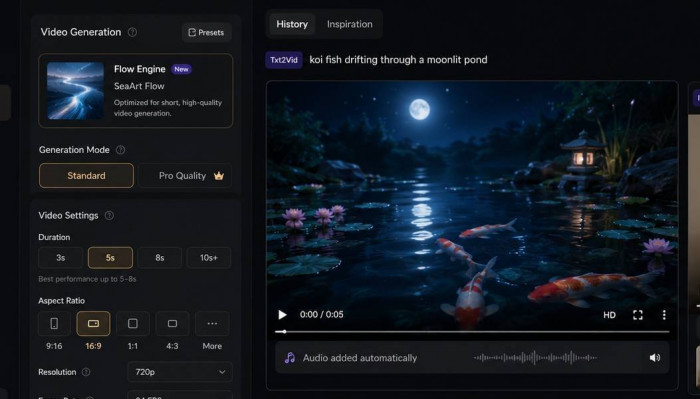
The limits appear the moment you push past 10 seconds: faces drift, fine features flicker, and temporal consistency breaks down, which is a weakness shared across most AI video in 2026. Treat this as a rapid prototyping and social clip tool, not a production animation pipeline.
The extras: try-on, character chat, and audio
The breadth keeps going beyond image and video generation. The virtual try-on tool placed a garment onto a character convincingly enough for catalog-style mockups, although it still feels better suited to visual previews than final commercial product imagery. The AI character chat is more substantial than expected: you can define a persona’s background, tone, and example dialogue, then converse with adjustable memory length. In testing, the roleplay held character across a session rather than collapsing into generic chatbot replies after a few turns.
SeaArt also includes AI audio and ASMR-style video generation. These feel more like expansion features than core strengths, but they support the platform’s bigger pitch: SeaArt is trying to keep creators inside one workspace instead of forcing them to jump between separate tools for images, motion, characters, and sound.
The mobile app
The mobile app is the weak link. It carries roughly a 3.3 rating on Google Play, and my experience matched that: a usable but unstable client that refreshed unexpectedly and once lost progress in the middle of a generation. For anything serious, the desktop browser is the place to work, and the app is best treated as a companion for browsing the gallery rather than producing final work.
Pricing and how it really behaves
SeaArt runs two currencies on top of its subscriptions, and understanding them is essential before you pay. Stamina replenishes daily, does not roll over, and is consumed first. Credits are bought separately, never expire, and kick in only once Stamina is gone. A standard image costs roughly 6 credits. Video runs anywhere from 30 to 90 credits depending on length and settings, which means a single long clip can burn what dozens of images would. Here is how the tiers break down, with the caveat that SeaArt has changed allocations over time and app store prices can differ from the website:
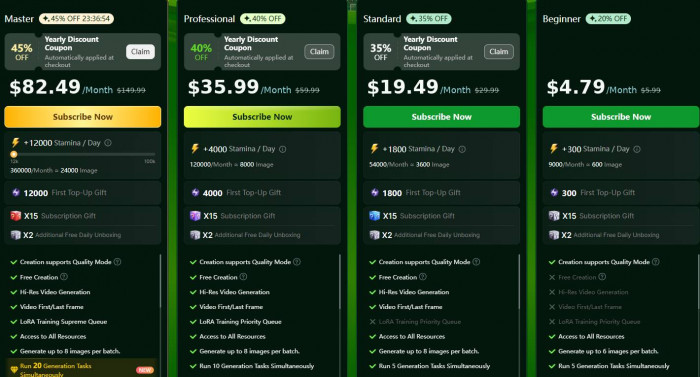
In daily use, Stamina drained faster than the headline numbers suggest, especially once video entered the mix, and I found myself topping up credits sooner than expected. Budget for that. One more quirk worth flagging: allocations have been raised over time without grandfathering, so long term subscribers report receiving far less Stamina than new members now get on the very same plan.
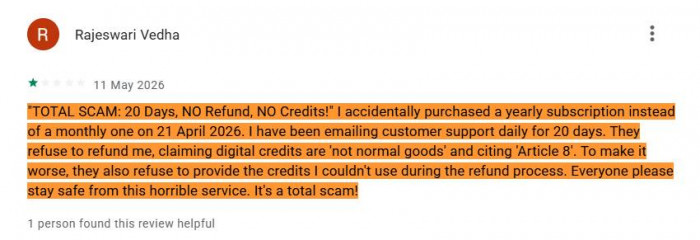
The billing behavior is the single biggest concern, and it is not a minor one. SeaArt promotes a three day free trial that requires card details and converts to a paid plan automatically. Its own policy states there are no refunds once a charge processes, and it advises canceling at least a day early because charges can fire hours before the trial technically ends.
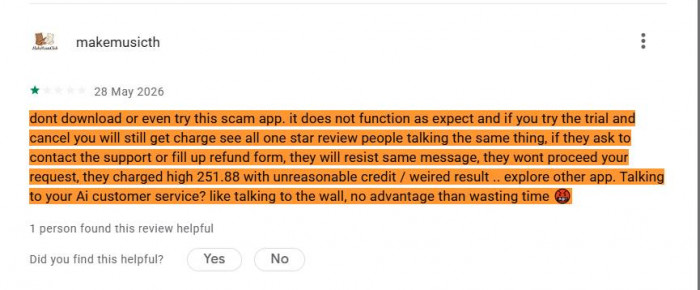
Across public review platforms this has produced a consistent and troubling pattern: users reporting charges at the 71st or 72nd hour of a 72 hour trial, annual charges of $251.88 when a monthly plan was expected, and charges continuing after cancellation, with support responding by quoting the no refund policy. Several users escalated to bank chargebacks. If you trial SeaArt, treat it as a 48 hour window and use a virtual card you can block.
What SeaArt does well
SeaArt’s strengths become clear once you test more than a few prompts:
• Anime and stylized images. This is still its strongest lane. With the right checkpoint, SeaArt can produce crisp character art, strong lighting, and polished compositions.
• Huge model choice. The model library can feel messy, but it gives SeaArt real range across anime, fantasy, portraits, concept art, and mockups.
• ComfyUI in the browser. Advanced users get node workflows, LoRA control, upscaling chains, and style transfer without setting up a local GPU.
• Fast testing. Standard generations are quick enough to make rerolling, prompt testing, and model switching feel practical.
• Editing convenience. Background replacement, eraser, removal, and upscaling are not best in class alone, but having them beside the generator keeps the workflow moving.
• Useful free tier. The free plan has limits, but it gives enough room to understand the tool before paying.
Where SeaArt falls short
No tool is all upside, and SeaArt's downsides are specific enough to state plainly:
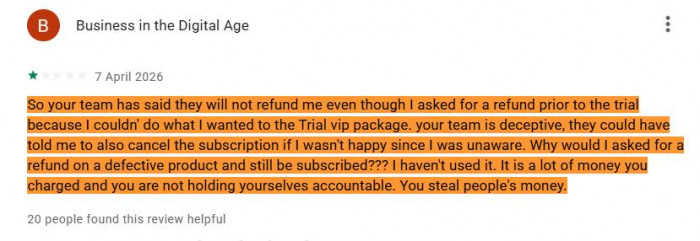
• Billing and trust. The trial to annual conversion, the rigid no refund stance, and reports of charges after cancellation are the most serious mark against it. The below image shows the real user complaining about a refund.
• Moderation that costs you. Content filtering tightened sharply through 2025 and 2026. The recurring complaint is legitimate creative work being blocked with no clear reason, while the credits spent on those blocked generations are not returned.
• Inconsistent quality. Because results depend so heavily on model choice, expect to regenerate often and to spend real time learning which checkpoints suit your work. Photorealism and any readable text remain persistent weak points.
• Slow support. Help is email ticket only, frequently slow, and often feels like a bot repeating itself, which stings most at exactly the moment a billing problem needs a human.
• Privacy and exposure. Independent reporting has flagged trackers sending data to third parties, and the platform has faced a scraping accusation. Creations default to a public community gallery unless private mode is switched on, so it is not the place for sensitive or client confidential images.
The heaviest concern on record sits in that same open library. In 2025, independent research found it being used to generate sexually explicit material depicting minors, after which SeaArt asked its community to report such content. The open and lightly policed gallery is both the platform's social engine and its biggest liability, and any honest review has to name that.

Who it is for and who should skip it
After six weeks, the audience is clear. SeaArt is an easy recommendation for anime, manga, and stylized creators, for hobbyists and students who want enormous capability at little or no cost, and for anyone curious about ComfyUI and LoRA who does not want to build and maintain a local rig. It rewards people who are willing to learn its depth and read its currency meters.
It is the wrong tool for anyone who needs photorealistic polish straight out of the box, for enterprise teams that require data privacy guarantees and dependable support, and for anyone who tends to forget about free trials before they convert into a year of billing.
Alternatives worth considering
No single product replaces everything SeaArt does, and that breadth is its real moat. But for specific needs, there are stronger or calmer choices:
| If you need | Reach for | Why |
| Aesthetic polish and clean billing | Midjourney | Best quality per prompt, with a simple and predictable subscription |
| A polished interface and consistency | Leonardo AI | Curated models and character consistency tools, easier for newcomers |
| The closest direct analog | Tensor.Art or PixAI | Community model sharing and galleries with the same anime lean |
| Commercial safe generation | Adobe Firefly | Trained on licensed content, with copyright indemnity for business use |
| Dedicated video | Runway or Kling | Stronger, more focused video tools with more transparent billing |
| Readable text inside images | Ideogram | Accurate typography, the one thing SeaArt cannot do |
Scorecard
| Category | Rating out of 5 |
| Model library and variety | 4.8 |
| Creative control (LoRA, ComfyUI) | 4.6 |
| Image quality (model dependent) | 3.8 |
| Video generation | 3.3 |
| Ease of use for beginners | 3.2 |
| Mobile experience | 2.8 |
| Value for money | 4.3 |
| Billing transparency and trust | 1.8 |
| Overall | 3.6 |
The Verdict
SeaArt AI is the most generous and capable all-in-one creative playground you can open right now, and for the right user it is genuinely worth the time. It is also one of the riskier subscriptions I have tested, and the gap between how impressive the tool is and how chaotic the billing can be is the defining tension of the whole experience. Use the free tier freely and learn how fast your Stamina drains before you spend a cent. If you do pay, do it with your eyes open, a calendar reminder set a day before any renewal, and a card you can block.