Most creators think their problem is a lack of ideas. It is not. The real issue is that content creation is being treated as a daily decision instead of a structured system. Every time you open your laptop and ask “what should I post,” you are restarting the process from zero. That is what makes content feel inconsistent, slow, and mentally exhausting.
The moment you shift from thinking in terms of posts to thinking in terms of systems, everything changes. Planning stops being reactive. Execution becomes repeatable. And most importantly, results become predictable.
At its core, the solution is simple: replace random inspiration with a system that tells you what to post, when to post it, and why it matters to your audience .
Why Guessing Keeps You Stuck
Guessing feels creative, but it creates hidden friction that builds over time.
When you rely on instinct alone, your content becomes inconsistent. You post when you feel like it, talk about whatever comes to mind, and shift direction frequently. From your perspective, this feels flexible. From your audience’s perspective, it feels unclear.
The algorithm also struggles in this environment. Without consistent themes and signals, it cannot understand who your content is for. As a result, distribution becomes unstable.
More importantly, guessing wastes effort. Instead of improving your content, you spend most of your time trying to come up with ideas. Over time, this leads to fatigue and reduced output.
A few patterns usually emerge when guessing continues:
● You recycle the same safe topics without realizing it
● You ignore what actually performs because there is no tracking system
● You attract a scattered audience that does not fully connect with your content
Guessing is not harmless. It is a cost you pay for not having a system.
Start With Who You Are Actually Talking To
Before deciding what to post, clarity about your audience changes everything.
Most creators define their audience too broadly. This leads to generic content that tries to speak to everyone but resonates with no one. What works better is narrowing down your audience into a specific situation.
Think in terms of three simple elements:
● Who they are in practical terms
● What they are trying to achieve
● What keeps getting in their way
For example, instead of “people interested in fitness,” a clearer definition would be busy professionals trying to lose weight but struggling with time and consistency. That level of clarity directly shapes your content.
Once this is defined, map your audience across three stages:
| Stage | What They Think | What Your Content Should Do |
| Problem-aware | “Something is not working” | Highlight the issue clearly |
| Solution-aware | “There are options, but I am unsure” | Educate and compare approaches |
| Ready-to-act | “I just need clarity or proof” | Build trust and push action |
This framework ensures that your content meets your audience where they are, instead of speaking randomly.
Replace Ideas With Content Buckets
Instead of asking what to post, shift the question to which category you are posting from.
Content buckets give you a controlled set of directions that your content rotates through. This removes the need to start from scratch every time.
A simple and effective structure includes five buckets:
● Educational content that explains and solves problems
● Entertaining content that reflects relatable experiences
● Inspirational content that shows what is possible
● Trust-building content that reveals your process and proof
● Conversion content that encourages the next step
Each bucket serves a different purpose, but together they create balance.
When these buckets are in place, content creation becomes a selection process instead of a creative struggle. You are choosing from defined paths rather than searching for new ideas every day.
Use a 4-Quadrant System to Structure Content
To make your system more intentional, you need to define not just what you post, but how deep it goes and who it is for. This is where the 4-quadrant system becomes useful.
It works on two dimensions: depth and intent.
| Type | Description | Example |
| Quick Discovery | Short, attention-grabbing content for new audiences | Reels, short videos, bold hooks |
| Quick Nurture | Short content for existing followers | Tips, quick answers |
| Deep Discovery | Detailed content designed to attract new users | Carousels, blog posts |
| Deep Nurture | In-depth content that builds trust | Case studies, breakdowns |
This structure ensures that your content is not random. It serves both growth and relationship-building.
Instead of guessing, you now decide which quadrant you are focusing on and which bucket you will use within it.
Let Data Decide What You Do Next
Once your system is active, your content itself becomes your best guide.
Instead of relying on instinct, you look at performance patterns. Over time, these patterns become clear.
| Signal | What It Indicates |
| Saves | Content is valuable and worth revisiting |
| Shares | Content is relatable and useful |
| Comments | Audience is engaged and thinking |
| Clicks | Content is driving action |
When certain topics or formats consistently perform better, that is not random. It is feedback.
For example, if short educational posts consistently generate more saves, that is a signal to create more variations of that format. If detailed case studies drive inquiries, those become part of your weekly structure.
This is how guessing is replaced with informed decisions.
Turn It Into a Weekly Content System
A system becomes practical when it turns into a routine.
Instead of deciding daily, you define a weekly structure that balances discovery, nurture, and conversion.
A simple example:
● Start the week with a quick discovery post to reach new people
● Follow with a deep nurture post that builds trust
● Add a lighter, relatable post to maintain engagement
● Include a deep discovery piece that delivers high value
● End with a conversion-focused post that invites action
The exact schedule can change, but the principle remains consistent.
Each week has a purpose. Each post fits into a larger system.
Use Prompts So You Never Start Blank
Even with a system, the blank page can still feel intimidating. This is where prompts help.
Instead of waiting for ideas, you create a bank of starting points.
For example:
● What mistake does my audience keep making repeatedly
● If they had 30 days to improve, what would I tell them to focus on
● What is something most people misunderstand about this topic
● What does my process look like behind the scenes
These prompts act as triggers. They remove friction and make content creation faster.
Over time, this becomes a repeatable workflow instead of a creative struggle.
Adapt One System Across Platforms
One of the biggest misconceptions is that you need different ideas for every platform.
You do not. You need different expressions of the same idea.
| Platform | How to Adapt |
| Visual hooks, short storytelling | |
| Structured insights and narratives | |
| YouTube | Long-form, in-depth explanations |
| Blogs/Email | Detailed breakdowns with examples |
The core idea stays the same. Only the format and depth change.
This is where systems create leverage. One idea turns into multiple pieces of content without extra effort.
Where Most Creators Go Wrong
Even when systems are introduced, mistakes still happen.
Some creators overcomplicate their systems, making them harder to follow than guessing itself. Others rely too heavily on tools without building a clear strategy.
A few common breakdown points:
● Trying to perfect every post instead of iterating
● Ignoring performance data after publishing
● Constantly changing direction instead of refining a system
The strongest systems are simple, flexible, and consistently used.
A Simple Way to Start Today
If everything feels overwhelming, start small.
Pick one audience and one goal you help them achieve. Write down five common problems they face.
Now map each problem across your content buckets.
This single exercise can generate dozens of content ideas without relying on inspiration.
That is the difference between guessing and operating with a system.
Tools that help plan, create, and optimize posts
1. Technylo : Your AI Content Workflow Hub
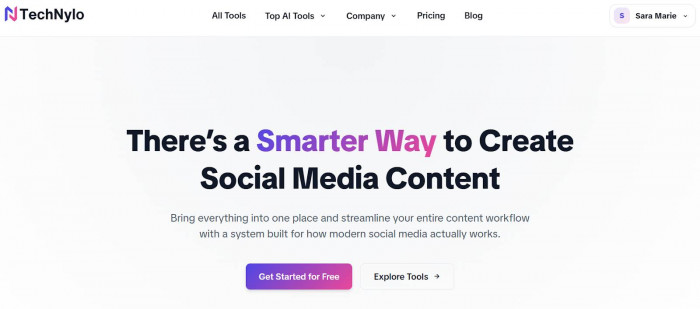
Technylo is built specifically to kill the “What do I post today?” problem by giving you a full content workflow in one place. Instead of jumping between caption tools, hashtag generators, and spreadsheets, you get a unified workspace to plan, create, and refine posts for platforms like Instagram, LinkedIn, YouTube and more.
Technylo provide AI tools such as Bio Generator, Hashtag Generator, Caption Generator, Hook Generator, Script Generator, Username Generator, Post Generator, Poll Generator, Grammar Fixer, Emoji Caption Generator, and a Content Calendar Generator, all focused on social media content.
Key things Technylo helps you do:
● Generate hooks, captions, bios, usernames and scripts tailored to different platforms.
● Create and visualize a content calendar so you always know what is going out and when.
● Fix grammar and polish tone, with options like emoji‑friendly captions and poll ideas.
● Keep everything inside one workspace instead of juggling multiple single‑feature tools.
Technylo is ideal if you want less manual work and a system that scales: creators, agencies, and small brands can turn it into the central hub that connects ideation, copy, and planning.
2. Jasper : Brand‑Ready Social Copy
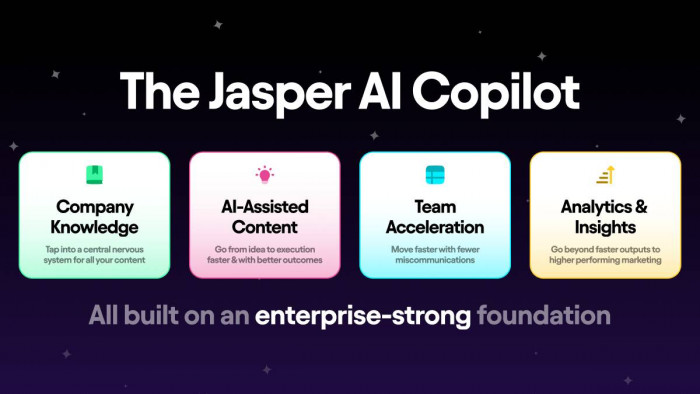
Replacing ChatGPT in this list, Jasper focuses on‑brand copywriting with strong support for marketing teams. It is built to remember your brand voice, product details, and style guidelines so you do not need to re‑explain your tone for every caption. For social media, Jasper can generate posts, hooks, carousels, and ad copy that sound consistent across channels.
Where Jasper stands out:
● Brand Voices: Train it on your existing content so it mimics your tone and vocabulary.
● Templates: Dozens of ready‑made templates for social posts, ads, captions, and headlines.
● Collaboration: Team workspaces, project folders, and approval flows.
● Multichannel: Use the same voice across websites, blogs, emails, and socials.
If you care deeply about consistent brand language on every post and ad, Jasper is a strong “voice engine” to pair with a planning tool like Technylo.
3. SocialBee : AI + Scheduling Machine
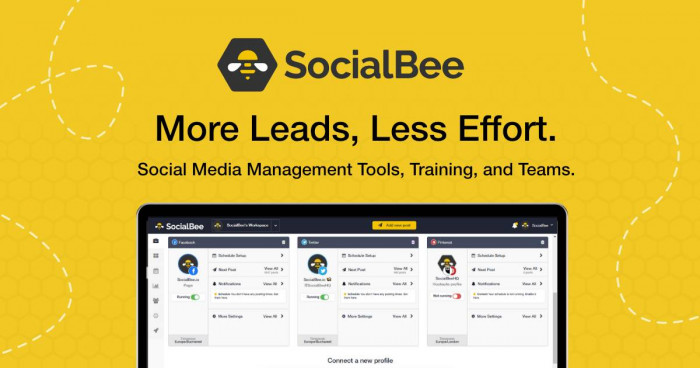
SocialBee combines AI writing with powerful scheduling, so it is perfect if you want content creation and publishing handled from one dashboard. It can generate dozens of post variations from a single prompt, categorize them (educational, promotional, entertaining), and recycle evergreen content automatically. This turns one idea into weeks of social content without constant rewriting.
Why SocialBee works so well:
● Category‑based posting (educational, promotional, curated content, etc.).
● AI post generation for captions and variations.
● Evergreen recycling, so top-performing posts return to your calendar.
● Queue‑based scheduling for all major platforms.
If you want your profiles to stay active non‑stop without babysitting the calendar, SocialBee is a reliable “always‑on” engine.
4. Predis.ai : Data‑Driven Creative Posts

Predis.ai goes beyond basic text generation by building entire post concepts: captions, carousels, creatives, and hashtags tailored to your platform. You can feed it a short brand description or prompt, and it produces visually‑led posts, especially strong for Instagram and Facebook. It also offers analytics and insights so you can see what has been resonating.
Why creators like Predis.ai:
● AI‑generated images and carousels based on your text input.
● Auto‑suggested hashtags and captions aligned with the visuals.
● Simple editor to tweak text and design without needing a designer.
● Analytics to understand performance trends over time.
Predis.ai is a great fit if your feed is heavily visual and you want “idea → design → caption” handled inside one creative‑first tool.
5. Narrato : Content Studio With AI Posts

Narrato is an AI‑powered content workspace that extends beyond social posts, but its social post generator is impressive. It offers templates for LinkedIn, Instagram, Facebook, and X, plus automatic hashtags and emojis to increase discoverability. Because it is built as a full content operations platform, you can manage blogs, landing pages, and social content in the same environment.
Highlights you get with Narrato:
● AI templates for social posts, blogs, emails, and more.
● Content calendar with workflow stages (draft, review, approved, published).
● Collaboration tools for teams: task management, comments, version tracking.
● Brand style guides to keep tone, structure, and wording consistent.
Narrato is a smart choice for content teams that want one studio to manage everything from long‑form content to daily posts.
6. Planable : Collaboration‑First Social AI
Planable began as a collaboration and approval platform for social media managers and agencies, and later layered in AI writing. Its biggest strength is how accurately it previews posts as they will appear on each platform, which makes client approvals painless. AI helps you quickly draft or rewrite captions, but the core value is the workflow around them.
Why Planable is powerful for teams:
● Pixel‑perfect previews of posts for Instagram, Facebook, LinkedIn, and X.
● Centralized feedback and approval threads on each post.
● AI caption suggestions to speed up writing and revisions.
● Multi‑brand, multi‑workspace structure ideal for agencies.
If your main problem is coordination “Who approved this?” “What’s scheduled?” Planable keeps the process clean while still giving you AI help on the copy itself.
7. Anyword : Performance‑Focused Social Copy
Anyword is built around one promise: copy that is optimized to perform before you even publish it. It uses predictive AI scoring to estimate how well a caption or ad is likely to resonate with your audience, then lets you compare variations. This is especially valuable for paid campaigns where every underperforming line of text costs real money.
What makes Anyword stand out:
● Predictive performance scores on each variation of copy.
● Audience and persona targeting to tailor messages.
● Support for social ads, organic posts, emails, and landing pages.
● A/B testing ideas generated directly in the interface.
Use Anyword when you want your social posts and ads to be driven by performance data rather than intuition alone.
8. Ocoya : Smart Posting With Predictions
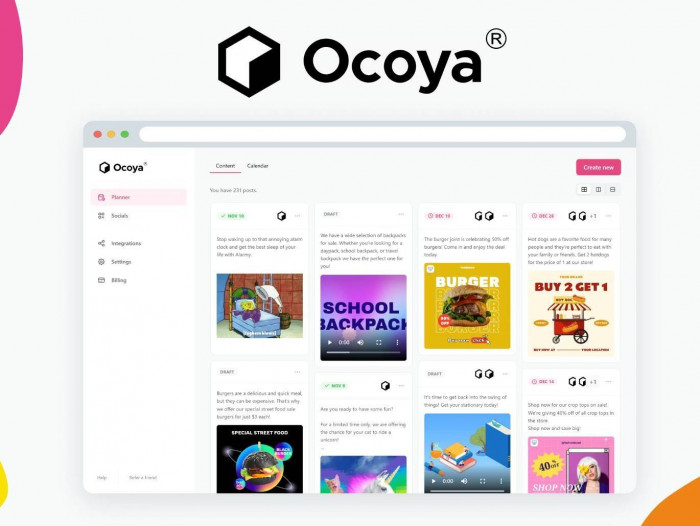
Ocoya is an AI social media tool geared toward speed and timing. You can generate posts from a short description, remix them with AI, and pair them with visuals from its template or media library. A standout feature is its predictive insights around when and how to post for maximum results.
Why Ocoya earns a place in your stack:
● Fast caption generation with remix options for tone and length.
● Built‑in design tools and template library for social visuals.
● Suggestions for best posting times based on historical performance.
● Support for major social networks and e‑commerce integrations.
If your goal is not just posting consistently but posting at the right moments with polished visuals, Ocoya’s prediction layer is a strong ally.
Final Interpretation
Content creation becomes difficult when every post feels like a new decision. Guessing creates inconsistency, drains energy, and makes growth unpredictable. Systems do the opposite. They reduce friction, improve clarity, and make results repeatable.
The creators who grow consistently are not the ones with the most ideas. They are the ones who have built a system that allows ideas to be executed efficiently.
Once that system is in place, the question “what should I post” stops being a daily problem. It becomes a simple choice within a structure that already works.