AI landing page builders have turned what used to be a week‑long design and copy job into something you can ship in an afternoon. Instead of wrestling with blank canvases and CSS, you describe your offer, audience, and goal and AI generates layouts, copy, and even images that are already optimized for conversions. The real edge now is choosing tools that don’t just look pretty, but help you launch fast, test aggressively, and learn what actually converts.
In this guide, we’ll break down eight standout AI landing page tools worth considering in 2026: Unbounce, Unicorn Platform, Framer AI, Webflow AI, Kleap, Canva, Landingi, and Sitekick AI.
1. Unbounce : Conversion‑First AI Landing Page Engine
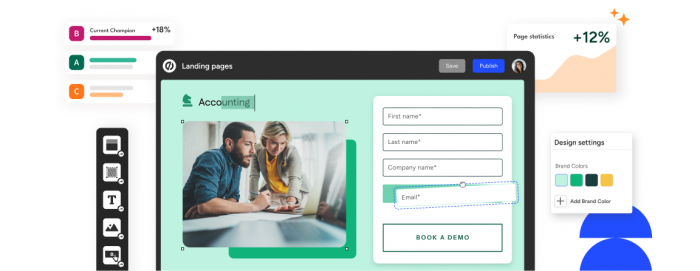
Unbounce remains one of the strongest choices when you care about conversion rate more than anything else. Its AI‑driven Smart Builder and Smart Traffic are designed to get more signups or sales from the same amount of traffic.
Features and Capabilities
Unbounce’s Smart Builder uses AI to suggest layouts and sections tailored to your industry and campaign goal, drastically shortening the time from idea to publish. Smart Traffic automatically sends each visitor to the variant where they are most likely to convert, learning from behavior and lifting conversions by an average of around 30% in internal tests. There’s also an AI copy assistant (formerly Smart Copy) that generates and refines headlines, CTAs, and body text to match the intent of your page.
Unbounce Pros and Cons
| Pros | Cons |
| Strong focus on conversion optimization with Smart Traffic | Pricing is higher than many lightweight AI builders |
| AI‑assisted layout and copy tailored to campaign goals | Can feel overkill for very simple, one‑off pages |
| Mature A/B testing and analytics built in | Learning curve for users new to experimentation |
| Large template library and integrations (CRM, email, ads) | Design flexibility is good, but not as “freeform” as pure design tools |
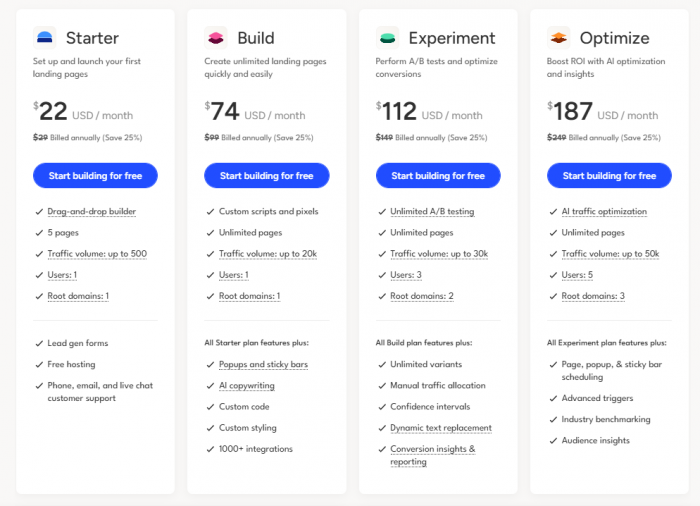
Unbounce Pricing and Plans
Best Use Case
Unbounce is a go‑to choice when you want every visitor to count, think paid ad campaigns, SaaS trials, and high‑value lead gen where small lifts in conversion rate have a big revenue impact. It suits marketers and growth teams who are comfortable with testing and want AI to optimize routing and page elements at scale.
2. Unicorn Platform : Founder‑Friendly AI Launch Pad
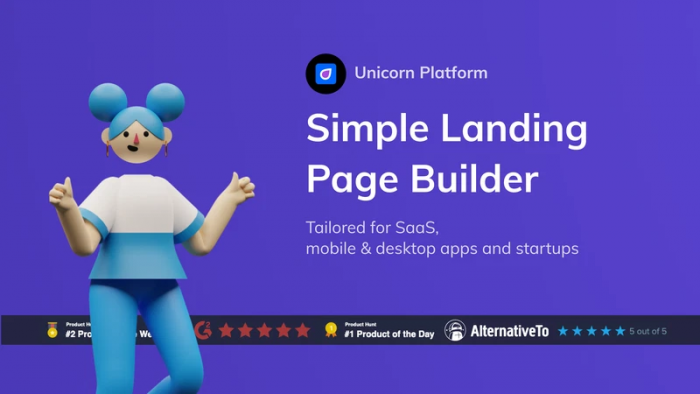
Unicorn Platform focuses on startups, indie makers, and SaaS teams who need to ship landing pages quickly without getting stuck in complex design systems. Its AI features are built around speed, clarity, and no‑code publishing.
Features and Capabilities
Unicorn Platform’s AI can generate full sections, features, FAQs, pricing based on short prompts about your product and audience. It comes with SaaS‑oriented blocks like testimonials, integrations, and changelogs, plus simple controls for styling and brand colors. Built‑in forms and email integrations make it easy to collect leads from day one, and you can publish on a custom domain without touching hosting.
Unicorn Platform Pros and Cons
| Pros | Cons |
| Very fast to go from idea to live page | Less suitable for large, complex sites |
| AI blocks tuned for SaaS, waitlists, and startups | Design freedom is more section‑based than pixel‑perfect |
| Simple, opinionated interface that reduces decision fatigue | Smaller ecosystem than some older builders |
| Direct publishing with hosting included | Advanced SEO and custom logic are more limited |
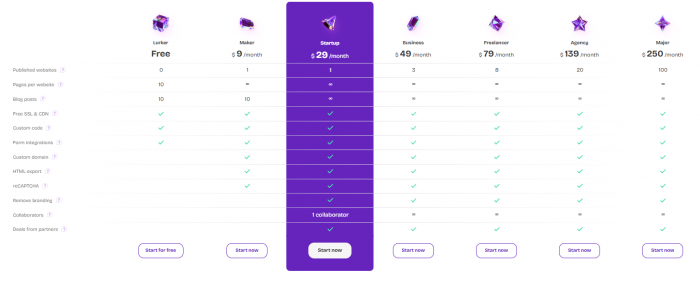
Unicorn Platform Pricing and Plans
Best Use Case
Unicorn Platform shines when you are launching SaaS, indie products, or waitlists and want to avoid over‑engineering. It’s ideal for founders and small teams who value speed and clarity over ultra‑custom design.
3. Framer AI : Design‑Led Marketing Pages with AI Help
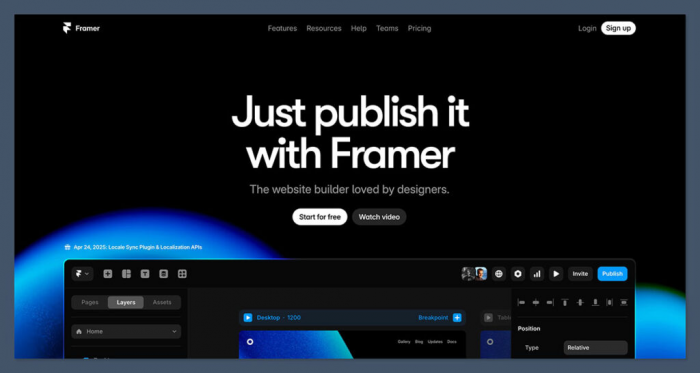
Framer has a strong reputation in the design world, and its AI landing page features bring that polish to marketing sites and launch pages. It is aimed at people who care deeply about how their page looks and feels, but still want AI to fast‑track the first version.
Features and Capabilities
Framer AI can generate full landing page layouts complete with hero sections, grids, and typography from a short description of your product. It supports smooth animations, responsive design, and modern visual patterns that look like they came out of a design studio. Once AI sets the foundation, you can refine details with Framer’s powerful visual editor.
Framer AI Pros and Cons
| Pros | Cons |
| Very polished, modern designs out of the box | Slightly steeper learning curve for non‑designers |
| AI jump‑starts layout, then you refine visually | More design‑oriented; less focused on hardcore CRO tooling |
| Great for marketing pages that need to impress | Can be overkill for basic, text‑heavy pages |
| Direct hosting and publishing built in | Dynamic data and large site structures need more planning |
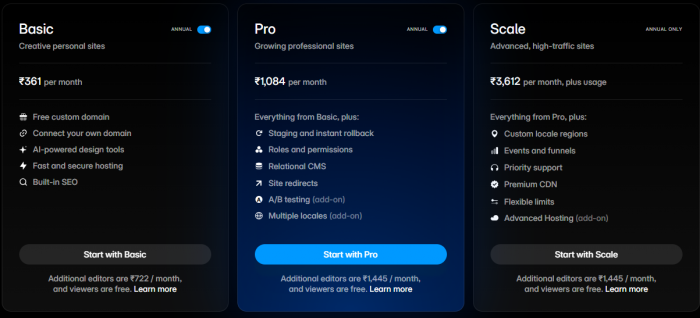
Framer AI Pricing and Plans
Best Use Case
Framer AI is ideal when you want your landing page to feel like a premium brand experience product launches, creative studios, and design‑driven SaaS products. It suits teams that care just as much about visual impact as they do about conversion metrics.
4. Webflow AI : Structured Sites with AI‑Assisted Content
Webflow AI extends the power of Webflow’s visual development platform with AI content and structural suggestions. It is better suited to landing pages that sit inside a broader website system rather than one‑off throwaways.
Features and Capabilities
Webflow AI can assist with writing section copy, improving microcopy, and generating component text in context as you build. Because it lives inside Webflow, you can connect AI‑generated content to CMS collections, reusable components, and site‑wide styles. This makes it easier to maintain consistency across landing pages, blog sections, and other marketing assets.
Webflow AI Pros and Cons
| Pros | Cons |
| Strong when landing pages are part of a bigger site | Heavier setup than simple landing‑page‑only tools |
| AI integrated into a robust, visual development workflow | Learning curve is higher for non‑technical users |
| Great for long‑term scalability, CMS, and design systems | Slower to “first publish” if you just need a quick campaign page |
| Fine‑grained design control and animations | Requires more time to master than guided builders |
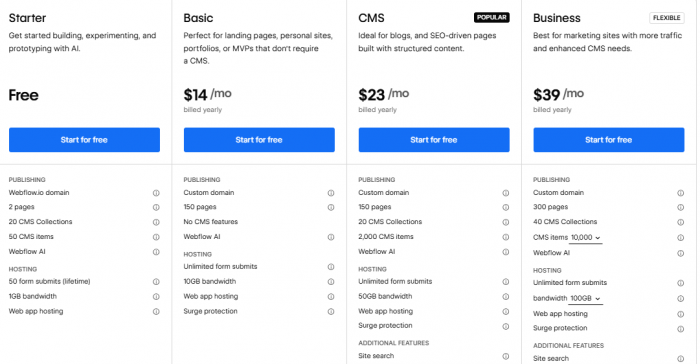
Webflow AI Pricing and Plans
Best Use Case
Webflow AI suits companies building a scalable marketing site where landing pages link tightly with content, blog, and product sections. It’s a strong choice for teams that want long‑term control and a future‑proof design system rather than a single quick campaign page.
5. Kleap : Speed‑Driven AI Landing Page Builder
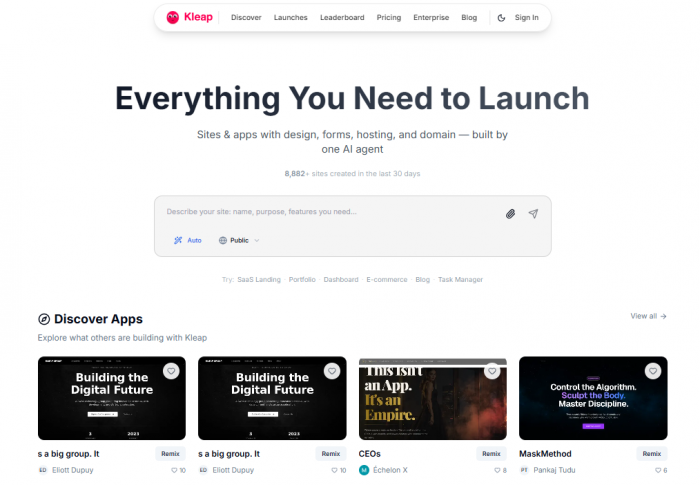
Kleap is a newer entrant that prioritizes creation speed, ease of use, and conversion intelligence. It is built to generate polished, mobile‑friendly pages faster than most alternatives.
Features and Capabilities
Kleap’s AI analyzes your input offer, audience, and goal and automatically selects layouts and content structures proven to convert. It includes built‑in conversion tracking that shows which elements get the most interaction, helping you refine your page without formal A/B testing. The interface is intentionally minimal, so you can move from idea to live page in minutes.
Kleap Pros and Cons
| Pros | Cons |
| Extremely fast page generation with conversion‑aware layouts | Less deep design customization compared to heavy tools |
| Built‑in insights about which elements visitors click | Younger ecosystem with fewer third‑party integrations |
| Mobile‑first pages that load quickly | Not suited for very complex, multi‑page sites |
| Simple, non‑technical interface | Reliant on AI defaults; some users will want more manual control |
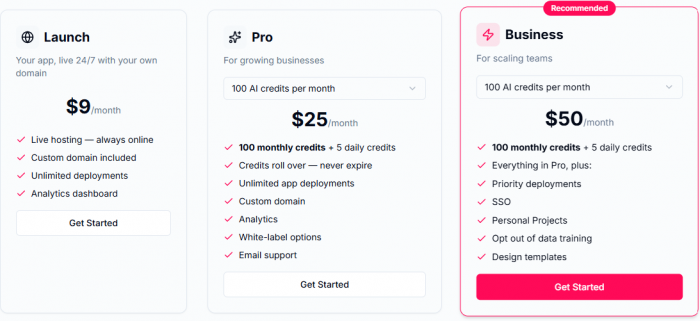
Kleap Pricing and Plans
Best Use Case
Kleap is well suited for solopreneurs, small campaigns, and marketers who want to stand pages up quickly for ads, lead magnets, or time‑sensitive offers without getting bogged down in heavy configuration.
6. Canva : Visual‑First Landing Pages with AI Copy
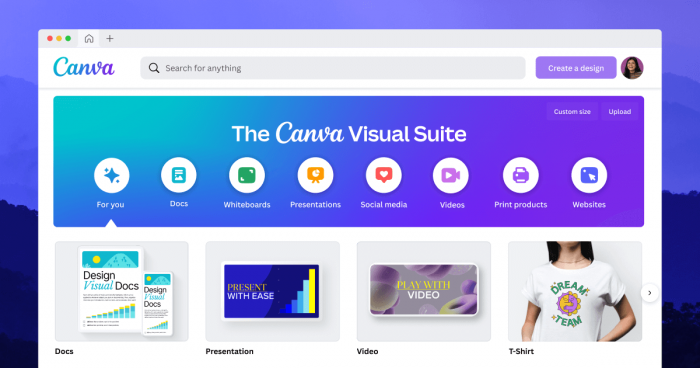
Canva is best known for design, but it also offers landing page templates and AI features that make it surprisingly capable for simple, visual landing pages. It’s an approachable entry point for non‑technical users.
Features and Capabilities
Canva provides drag‑and‑drop landing page layouts with AI tools for generating on‑page copy and images. Its Magic Studio can help you create illustrations, photos, and design elements from prompts, while AI text tools draft headlines and section copy based on your offer. Pages can be published directly via Canva’s hosting or exported and embedded elsewhere.
Canva Pros and Cons
| Pros | Cons |
| Very easy to use, familiar interface for millions of users | Less advanced in CRO features compared to Unbounce‑style tools |
| Strong visual control and template variety | Limited complex logic, personalization, or deep analytics |
| AI for both images and copy in one place | Best for simpler landing pages, not complex funnels |
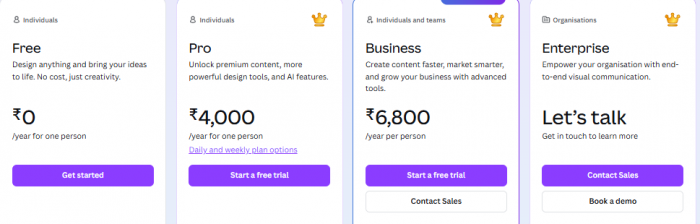
| Affordable, with a generous free tier | Performance and SEO controls less granular than dev‑centric tools |
Canva Pricing and Plans
Best Use Case
Canva works brilliantly for creators, small businesses, and campaign‑specific pages where strong visuals and simplicity are more important than deep experimentation features. It’s ideal if you already live inside Canva for other marketing assets and want a low‑friction way to spin up basic landing pages.
7. Landingi : Marketing‑Team AI Builder with Testing
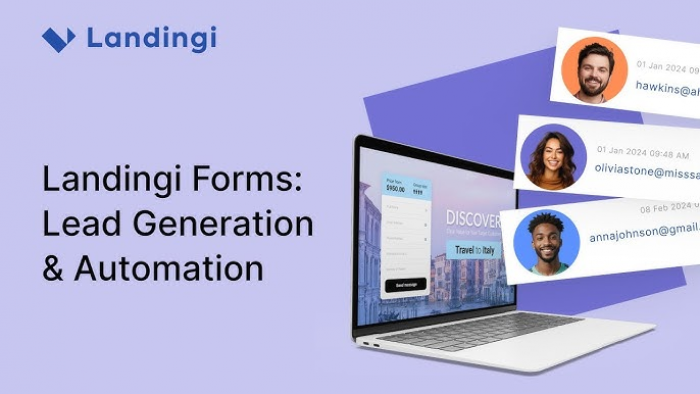
Landingi is a dedicated landing page platform that blends templates, AI‑assisted content, and testing tools. It is designed for marketers who run multiple campaigns and need repeatable workflows.
Features and Capabilities
Landingi offers customizable templates for different industries and goals, with AI tools to generate or refine headlines and body copy. It includes A/B testing, pop‑ups, and funnels, plus integrations with popular CRMs and email platforms. Performance tracking helps you understand which variants and elements are driving conversions.
Landingi Pros and Cons
| Pros | Cons |
| Built specifically for landing pages and funnels | Interface is more “marketer‑tool” than pure no‑code builder |
| AI copy support plus A/B testing and pop‑ups | Design flexibility, while decent, is not as deep as design‑first tools |
| Good integration options with email and CRM systems | Some features only available on higher‑tier plans |
| Suitable for agencies and multi‑campaign setups | May feel heavy for very small, simple projects |
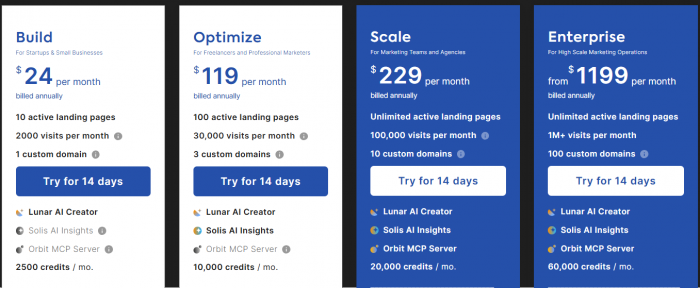
Landingi Pricing and Plans
Best Use Case
Landingi fits marketing teams and agencies that manage multiple campaigns and want AI to help with copy, while still having strong testing and integration options out of the box.
8. Sitekick AI : One‑Click Landing Pages for Non‑Technical Users
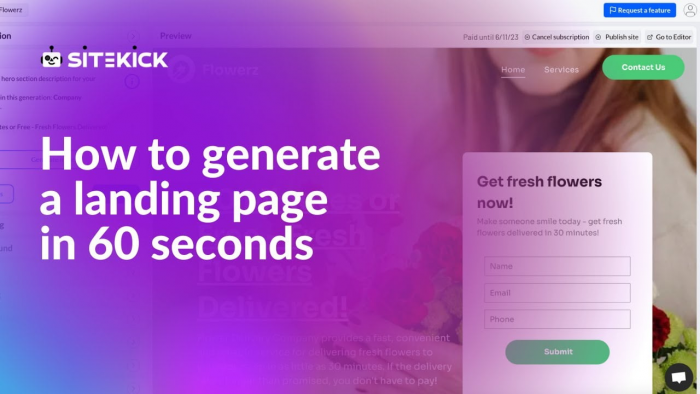
Sitekick AI is built around an aggressive promise: full landing pages in under five minutes, complete with design, copy, and images. It targets users who want a professional‑looking page with almost no setup.
Features and Capabilities
Sitekick AI asks a few questions about your product, value proposition, and audience, then generates a complete landing page with sections, visuals, and copy. You can tweak text and layout, but the heavy lifting is done by AI, making it easy for non‑technical users to get something live fast. Hosting, domains, and basic analytics are typically handled inside the same platform.
Sitekick AI Pros and Cons
| Pros | Cons |
| Extremely fast creation process with minimal input | Less control over fine‑grained design details |
| End‑to‑end solution: copy, design, images, hosting | Not ideal for complex or heavily customized flows |
| Very approachable for non‑technical founders | Ecosystem and integrations smaller than legacy platforms |
| Good starting point that you can refine later | May need manual polishing for high‑stakes campaigns |
Sitekick AI Pricing and Plans
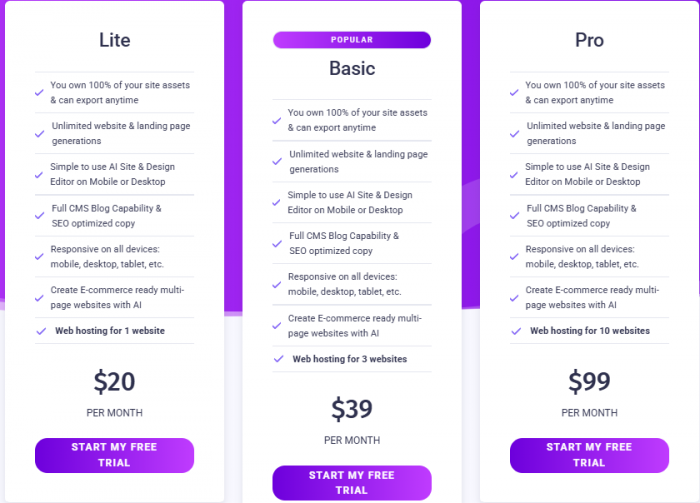
Best Use Case
Sitekick AI is well suited for solo founders, creators, and marketers who don’t want to touch design tools or code and just need a clean, functional landing page up quickly especially for validation, MVPs, or short‑term campaigns.
Pick a Stack, Not Just a Single Tool
There is no single “best” AI landing page builder for everyone. Conversion‑driven teams might gravitate towards Unbounce or Landingi, design‑led brands towards Framer AI or Webflow AI, and speed‑obsessed founders towards Unicorn Platform, Kleap, or Sitekick AI. Canva remains a friendly visual option when you want something simple and on‑brand without extra complexity.
In practice, your highest‑leverage move is to pick a stack that matches your situation: for example, Framer AI or Unicorn Platform for page creation, layered with Unbounce‑style experimentation later when a funnel proves itself. Used well, these AI tools don’t just make prettier pages they let you launch faster, test more, and systematically turn traffic into leads and customers.