Unlucid AI is not just another AI image generator. It is a browser-based visual tool that combines AI image creation, image editing, video generation, preset effects, and NSFW-capable outputs in one place. That makes it more flexible than a basic prompt-to-image tool, but also more sensitive to review because users may upload personal images, use face references, or create adult-style content.
The short version is this: Unlucid AI is useful when you want fast visual experiments with fewer restrictions. It is less convincing when you need polished brand work, deep editing control, or highly consistent professional outputs.
Quick Verdict
Unlucid AI works best as a creative playground. It gives users quick ways to create images, edit visuals, animate still images, and try playful video effects without learning complex tools like Photoshop, Runway, or CapCut.
Its biggest advantage is freedom. The platform openly supports sexually explicit and non-sexually explicit content, which makes it different from stricter mainstream tools. But that freedom also comes with responsibility. Consent, uploaded images, privacy, and content rules matter more here than they would on a normal AI design tool.
In simple terms, Unlucid AI is good for fast visual freedom. It is not built for polished creative control.
What Kind of AI Tool Is Unlucid AI?
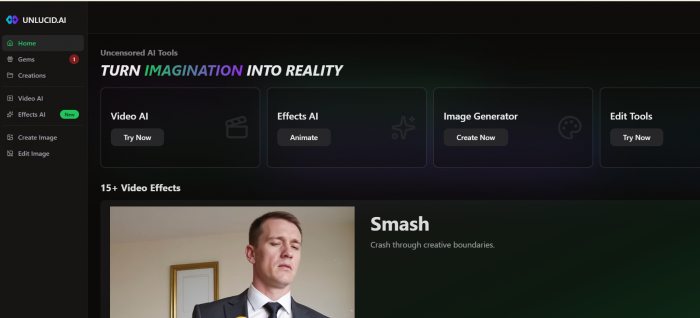
Unlucid AI sits between an AI image generator, an image editor, and a lightweight AI video/effects platform. Its main areas are Create Image, Edit Image, Video AI, and Effects AI.
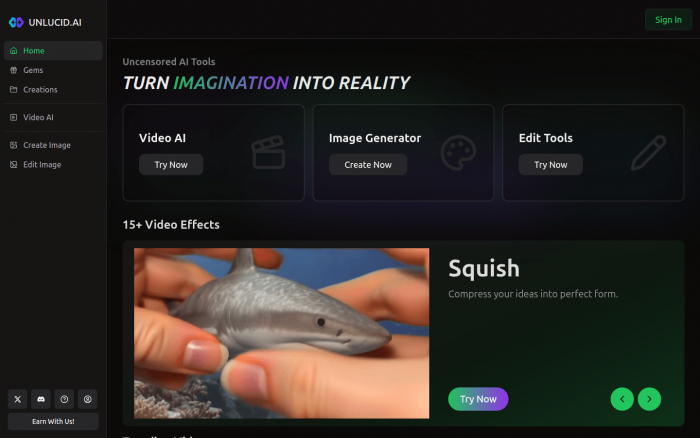
That setup gives the platform a broader feel than a single-purpose image generator. You can generate an image from a prompt, edit an existing photo, turn a still image into a short video, or apply preset effects such as Dance, Squish, Flying, Zoom, Slo-Mo Smash, and 360 Microwave.
| Area | What Unlucid AI offers |
| Image generation | Creates images from text prompts in styles such as realistic, cartoon, 3D render, anime, and pencil. |
| Image editing | Lets users remove objects, add or replace elements, change clothing, and restyle images. |
| Video and effects | Turns images into short videos or applies preset motion effects. |
| NSFW creation | Allows adult-oriented outputs, with restrictions around consent, minors, impersonation, and harmful content. |
| Gems system | Uses credit-style Gems instead of a traditional monthly subscription plan. |
The product is not trying to be the most advanced tool in every category. Its appeal is that it puts several fast creative actions in one simple interface.
First Impression and Workflow
The first thing that stands out about Unlucid AI is how direct the platform feels. The navigation is built around action, not technical language. You choose whether you want to create, edit, animate, or apply an effect. That makes it easier for casual users who do not want to understand layers, timelines, masks, models, or advanced settings before they start.
The workflow feels designed for quick experimentation. You enter a prompt, upload an image, choose an effect, or use a reference, then wait for the result. That is useful for social visuals, fantasy concepts, adult-style AI art, meme clips, outfit changes, and quick image-to-video tests.
Where it feels less strong is precision. A simple interface helps beginners, but it also means advanced users may want more control. If you need exact brand colors, clean commercial retouching, layered edits, or perfect character continuity across multiple images, Unlucid AI may feel too loose.
Image Generation: Strong for Ideas, Weaker for Exact Control
The image generator is one of the most useful parts of Unlucid AI. It supports multiple styles, including realistic, cartoon, 3D render, anime, and pencil. It also includes useful controls such as image reference, seed reuse, high-resolution upscale, and face reference support.
That gives users more control than a basic prompt box. A reference image can guide the result. A seed can help reproduce a similar output. Upscale can improve clarity. Face reference can help when a user wants a more consistent look.
I tried generating an image of high tech city with a simple prompt and with a reference image and below is the output which I got.
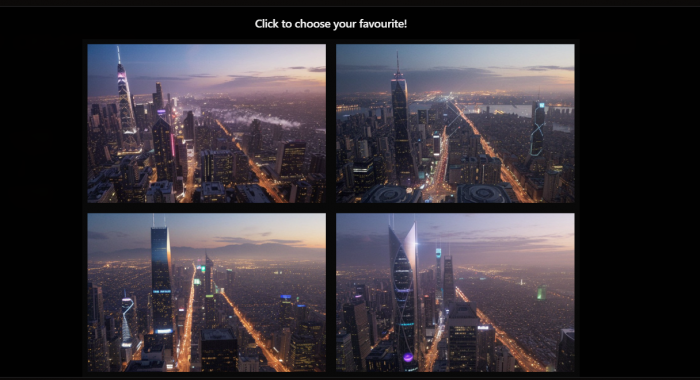
The best use case is bold visual creation. Fantasy portraits, stylized characters, social media visuals, adult-oriented AI images, horror concepts, and experimental art are better fits than strict brand assets or product visuals.
Unlucid AI is strongest when the prompt is creative but not too rigid. It becomes less dependable when every detail has to match perfectly across multiple generations. That is common with many AI visual tools, but it matters more if you are planning a serious character project or commercial campaign.
Image Editing: Useful for Quick Changes
Unlucid AI’s editing tools are more practical than simple filters. The platform supports tasks such as removing unwanted objects, adding or replacing objects, changing clothing, and making visual changes without using traditional editing software.
This makes it useful for casual image cleanup and fast creative variations. For example, a user may want to remove a distracting person, change an outfit, test a new look, or replace one object with another. These are exactly the kinds of edits that many casual creators want without opening Photoshop.
The limitation is realism. AI editing can still struggle with edges, lighting, object blending, fabric texture, hands, and complex backgrounds. Simple edits are more likely to work well. Complex edits may need several attempts or another tool for cleanup.
For everyday creators, this is useful. For professional designers, it is more of a draft tool than a final editing system.
Video AI and Effects: Fun, Fast, and Social-First
Unlucid AI’s video tools are split between more open video generation and preset Effects AI. The effects side includes short, playful transformations such as Dance, Flying, Squish, Zoom, Slo-Mo Smash, Birthday Party, and 360 Microwave.
This part of the platform feels very social-first. It is not built for long-form video production. It is built for quick motion, funny transformations, short clips, and visual experiments.
The best results depend heavily on the input image. A clear subject, clean background, good lighting, and centered framing will usually help. If the source image is crowded, poorly lit, or awkwardly posed, the effect can look artificial.
This is where Unlucid AI feels fun but not always professional. It can make a still image more dynamic, but it does not replace Runway, Kling, Pika, PixVerse, CapCut, or a full video editor if you need deeper motion control.
The NSFW Side Is a Core Feature
The NSFW side is one of the main reasons Unlucid AI stands out. The platform’s terms say it allows users to generate both sexually explicit and non-sexually explicit content. That means the adult capability is not just implied by the word “uncensored.” It is part of the product.
For users who feel restricted by mainstream tools, this can be the biggest reason to try Unlucid AI. It may appeal to people creating adult fantasy art, mature visual concepts, erotic AI images, horror visuals, or less-filtered creative experiments.
But NSFW support changes the review. Adult content is not just another feature like image upscale or background removal. It raises questions about consent, face references, uploaded photos, privacy, identity misuse, and legal boundaries.
Unlucid AI does set rules around this. It says users must be over 18. It prohibits non-consensual intimate images, minor-related sexual content, sexualized fictional minors, impersonation, identity theft, rape or abuse content, hate content, and other harmful or illegal material. It also says users should only use their own face, AI-generated faces, or someone else’s face with express written consent when using facial reference tools.
That is important. Unlucid AI is adult-capable, but it is not presented as a free-for-all. The platform gives more creative freedom, but users still carry serious responsibility.
Consent and Face Reference Matter More Here
Face reference tools can be useful when users want a consistent character or a more controlled visual result. But in an adult-capable platform, face reference becomes a sensitive feature.
Unlucid AI’s terms say users should only use their own face, AI-generated faces, or the face of someone who has given express written consent. If the face belongs to someone else, users are expected to keep written consent records.
That is a stronger consent position than many casual AI tools provide. Still, users should be careful. A rule on paper does not remove the risk of misuse. Anyone creating NSFW or sensitive visuals should avoid real-person images unless they have clear permission.
This is one of the biggest trust points in the whole review. Unlucid AI can be fun for fictional or AI-generated characters. It becomes much more serious when real people are involved.
Pricing and Gems
Unlucid AI uses a Gems system instead of a standard monthly subscription. At the time of writing, the public Gems page lists three main bundles.
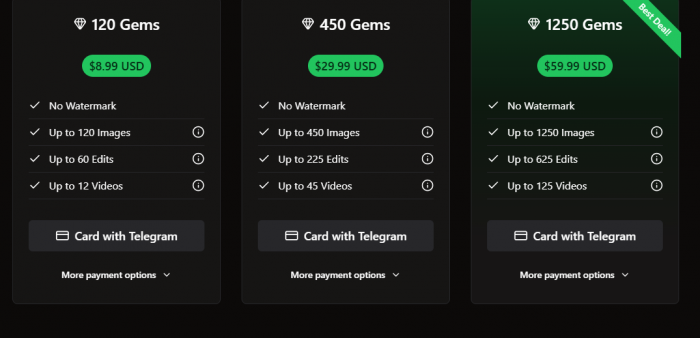
The site also mentions free daily Gems and says paid bundles remove watermarks. This gives users a flexible pay-as-you-go structure, which may be better than a subscription for casual users.
The real cost depends on retries. If one image or video works on the first attempt, the Gems feel valuable. If you need several attempts to get one usable result, the actual cost rises quickly.
This is especially important for video and NSFW outputs because users may be more specific about pose, face, expression, style, or motion. The bundle may look generous, but the real value depends on how many usable outputs you get.
What Real Users Are Saying
Public feedback for Unlucid AI is still limited, so it should not be treated like a mature review base. G2 shows a small but positive signal, with users appreciating the easy interface and quick access to generative AI features. Reddit comments are more practical: users like the creative freedom and reference-image workflow, but they also question video quality, Gems usage, and whether free daily credits are enough for regular use.
What customers appreciate
● Users like that Unlucid AI is easy to start using without professional editing experience.
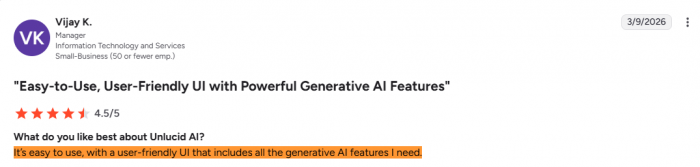
● They appreciate having image generation, editing, video effects, and reference-based creation in one place.
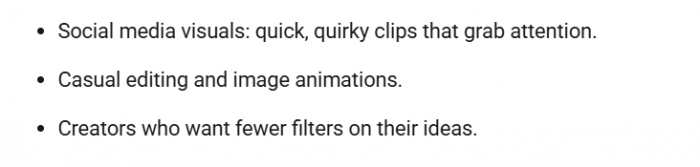
● Some users like the face and pose reference workflow when it produces a result close to what they wanted.
● The less-restricted and NSFW-capable setup appeals to users who feel limited by mainstream AI tools.
What customers complain about
● Free Gems can feel too limited, especially for users trying video generation regularly.
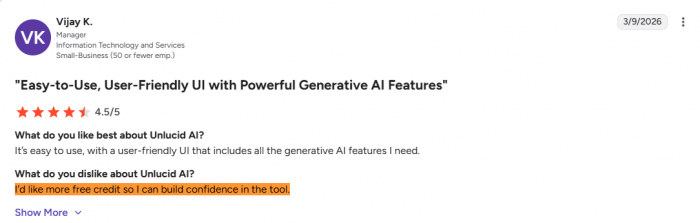
● Video quality may be fine for casual social clips, but not strong enough for polished production.
● The Gems system can become costly when users need multiple attempts to get one usable output.
● Reference-based results can be useful, but errors or failed generations can interrupt the workflow.
● Some users may feel cautious about uploading sensitive images because the tool has adult-oriented features.
The fair takeaway is simple: users seem to like Unlucid AI for speed, freedom, and flexible creation. The main complaints are around credit value, consistency, video quality, and trust when using personal or sensitive images.
Privacy and Upload Handling
Privacy matters more with Unlucid AI than with a normal image generator because users may upload personal images, face references, and sensitive adult-style content.
The privacy policy says the platform collects Google Sign-In data such as email, name, and profile picture. It also collects device and analytics information, including browser type, device type, IP address, access time, pages visited, and features used. Payment information is handled by third-party processors rather than collected directly by Unlucid AI.
The most useful detail is the upload retention policy. Unlucid AI says uploaded content is stored temporarily in cloud storage for up to 48 hours after processing, then automatically deleted. Its terms also say user-created content is temporarily stored and encrypted on secure servers for up to 48 hours before deletion. Some locally stored content may remain in browser storage unless the user clears it.
That 48-hour detail is better than vague privacy language. It gives users a clear window. Still, the adult nature of the platform means users should be careful with real-person uploads, client images, private photos, and anything sensitive.
For casual fantasy images or fictional characters, the risk feels lower. For real people or sensitive uploads, extra caution is necessary.
Strengths and Limitations
Unlucid AI’s strengths come from its mix of speed, variety, and creative freedom. It gives users one place to create images, edit visuals, generate short videos, apply effects, and explore adult-capable outputs.
Its strongest points are:
● It combines image generation, image editing, video creation, and AI effects in one simple browser platform.
● It supports NSFW and less-restricted creation more openly than many mainstream tools.
● It offers practical editing options such as object removal, object replacement, and clothing changes.
● It is easy to approach for casual creators who do not want complex software.
● Its privacy and terms pages provide more detail than many small AI tools.
Its main limitations are:
● It is not the best choice for polished brand-safe visuals or professional marketing assets.
● Its video tools are better for short creative tests than precise production work.
● Character consistency can be difficult across multiple outputs.
● The editing tools are useful, but not as accurate as dedicated design or photo-editing platforms.
● The Gems system can feel costly if users need several retries.
In practical terms, Unlucid AI is strong for fast visual freedom, but weaker for controlled production quality and brand-safe consistency.
Best Use Cases
Unlucid AI makes the most sense for users who want fast, flexible, and less-restricted visual creation. It is especially useful for casual creators, fantasy-art users, social media experimenters, meme creators, and adults who want NSFW-capable AI generation within stated rules.
| Use case | Fit |
| Fantasy and stylized AI images | Strong |
| NSFW-capable AI art | Strong, with caution |
| Social media visuals | Good |
| Meme-style effects | Good |
| Quick image edits | Good |
| Image-to-video experiments | Good |
| Brand campaigns | Mixed |
| Consistent character storytelling | Mixed |
| Sensitive real-person uploads | High caution |
The best way to use the tool is to treat it as a fast creative sandbox, not a final production system.
Alternatives to Unlucid AI
The right alternative depends on what you need most.
| Need | Better alternative |
| More polished AI image generation | Midjourney or Leonardo AI |
| Brand-safe image creation | Adobe Firefly or Canva |
| Professional image editing | Photoshop |
| Advanced AI video generation | Runway, Kling, Pika, or PixVerse |
| Social video editing | CapCut |
| AI art model variety | SeaArt AI |
| Controlled creative workflow | Leonardo AI |
Unlucid AI’s advantage is not that it beats all of these tools individually. Its advantage is that it combines several lightweight creative tools with NSFW-capable flexibility in one place.
Bottom Line
Unlucid AI is a fast, flexible AI visual platform with a clear adult-oriented edge. It is useful for users who want image generation, quick edits, playful effects, image-to-video experiments, and NSFW-capable creative freedom without dealing with complex software.
Its biggest strength is freedom. It gives users more room to create than many mainstream AI tools. Its biggest weakness is control. It is not the best fit for polished brand design, high-precision editing, production-level video, or sensitive client work.
The NSFW side makes it more interesting, but also more serious. Users should understand the consent rules, avoid real-person misuse, and be careful with uploaded images.
The cleanest verdict is this: Unlucid AI is worth trying if you want fast visual experimentation with fewer restrictions. It is not the right tool if you need professional polish, brand safety, exact consistency, or deep creative control.