Wsup AI is no longer an active AI character chat platform in the normal sense. The app has moved into its final stage, and the important question now is not whether it is worth trying. The real question is what existing users should save, what they should check, and where they should move next.
The shutdown is especially important because Wsup AI was not just a casual chatbot. It handled custom characters, long conversations, personas, credits, images, memory, and roleplay history. That means users may have more than a login at stake. They may have saved characters, private chats, unused credits, and personal content sitting inside a platform that is closing.
The Shutdown Timeline
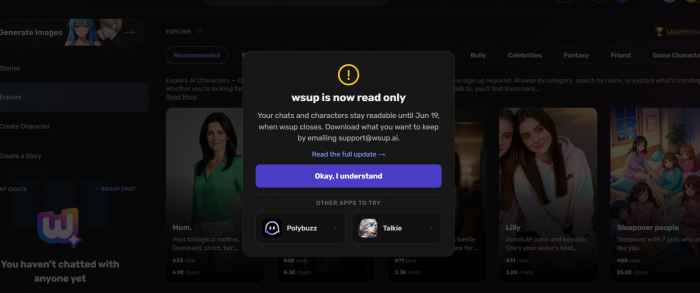
The clearest public signal is Wsup’s own shutdown notice, which says chats and characters remain readable until June 19. It also tells users to email [email protected] if they want to download what they want to keep.
A public community repost of Wsup’s Discord announcement gave a more detailed timeline. According to that repost, chat stayed open until Sunday, May 24. From May 25 to June 18, the platform moved into read-only mode. From June 19 onward, wsup.ai is expected to become a landing page.
That timeline matters because users are not dealing with a vague “the app may close someday” situation. They are dealing with a narrow recovery window.
| Date / Period | What Changed | What Users Should Do |
| May 19, 2026 | Google Play shows the last Android update date | Treat Android development as finished |
| May 21, 2026 | App Store version 0.0.75 is marked “Final update” | Stop expecting normal iOS improvements |
| Through May 24 | Public community repost says chat remained open | Active use effectively ended around this point |
| May 25 to June 18 | Read-only access period | Save chats, characters, personas, and receipts |
| June 19 2026 | Wsup says chats and characters stop being readable when it closes | Expect the platform to become unavailable or reduced to a landing page |
For users, the practical meaning is simple: Wsup AI is now a recovery task, not a platform to keep building on.
Why This Shutdown Is Different
Some apps close and users lose only a login. AI character apps are different because the value is built over time.
Wsup AI’s own app description promised characters with “voice, memory, and personality.” It also promoted custom characters, multiple AI chats, instant access, stories, and evolving personalities. On iOS, earlier updates added personas, long-term memory controls, editable AI messages, explore filters, character editing, LLM model selection, gifts, streaks, leaderboards, and transaction history.
Those features tell us what users were encouraged to build: ongoing relationships with characters, custom roleplay setups, private stories, memory-based interactions, and credit-backed usage patterns.
That is why the shutdown is not only a product update. It directly affects user data, creative work, and paid value.
What Users Should Save First
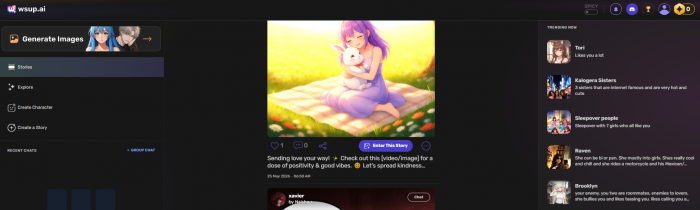
The first mistake is trying to save everything in a panic. Most users should save by priority, not volume.
Start with anything that would be difficult to recreate on another platform. Custom characters should come first because they contain the core setup: name, personality, backstory, greeting, relationship style, tone, and scenario. A full chat can be useful, but a clean character card is often more valuable when rebuilding elsewhere.
Long conversations should come second. If a roleplay arc, emotional chat, or fictional world matters, copy it before access closes. Do not rely on memory or screenshots alone if the conversation is long.
Personas and memory notes should come third. Wsup had long-term memory and persona management features, so users who used them should preserve the details separately.
| Priority | Save This | Why It Matters |
| 1 | Character names, bios, greetings, backstories | Needed to rebuild bots elsewhere |
| 2 | Long-running chats | Hardest content to recreate manually |
| 3 | Personas and memory notes | Preserves relationship and roleplay context |
| 4 | AI-generated images or uploaded media | May disappear when access ends |
| 5 | Credit balance and transaction history | Needed for refund or support requests |
| 6 | Account email and support messages | Helps prove ownership if support responds |
A useful rule: save the top 5 characters and top 5 conversations first. After that, save secondary material only if time allows.
Credits Need Immediate Attention
Wsup AI promoted free access, but it also had clear credit-related signals. Google Play listed in-app purchases. The App Store’s final update specifically mentioned transaction history so users could see where their credits went. Public reviews also complained about credits, point cuts, and the cost of using certain LLM options.
That makes credits one of the most important post-shutdown issues.
If users still have unused credits, they should not buy more or spend casually. They should first check their balance, collect receipts, and contact support. If the purchase was made through Apple or Google Play, users should also check whether the app store still allows a refund request.
A support message should include:
● Account email used on Wsup AI
● Platform used, such as web, iOS, or Android
● Approximate unused credit balance
● Purchase date and amount
● Receipt screenshot from Apple, Google Play, or payment email
● Clear request for refund, credit handling, or account export
The important point is that credits are no longer normal app currency. In a shutdown window, they become time-limited value. Without a clear company policy, users should treat unused credits as something to document quickly.
Privacy Should Come Before Migration
Wsup AI’s privacy disclosures make the shutdown more important.
Google Play says the app may collect location, personal info, and four other data types. It also says data is encrypted in transit and users can request deletion. Apple’s privacy section lists data that may be used to track users across apps and websites, including location, identifiers, usage data, and diagnostics. It also lists user content, photos or videos, contact information, identifiers, and usage data as data linked to the user.
For a normal entertainment app, this would already be worth checking. For an AI companion app, it matters more because the content can be personal. Users may have shared fictional fantasies, emotional conversations, relationship details, private roleplay, images, or identity-related information.
Before moving to another platform, users should decide what they want to keep and what they want removed.
| Data Type | User Risk | Action |
| Chat history | May include private or emotional content | Save only what matters, then request deletion if needed |
| Custom characters | May reveal personal preferences or creative work | Export bios and prompts |
| Uploaded photos or videos | More sensitive than text | Delete or request removal if personal |
| Email address | Linked to account and support requests | Use it for official export/deletion requests |
| Credit history | Needed for refunds or disputes | Save transaction records |
| Usage data | Used for analytics or personalization | Review privacy settings if available |
The safest approach is not to assume that chats disappear automatically when the app closes. Users should actively request export or deletion depending on what they want.
Be Careful With Fake Wsup Mirrors
Shutdowns often create search demand, and search demand creates risk. Once users realize an app is closing, they start looking for APKs, mirrors, old versions, and “working” copies. That is risky with Wsup AI.
AppBrain lists version 0.0.75 as the latest Android version and says the APK size is 70.5 MB, but users should still avoid random third-party downloads unless they understand the risk. A copied APK can be modified. A fake mirror can collect login details. A cloned site can use the Wsup name while operating under different privacy rules.
This matters because Wsup AI users may be emotionally attached to characters and chats. That makes them more likely to click unsafe recovery links.
Use only official routes where possible: the official website, official app store listings, and the support email listed in the app store. Do not enter payment details or account credentials on a mirror site claiming to “restore” Wsup AI.
How to Rebuild Characters Elsewhere
Users moving away from Wsup AI should not copy huge chat logs into a new app and expect the same result. A cleaner migration works better.
Start by turning each important Wsup character into a compact character card. The card should include the character’s name, personality, speaking style, backstory, relationship to the user, boundaries, first message, and any memory notes that shaped the old chat.
That character card can then be reused on platforms that support custom bots or character creation.
| Character Detail | What to Copy |
| Identity | Name, role, age range if relevant, fictional setting |
| Personality | Traits, behavior, emotional tone |
| Voice | Formal, playful, romantic, sarcastic, calm, dramatic |
| Backstory | Key events that shape the character |
| Relationship | Stranger, friend, partner, rival, mentor, etc. |
| Scenario | Where the chat begins and what the roleplay context is |
| Boundaries | What the character should avoid or maintain |
| Memory notes | Important facts from the old Wsup chat |
This method is better than moving raw chat history because different platforms use different models and memory systems. A clear character card gives the new model a stronger starting point.
Which Alternative Makes Sense Now
Wsup AI’s own shutdown messaging reportedly pointed users toward PolyBuzz and Talkie. Those may work for users who want a similar character discovery experience. But the better replacement depends on how someone actually used Wsup.
| Wsup Use Case | Better Alternative Direction |
| Casual character chat | Character.AI, Chai, Talkie |
| Browser-first roleplay | Janitor AI |
| Custom character cards | Janitor AI, Joyland AI |
| Story-driven roleplay | Joyland AI |
| Mature or NSFW-style chat | Crushon AI |
| AI companion use | Replika |
| Broad character discovery | Character.AI, PolyBuzz, Talkie |
Character.AI is better for users who want a large mainstream character library and polished experience. Chai is better for quick mobile discovery. Janitor AI is better for custom roleplay control. Joyland AI is better for story-driven interactions. Crushon AI is closer to users who wanted mature roleplay. Replika fits users who treated Wsup more like an AI companion than a roleplay app.
No replacement will behave exactly like Wsup AI. The goal is not to find a perfect clone. The goal is to preserve the parts that matter and move them to a platform that is still active.
What the Store Data Tells Us
The store data shows that Wsup AI was not an invisible experiment. It had measurable user activity before the shutdown.
Google Play showed 10K+ downloads, in-app purchases, a 12+ rating, and around 200 reviews. AppBrain estimated 35,000 total Android downloads and 6,400 downloads in the last 30 days, with a 4.32 rating from 190 ratings. The App Store showed 4.5 stars from 111 ratings in the U.S. listing and an 18+ age rating.
Those numbers suggest Wsup AI had a real user base, but not a massive one compared with larger AI character platforms. That helps explain why the shutdown is meaningful to users but not necessarily a major industry shock.
The review data also reveals why users were split. Positive reviews praised free access, no ads, unlimited energy, and lifelike chats.
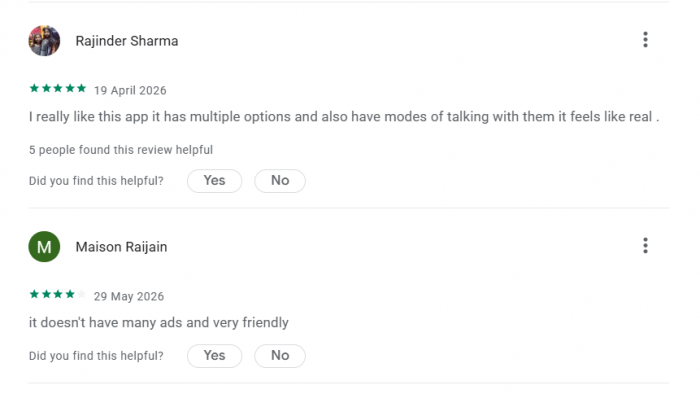
Negative reviews mentioned story resets, memory problems, vague moderation, app restrictions, credit frustration, and glitches.
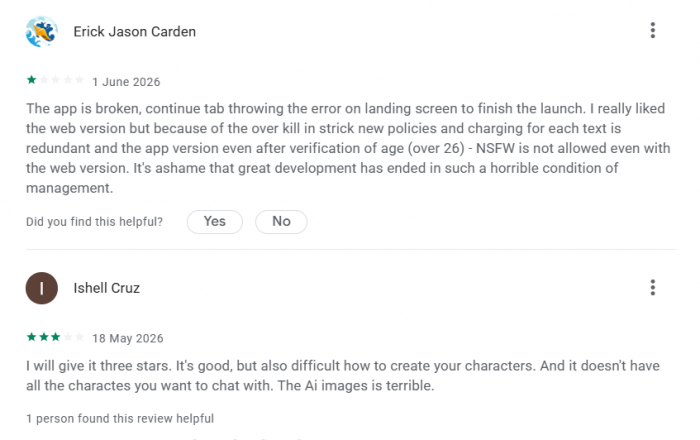
This pattern matters because it shows the product’s core tension. Wsup AI had enough appeal to attract and satisfy casual users, but the deeper infrastructure around memory, moderation, credits, and platform continuity was not strong enough to keep it stable.
What Users Should Do Today
Users should treat Wsup AI as a closing account and follow a practical cleanup process.
First, log in and check whether your chats and characters are still readable. Save the characters and conversations that matter most. Second, check transaction history and credit balance. Third, collect receipts for any recent purchases. Fourth, review uploaded media and sensitive chats. Fifth, email support if you need a download, refund help, or data deletion. Sixth, rebuild your important characters in a separate document before moving to another platform.
The short checklist is:
● Save your most important character cards.
● Copy or screenshot key conversations.
● Export or request downloads through [email protected].
● Check credit balance and transaction history.
● Save Apple, Google Play, or web payment receipts.
● Request data deletion if sensitive material was shared.
● Avoid unofficial APKs and mirror sites.
● Choose a replacement platform based on your actual use case.
This is not a normal app uninstall. It is an account closure process.
Final Take
Wsup AI’s shutdown is not just a product ending. It is a reminder that AI character platforms hold more user value than their app-store category suggests.
Wsup AI had real features: custom characters, multiple AI chats, stories, personas, long-term memory, gifts, LLM model selection, transaction history, leaderboards, streaks, and image-related features. It also had real traction, including tens of thousands of Android downloads, positive ratings, and active user reviews before the final release.
But now the important part is recovery. Wsup AI users should not spend time testing new chats or building new characters. They should save what matters, check credits, protect personal data, and move carefully.
The platform’s final lesson is clear: in AI character chat, continuity is the product. When continuity ends, the user’s priority should shift from chatting to preserving.