I used to write one post and paste it into five apps.
It felt efficient. One idea, five feeds, done before my coffee cooled. Then I watched the same paragraph pull dozens of comments on LinkedIn and vanish on Instagram an hour later. Same words, same link. Completely different result.
That gap is what this guide is about. A platform-ready post is the cure for the copy-paste habit: content shaped for one app and the people who actually spend time there. It matters because relevance is local. Sprout Social’s 2025 Index found 93% of consumers want brands to be culturally relevant on social, and what reads as relevant on LinkedIn falls flat on TikTok. Social apps are also where people search now; by 2025, nearly one in three started a search inside an app instead of on Google, so your posts compete as results, not only feed entries.
By the end, you can take any idea and ship it in the shape each platform rewards. Here is the system I built to do it on repeat.
What Is a Platform-Ready Post?
A platform-ready post is content optimized for the audience, format, algorithm, and on-app behavior of one specific platform. One core message becomes several different posts, each tuned so it reads like it belongs where it lands. The post speaks the platform’s language, uses the format the app pushes, gets built mobile-first, and asks for one clear action. Here is the difference at a glance.
| Generic post | Platform-ready post |
|---|---|
| Same copy in every app | Rewritten for each app |
| Easy to scroll past | Built to stop the scroll |
| Reach capped by the algorithm | Shaped to ride the algorithm |
| Generic formatting | Native to the format |
Knowing the difference is easy. Doing it on purpose, under deadline, is the hard part, and that is what the next four letters are for.
The P.O.S.T. Framework
When I am rushed, I run every post through P.O.S.T.: Purpose, Orientation, Structure, Trigger.
Purpose is the two questions I answer before writing: why am I posting this, and what should the reader do after? The why lands on one job, building awareness, driving traffic, capturing leads, or growing a community. Pick one. A post chasing all four does none of them.
Orientation points me at the real audience. A LinkedIn reader is half-working and scanning for something to repeat in a meeting. A TikTok viewer wants to feel something in two seconds. Same person, different headspace depending on the icon they tapped.
Structure is the bones of the post, and it carries enough weight that I gave it the next section.
Trigger is the nudge that turns a reader into an action: a comment, a save, or a click. Want comments? End on a question people argue about. Want saves? Make the post a reference they will pull up again.
The Anatomy of a High-Performing Post
Structure breaks into four parts. Get these right and the platform tweaks later are cosmetic.
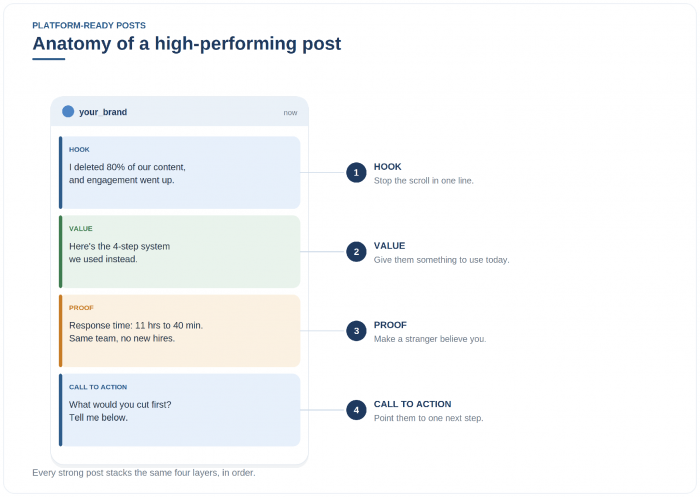
The hook is the one line that earns the rest, and I keep five types on hand. A curiosity hook opens a loop: “I deleted 80% of our content and engagement went up.” A contrarian hook pushes against the obvious: “Posting daily is hurting your reach.” A question hook hands readers their own situation: “Why do your best ideas get the fewest likes?” A data hook leads with a number: “We tested 50 hooks and two patterns explained almost every winner.” A story hook drops you mid-scene: “My biggest post started as a voice note in a parking lot.”
Value is what you do with the attention, and it is the part most posts skip. You teach something usable, tell a story they see themselves in, or hand over a checklist they can copy. The test: would a reader screenshot this or send it to a coworker?
Proof makes a stranger believe you. One specific number beats five adjectives. “It worked great” persuades no one; “it cut our response time from 11 hours to 40 minutes” does the work.
The call to action points them to one next step, matched to the goal you set in Purpose. One ask per post. Two asks split the reader and you lose both.
Platform-Specific Content Strategy
The skeleton holds across every app. What changes is the skin: the format, the length, and the tone people expect when they arrive.
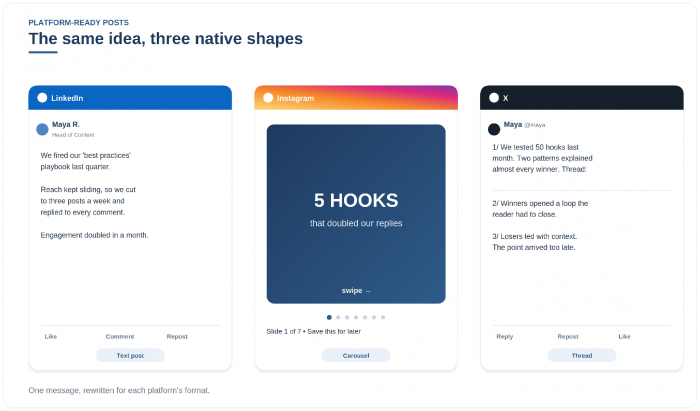
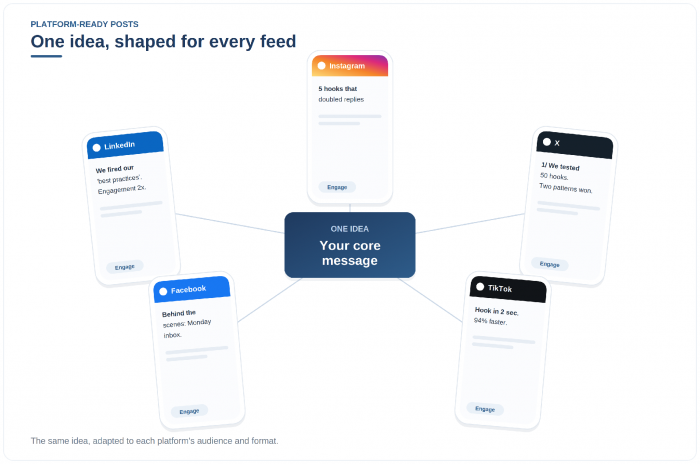
On LinkedIn, write like a person thinking out loud. Personal stories with a professional lesson and contrarian takes travel here, and the audience keeps getting younger as the app pushes video.
Instagram is visual-first and built for saves. Reels carry reach and carousels earn saves, while the caption supports the visual rather than carrying it. Front-load the hook before the “more” cutoff.
X moves on speed and opinions. Short takes and threads that unpack one idea do well, and it is still where news and professional conversation break first.
Facebook still owns community, especially in Groups and among an older audience. Shareable posts and behind-the-scenes looks at the people behind a brand outlast a quick like.
TikTok lives in the first two seconds and doubles as a search engine for younger viewers. Lead with a spoken hook, deliver the value in plain steps, then repeat the call to action on screen.
That is five platforms running on one skeleton.
Repurposing One Idea Into Six Platform-Ready Posts
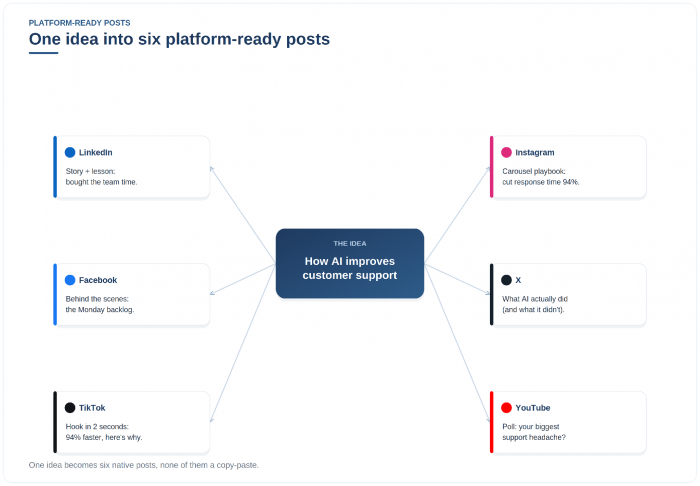
Theory is cheap, so here is one idea, “How AI improves customer support,” run through the system. The map above shows all six versions. Here are four of them in full.
Our support team was drowning, so we let AI draft the first reply on routine tickets.
Response time dropped from 11 hours to 40 minutes, with no new hires.
Where could a first draft buy your team time without losing the human touch?INSTAGRAM CAROUSEL
Slide 1: We cut support response time by 94%. Here is the playbook.
Middle slides: one change per slide, each with its before and after number.
Last slide: Save this for your next support review.X THREAD
1/ We cut support response time from 11 hours to 40 minutes. AI did part of it, but not the part people assume.
2/ It drafted the first reply for an agent to approve, instead of answering customers.
3/ Humans still own anything complex. The bot clears the runway. Follow for the metrics.TIKTOK SCRIPT
[0:00] “We cut support wait times 94% with AI. Here is the catch.”
[0:12] “It writes the first draft. A human edits and sends.”
[0:18] “Follow for the exact setup.”
Same idea, six shapes, one afternoon. None of them is a copy-paste, and most lean on visuals.
Platform-Ready Visual Content
On social, the visual is often the post, not decoration.
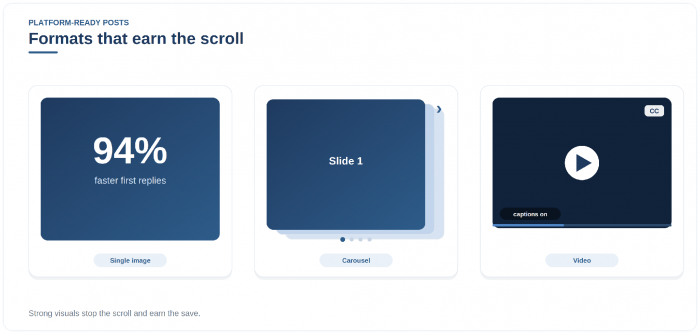
A single strong image earns the scroll-stop. Carousels keep people swiping, which the algorithm reads as time spent, and each slide is a reason to save. Short, captioned video carries more reach than anything else on most apps right now.
One part gets skipped and it costs you reach: accessibility. Add alt text so screen readers and the systems indexing social can parse your post. Most people watch video on mute, so burn in captions. Check your contrast so text survives a dim phone screen. You know the parts now, so let me put them together fast.
The 30-Minute Workflow
Here is how I assemble the parts, start to finish, in about half an hour, with AI handling the grunt work so I keep the judgment.
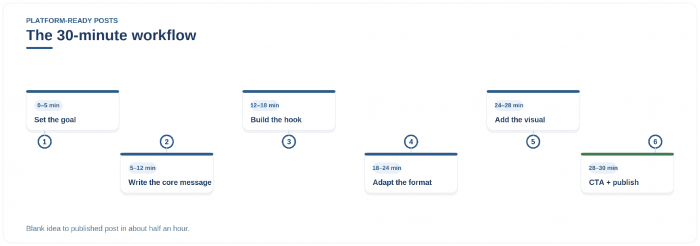
The timeline above is the whole process. I set one goal, write the core message in plain text, then build the hook using the types from the anatomy section. From there I adapt the format to one platform, add the visual with its alt text and captions, write the single call to action, and publish or schedule it.
A caution the 2026 research keeps repeating: AI speeds the work but cannot supply the voice. More than half of users told Sprout they are uncomfortable with undisclosed AI content, and the accounts that win have a recognizable, ownable tone. Use the tools to go faster, not to sound like the feed.
Measuring the Success of Platform-Ready Posts
You shipped it. Now you find out whether the adaptation paid off, and the metric that matters depends on the goal you set in Purpose.
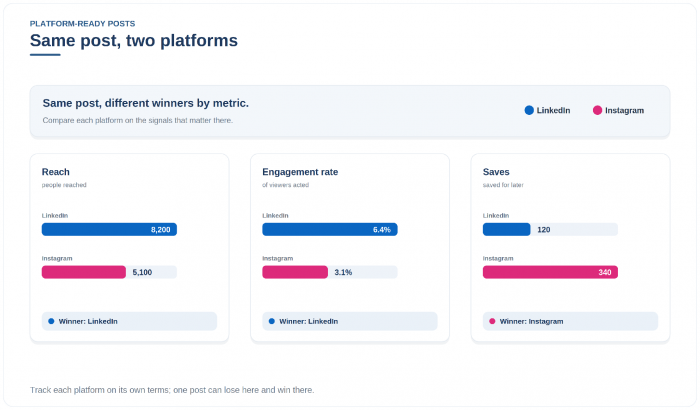
Likes are the weakest signal. Comments and shares cost the reader effort, and saves are often the most telling, because a save means “I will need this again.” For conversion, follow clicks and leads, the numbers that connect a post to the business. Here is a simple map.
| Goal | Watch this | The question it answers |
|---|---|---|
| Awareness | Reach, impressions | Did new people see it? |
| Engagement | Comments, shares, saves | Did it earn a save or a comment? |
| Conversion | Clicks, leads, sales | Did it move someone to act? |
| Community | Replies, repeat commenters | Are the same people coming back? |
Track each platform on its own, not in aggregate. A post can flop on one app and win on another, exactly like the LinkedIn-versus-Instagram split I opened with. Do more of what worked where it worked. The last thing worth your attention is where this is heading.
Where Platform-Ready Content Is Heading
A few shifts are reshaping what platform-ready means, and they point the same way: more specific, more human, more native to each app.
AI-assisted personalization is the default now, which means the bar is no longer producing content but producing content worth following. Social search keeps growing, so keyword-aware first lines and real alt text are becoming discovery tools. Creator-led marketing is rising because people believe people, and short-form video stays dominant, with serialized video the format to watch: Deloitte projected micro-dramas pulling close to $8 billion in revenue this year.
The thread tying it together is community. Engagement and replies, plus showing up in smaller spaces, beat chasing one viral hit.
So pick one idea this week. Shape it for two platforms instead of pasting it into five, ship both, and watch which one your audience actually answers. That answer is where your next post starts.